
Summarize Content With:
You’ll find most of the articles about “AI contact center vs call center” will teach you the differences between the two. It is helpful for 30 seconds, and then you’re back to where you began, watching the vendor demo and deciding which to purchase.
The following is a different guide. It lists 10 specific buyer’s remorse patterns when choosing the wrong category: purchased a call center when looking for a contact center, paid for omnichannel that they don’t use, bought the AI buzzwords, and missed channel compliance. On every one of them, you’ll get out what it costs, how to prevent it, and the precise pre-sign question to take to the next vendor demo.
This is the page to ward off the worst purchases from vendors between 0-30 days picked (or picked yet worried that you made the wrong call).
- 10 specific regret patterns and composite buyer stories, cost analysis and avoidance scripts.
- In just 60 seconds, you’ll discover the distinction between a call center, contact center, and AI overlay.
- 3-question triage, select the correct category within 5 minutes
- Write vendor question per regret for next demo (copy past questions)
- Once you have determined that you are in a particular category, the next logical step will be to connect with the deeper buying tools that you need: this is called cluster routing.
- No vendor pitch, Botphonic appears once/twice with honest framing – this is buyer-advocate content
Introduction
It’s difficult to choose the best AI calling software in 2026! There’s some overlap across the vendors’ terminology. The terms “AI call center” and “AI contact center” are similar, but they have distinct meanings. AI is the buzzword for conversational AI, rule-based scripting, or a marketing tag slapped on a legacy product. The tiers are packages of channels that are not required; if a tier is not purchased, the channels included are not available.
Those who traverse this well know the right buyer. The buyers who do not develop one or more of the following 10 regret patterns and then spend 6-12 months working around the wrong vendor, or making an attempt to migrate to the right one.
This is a guide for buyers in the pre-pick window. Read this article to better understand the different categories. Run quick triage. Next, read the 10 patterns to avoid regret. Be sure to complete a pre-signed 7 question audit prior to signing.
Quick Category Disambiguator (60 Seconds)
| Term | What is really meant by it | Channels covered | Best for |
| Call center | Use voice-only to receive and/or send incoming and outgoing calls. | Voice (phone) | Voice-driven businesses (sales, support, dispatch) |
| Contact center | Multi-channel customer interactions | Voice + chat + email + SMS + social + WhatsApp + sometimes video | Those businesses that serve customers based on their experiences (B2C support, omnichannel sales) |
| AI call center | +AI augmentation on voiceCall center + AI augmentation on voice | Voice with AI | Voice-driven businesses looking for AI automation. |
| AI contact center | AI-powered contact center support on all channels. | All channels with AI | Multichannel CX across all channels with AI support for every channel. |
The category-confusion trap: Vendor marketing pages mix them up. They don’t mean the same thing. There can be one platform that can do a very good AI on voice, but not so good on chat or email. Weak AI could be on a multi-channel platform, and might be at the lowest level.
The “AI” label trap: AI phone call can be real (LLM power, multi-turn context, sentiment aware), rule-based scripting (decision trees with a chatbot feel) and marketing (powered by AI but actually no AI in it). All three are sold as “AI.”
To be able to make a comparison between different vendors, you must first distinguish between two aspects: channel scope and AI depth.
The 3-Question Triage
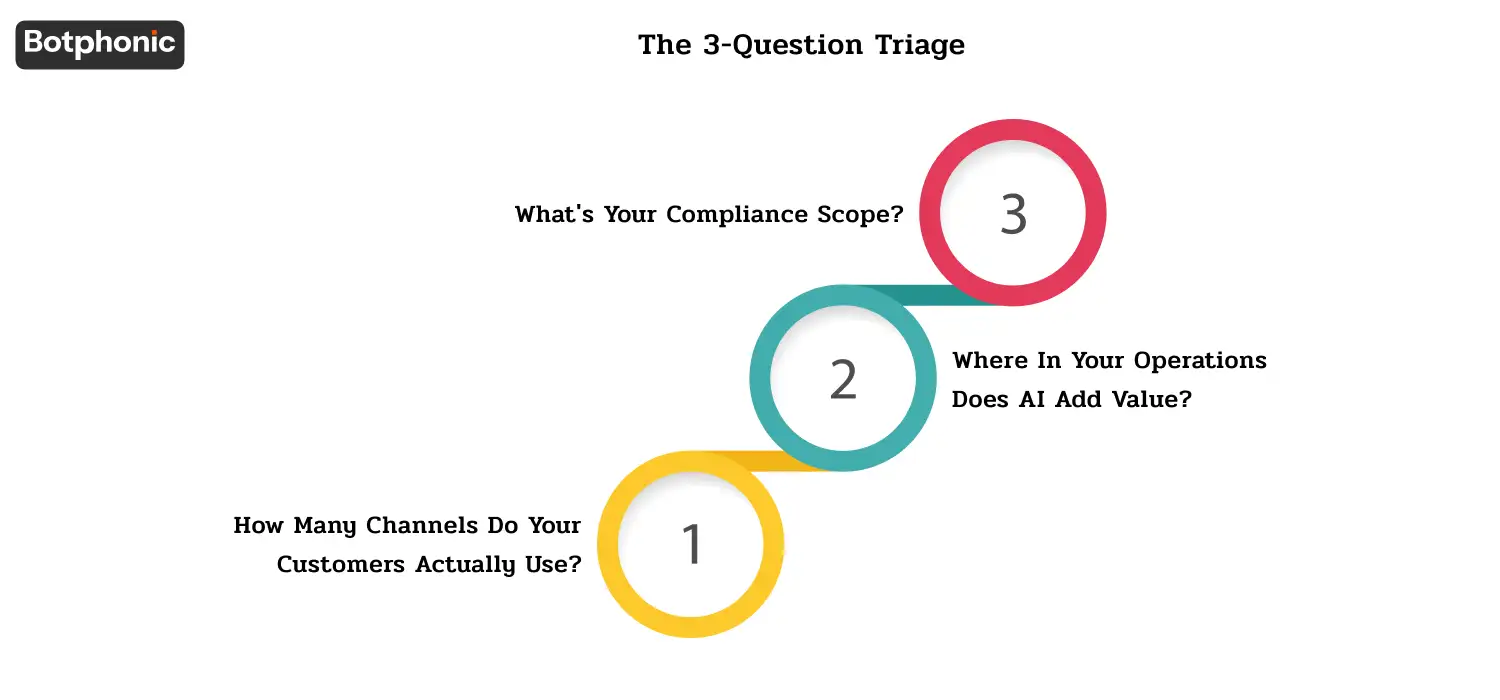
Prior to reading the regret patterns, answer the following three questions:
Q1: How many channels do your customers actually use?
(A) 2 channels (voice + voice) → A call center is required, but may need AI receptionist’s assistance
(B) 2-3 channels (voice + email + maybe chat) → This may require the services of a contact center, but think carefully about it; paying for full omnichannel when using only 3 is an over-buy situation.
(C) As far as channels are concerned, you must have a contact center if you want to use more than 4 channels, omnichannel (which also includes social and WhatsApp).
Q2: Where in your operations does AI add value?
(A) Voice automation only (intake, scheduling, qualification, after hours) → Voice automation is priority, others are nice-to-have for AI
(B) Multi Channel Deflection (chat bots + email auto response + voice AI) → AI in multiple channels is important.
(C) Traditional Call Center, modernized IVR – May not need full AI, could be sufficient.
Q3: What’s your compliance scope?
- Healthcare (HIPAA) requires BAA execution per channel; check per channel HIPAA support
- Apply for any screening where AI is used in the recruitment process, including but not limited to channel (EEOC AI hiring).
- Financial services (TCPA + FINRA + SOX) scope for voice TCPA is generally familiar; for SMS TCPA, it’s strict, while chat TCPA doesn’t exist, but it has other state-specific rules
- GDPR scope for any channel handling EU data, General B2B TCPA scope for outbound voice and SMS.
If your answers are A/A/Light → you need a simple AI call center. If they’re C/B/Heavy → you need a full AI contact center. Most buyers fall somewhere in the middle, and it’s in the middle that the regret patterns hit the hardest.
 PRO TIP
The 10 Regret Patterns
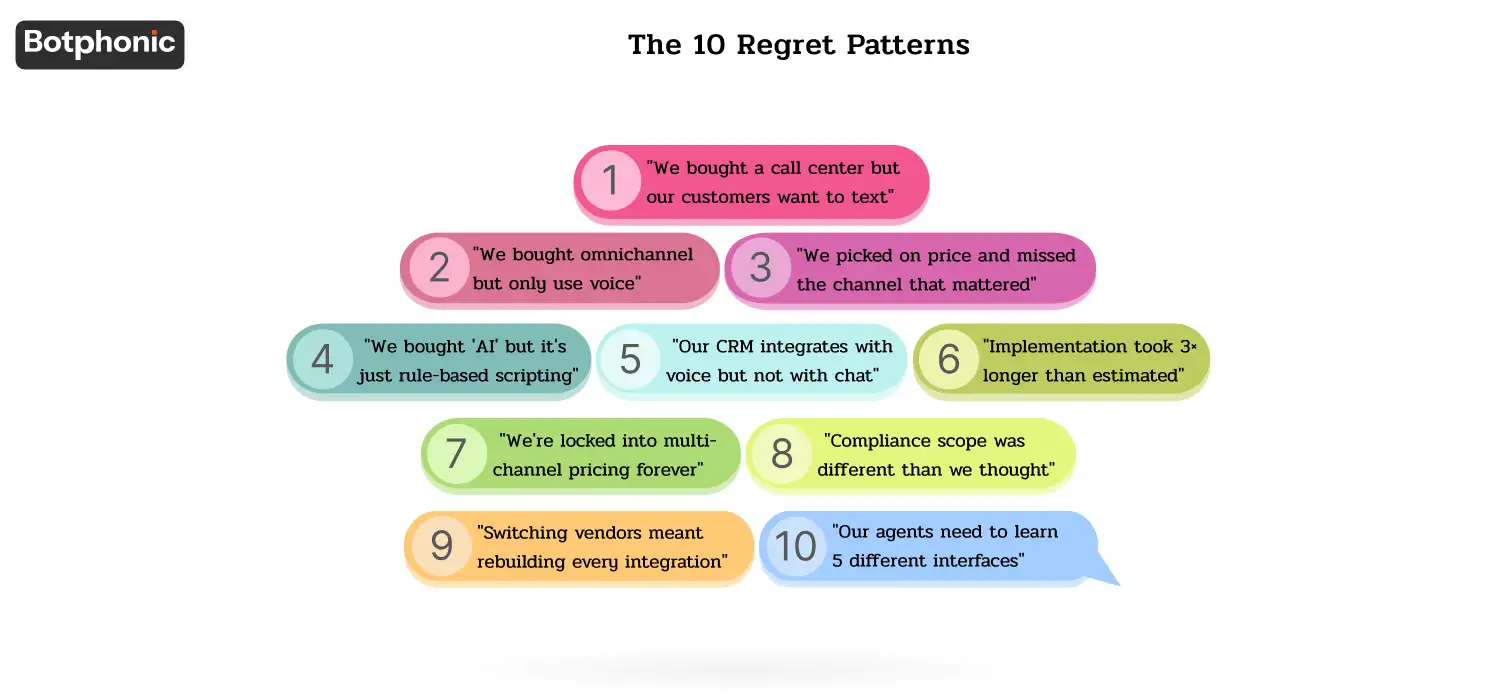
For each pattern: What went wrong with buyers, composite story, cost buyers, how to avoid the pitfall, pre-sign vendor question.
Regret #1: “We bought a call center but our customers want to text”
The pattern: Purchased a voice-based AI call center because that is the way the team works. After six months, the results of customer surveys showed 40% wished for SMS or chat, not voice. The call center investment is inadequate and the team is being rebuilt.
Acme HVAC acquired an AI call center to service incoming calls. A month or six months later, they found that millennial home owners were not calling but texting and waiting hours for a call back, but the platform didn’t support SMS. Competitors who offered text booking were lost by 30% after hours.
How much it costs: Usually 15-40% of customer demand that went unaddressed. Plus the migration cost (3-6 months) to include missing channels on a different platform.
The key to avoiding it: conduct customer surveys to determine actual customer channel preference before selecting platform tier. Pre-sale survey + audit inbound channel mix (how would you like us to reach you)
Pre-sign vendor question: What channels do you support and are they all native or via integration (third party connector)? Please present voice and chat / SMS / email demos as well.
Regret #2: “We bought omnichannel but only use voice”
The pattern: Purchased full contact center automation platform (omnichannel pricing plan) as they grew. Two years later, voice-only and the omnichannel infrastructure remains idle. Spending 2K-$5K a month over the top.
Greenfield Dental purchased a contact-center platform that included chat, SMS, social, and email channels, due to the salesman’s mention of the word “future-proofing” – and now, after 18 months, the organization only uses voice (the practice is appointment-based, so the chat channel isn’t in use). For a feature set equivalent to $1800/month, paying $3200/month.
What it costs: Premium of 30-80% over single channel. In 24 months that’s $30K-$80K in unused features.
How to avoid it: Purchase what you will need in the following 6 months, NOT the next 6 years. Most platforms offer tier upgrades; you don’t have to purchase capacity that you may not use.
Pre-sign vendor question: “If I use [my current channel mix] today and add more channels later, will this incur any contract penalties?” What is the difference between the two cost of the channels? Let me see how you did your pricing calculations on the addition of chat over 12 months compared to using chat now.
Regret #3: “We picked on price and missed the channel that mattered”
The pattern: Paid for the lowest level of tier that offered “everything” only to find out that the channel that provides revenue (e.g. outbound voice with TCPA compliance) was an enterprise add-on.
Story: Riverside Solar (residential solar lead-gen) purchased a plan for a contact center at $99/user/month that supports outbound. After 3 weeks they found that the enterprise tier ($349/user/month) was the cost needed to support TCPA-compliant outbound consent flows + DNC scrubbing. Upgrade or Go out of business.
What it costs: Upgrade to a higher tier (usually 2-5 times headline price) OR upgrade to another vendor with the missing capability at a competitive tier.
How to avoid it: Make sure that your top 3 use cases are the first ones listed on a specific tier and that there are no additional fees for each one. If the pricing page from the vendor doesn’t disclose which tier contains which feature, it’s a red flag.
Pre-sign vendor question: “Walk me through all of the features included in the [my target] tier, specifically: outbound dialing, TCPA consent capture, DNC scrubbing, [my critical feature] — all of them, all of them except enterprise add-ons.
Regret #4: “We bought ‘AI’ but it’s just rule-based scripting”
The pattern: Acquired a vendor with a “AI conversational platform” and on a deeper dive, you find there’s no LLM, no actual intent recognition, no multi-turn context. The rate of deflection is below 30% and it is not received well by customers.
The bottom line here is that Mountain View Insurance acquired a “conversational AI” platform for inbound intake. After three months, the customer satisfaction decreased by 15% due to the use of the “AI”.After three months, customer satisfaction decreased by 15% because of the “AI” – it was a sophisticated IVR with branching scripts. It was incapable of anything that wasn’t on the trained paths. Agents were forced to retell all the information to the aggravated customers.
What it costs: Cost comes from the sunk cost and the migration to a real vendor of AI (6-12 months) and the reputational damage caused by the poor customer experience.
How to avoid it: Do not use a demo to test AI behaviour. Specifically: put an off script question. Make a multi-turn question that requires them to remember context. Inquire using another language. The others are dealt with gracefully by real AI, while the rule-based scripts return generic answers.
Pre-sign vendor question: “In the demo, let me ask you three questions you don’t want to answer. Then ask me to clarify, then go back to the questions. If your platform does this naturally, it’s AI. If the platform doesn’t or returns generic answers, it’s scripting.”
Regret #5: “Our CRM integrates with voice but not with chat”
The pattern: Vendor promises integration with your CRM, but it’s voice channel only. Conversations in the chat do not appear in the CRM. Email communications do not go through CRM. Customer interactions reside on the contact center platform and sales/support tools don’t get the context.
Acme Marketing Agency purchased an AI-powered contact center and integrated it with “Salesforce.Acme Marketing Agency acquired an AI contact centre that has been integrated with Salesforce. 6 months later: voice messages were automatically logged to Salesforce, and chat was still available in the contact center dashboard. When sales reps communicate with prospects, they don’t know that the team has been having a conversation with the prospect for 2 weeks.
What it costs: Cross-channel context of the customer. Lower conversion rates typically 15-30% less than full integration. Engineering activities to fill the gap (typically 4-12 weeks).
How to avoid it: Check integration depth per channel. Not all channels are native on voice, it’s just $nativeCRM.
Pre-sign vendor question: “Show me an auto-logged chat conversation to my Salesforce contact record. Then show me the same for email, SMS and social. Show me the data structure that is written on each channel.”
Regret #6: “Implementation took 3× longer than estimated”
The pattern: Vendor estimated “2-week deployment. Reality was 6-8 weeks. For each extra channel added the extra weeks included are integration + testing + training. Compliance scope (HIPAA BAA, TCPA verification) increased by 1-2 more weeks. The software was delayed by months until it went live.
Bayview Financial bought an AI contact center. Sales rep thought it would take 3 weeks to go-live.Sales rep calculated that it would take 3 weeks to go-live. Reality: voice channel went live in week 3 (per estimate), but chat needed 2 weeks of integration work, email needed BAA execution + HIPAA verification (3 weeks), and full omnichannel didn’t go live until week 11.
What it costs: Disruption of operations during extended transition. Lost productivity. Typically, financial penalties or refunds issues if agreed by vendor specific timelines.
How to avoid it: Break down the time line by channel and compliance requirement, in writing. No channel takes longer than single channel; omnichannel always takes longer.
Pre-sign vendor question: “When can I expect you to have a written plan that covers the time required for voice, chat, email, SMS, social, plus time to execute HIPAA BAA, setup time for the TCPA consent flow, integration testing, staff training, and a parallel operation period? (Include buffer for each.)
Regret #7: “We’re locked into multi-channel pricing forever”
The pattern: Signed a multi-year contract with annual pricing on multi-channel tier. After two years, discovered a better single channel option for half the price. Switching was not an option as exit penalties + remaining contract term made migration not economically viable for 18+ months.
Story: Lakeside Medical Practice signed a 36-month contract with an enterprise contact center for “integrated omnichannel” and after 14 months, they found that they only needed voice + chat. The new AI receptionist service would cost $36K less for the contract. But early-termination penalty was $48K. Stuck.
What it costs: To have an unfavourable vendor for the rest of the contract. Cost of having to use a different platform that is better suited.
How to avoid it: Read the contract trap expose, which includes Trap #4 (multi-year lock-in, disguised as discount) and Trap #7 (early termination fees). Be sure to agree on exit rights prior to signing.
Pre-sign vendor question: What are my exit options at M12, M18 and M24? In particular, the cost of leaving a tier before the contract ends, and if I can downgrade my tier mid-contract.
Regret #8: “Compliance scope was different than we thought”
The pattern: Assuming purchased on “SOC 2 Type II + HIPAA + GDPR badges”. Facing the issue that discovered TCPA voice consent ≠ TCPA SMS consent ≠ GDPR for chat ≠ CCPA for California email subscribers. Each channel = different compliance scope. This was concealed by the badge-based assumption.
Oakwood Recruiting bought a contact center for outbound candidate outreach. After 90 days had passed, it was discovered that voice-channel TCPA was set up correctly, while SMS-channel TCPA (separate consent flow, as required by FCC TCPA) was not. Faced a $12K TCPA settlement. The “TCPA support” was limited to voice on the platform.
What it costs: Channel compliance violations, legal expenses and damage to reputation. Catastrophic for regulated industries.
How to avoid it: Make sure to check scope of compliance per channel and not per platform. TCPA is NOT the same for voice as it is for SMS. One channel’s GDPR is not the same as all channels GDPR.
Pre-sign vendor question: Walk me through TCPA consent flow on your platform for voice, SMS, WhatsApp, Walk me through GDPR data handling for chat vs email, Walk me through CCPA scope for each channel. For regulated industries: “Does BAA apply to voice-only or deployments which are limited to the HIPAA-scope industries?
Regret #9: “Switching vendors meant rebuilding every integration”
The pattern: After 18 months were up they decided to change vendors. Found that all the integrations (Salesforce, HubSpot, Zendesk) were developed for the vendor’s original API. When switching, all integrations had to be re-built. The headline savings were outweighed by the cost of migration.
Pinecrest Financial Advisors chose to replace Vendor A with Vendor B because Vendor B saved them 30% and offered better features. Over the next 18 months, the engineering team built 14 different integrations. However, each integration relied entirely on Vendor A’s specific data formats, webhooks, and OAuth flows. Engineers now estimate the new migration will require 4 to 6 months of work. Retention with Vendor A.
What it costs: “Integration debt” vendor lock-in. Switching cost typically requires 3-12 months of engineering work and $50K-$500K depending on the level of integration.
How to avoid it: When assessing, look for vendors that integrate using industry-standard integration patterns (REST + webhooks via standard schemas) rather than vendor-proprietary integration. To learn more about the CRM you’re considering, read the CRM-first buying guide.
Pre-sign vendor question: “What would you like to export your data in, if we change? Is it a schema or vendor-proprietary? So how would migration to a competitor be handled — do you offer migration tooling or is that up to us?
Regret #10: “Our agents need to learn 5 different interfaces”
The pattern: Purchase a multi-channel contact center with a different interface for each of the channels. Agents have to toggle between voice, chat, email, social and ticket UI. The average handle time should be increasing, not decreasing. Agent satisfaction decreases and turnover rises.
Westside Auto Group purchased a contact center that had voice, chat, email and SMS channels. There were one window per channel. The agents complained that they had to jump around between 4 windows + the CRM (5 windows altogether) to deal with multi channel customers. The mean handle time rose 22%. Agent attrition increased.
What it costs: The loss in productivity (usually 10-25% AHT added). Agent satisfaction decline. Higher turnover (50 to 100% agent replacement costs).
How to avoid it: Make sure that the platform offers a single agent interface (one window with all channels in tabs, not separate apps per channel). Evaluate the agent experience with the demo, and remember, that’s not the manager dashboard.
Pre-sign vendor question: “Give me a look at an agent’s screen when they’re in a busy hour with a number of conversations going on in voice, chat and email. Do they have one window or do they switch between apps? Is the interface unified (as an add-on or included)?
 NOTE
NOTE
The Pre-Sign 7-Question Audit
These are 7 things to consider before signing an AI contact center or AI call center contract:
- What is the real mix of channels we are on today and what will it look like in 12 months? (avoids regrets #1, #2)
- What is the total all in cost for our particular tier and channels required? (avoids regret #3)
- So, what exactly does the AI do when I put an unexpected question? (avoids regret #4)
- Does the CRM integration come as a natural fit on all channels I will use? (avoids regret #5)
- When would this be seen in practice, channel-wise and compliance-wise? (avoids regret #6)
- What are my options to get out at 12, 18, and 24 months? Does not regret #7 contract trap exposé (avoids)
- What is the compliance scope as per channel (TCPA voice vs SMS, GDPR per channel, etc.)? (avoids regret #8)
If you are not sure about any answer, then the vendor is not ready for your business, or you are not ready to assess the vendor yet. Walk or fill the space.
When the Right Answer is “Do Nothing Yet”
Not surprising, but building trust: AI contact center vs AI call center sometimes is neither, not yet.
Wait if: You don’t have a good way of measuring the performance of your current channel – Your customer-research is informal (no recent CSAT data, no preference surveys) – You don’t have a clear idea of what the use cases are that your customers need the AI to handle – Your CRM data is too messy for any integration to help – Your compliance scope is unclear (no documented HIPAA scope, no current TCPA consent flow)
Where Botphonic Fits (Honest Framing)
Botphonic is an AI phone calling software solution. The company is uniquely positioned for customers who fall in the “call center/AI on voice” quadrant based on their answers to the questions listed above. We are not highly differentiated when it comes to customers requiring complete omnichannel communication contact center capabilities, including email, social media, and ticket management features.
Where Botphonic is uniquely positioned:
- Voice-based AI with TCPA compliant outbound campaigns and native CRM integration
- SOC 2 Type II compliant and HIPAA ready (BAA available)
- Native integrations with Salesforce, Hubspot, Zoho, and Pipedrive
- Transparent SMB pricing
- Time-to-value in under 30 minutes
Where Botphonic is less differentiated:
- Omnichannel (chat, email, social media, WhatsApp) with native AI for all channels
- We excel at voice; other channels can be integrated but are not equivalent to voice AI capabilities.
Test our voice AI against the 10 regret patterns above.
Request a Free Demo