

Summarize Content With:
Takeaways
Most AI call center buyer’s guides allege that CRM integration is just one of the 12 features of an AI call center. If you already have an investment in CRM, it is wrong — the compatibility with CRM is the first criterion for evaluation, and not the eighth. This guide is designed in this manner.
Choose your CRM (Salesforce, HubSpot, Zoho, Microsoft Dynamics, Pipedrive, ActiveCampaign, or your chosen option); read the section focused on your CRM choice: integration depth options, what good vs bad integration looks like, implementation timeline, total cost, and the red flags unique to your CRM stack.
- 6 major CRMs covered: Salesforce, HubSpot, Zoho, Microsoft Dynamics, Pipedrive, ActiveCampaign,each with integration-type options + decision criteria
- The 5-tier integration decoder lets you decode messages from native, CTI, REST API, Zapier, or custom data. The meaning of both the concepts and when to take them;
- 6 evaluation criteria relevant to CRM-AI integration, in addition to the 28 criteria evaluation matrix.
- Per-CRM implementation timelines – actual day counts (3-5 days for native Salesforce; 1-2 weeks for FSC; 2-3 days for HubSpot Native, etc.).
- Per-CRM red flags, connector fees, per-record sync fees, API rate limits, OAuth re-auth pain
- Integrate with cluster and provide links to vendor-specific integration pages (Salesforce, Hubspot, Zoho) for next-step deployment
Introduction
Your team is Salesforce based. Or HubSpot, Zoho or Microsoft Dynamics. You’ve decided that you need AI driven call center automation, appointment booking, intake, after-hours and outbound campaigns. All 100 vendor websites state that it integrates with all major CRMs. This doesn’t mean that your CRM will receive an integration project that takes 30 minutes or a project that takes 4 weeks, but it does reveal this.
In this guide, you’ll get the honest answer to the question: “If I have a CRM, what should I expect to look for, what’s the timeline for implementing it and what are the red flags to look out for for me to walk away?”
Landing on your CRM with the $1 quick-pick. See the deep dive in the specific CRM section in $3. Use $4-$6 to assess cost, time, and red flags. To connect to Botphonic’s vendor-specific integration pages, or to the overall evaluation matrix for the following step.
Quick CRM-by-CRM triage
CRM Comparison Salesforce, HubSpot, Zoho, Microsoft Dynamics, Pipedrive, and smaller CRMs behave differently in terms of integration type, setup time, and dependency on native vs API-based connections.
| Your CRM | Best integration type | Typical setup time |
| Salesforce (Sales Cloud / Service Cloud / FSC) | Native Contact Center Interaction (CCI) with Open CTI or Service Cloud Voice. | Sales/Service Cloud: 3-7 days, FSC: 1-2 weeks |
| Who is HubSpot (Sales Hub / Service Hub)? | Native via Calling Extensions API. | 2-3 days |
| Zoho (CRM / One) | Native (Telephony Provider API) | 2-3 days |
| Microsoft Dynamics 365 (Sales / Customer Service) | Home-VIA Channel Integration Framework (CIF) v2 | 5-10 days |
| Pipedrive | API + webhook | 1-3 days |
| ActiveCampaign / Freshsales / Insightly / others | API + Zapier | Coverage of objects varies from 1 to 5 days, depending on the object. |
| Custom / proprietary CRM | Integrating a REST API with a custom build. | 1-4 weeks |
Integration Types Decoded
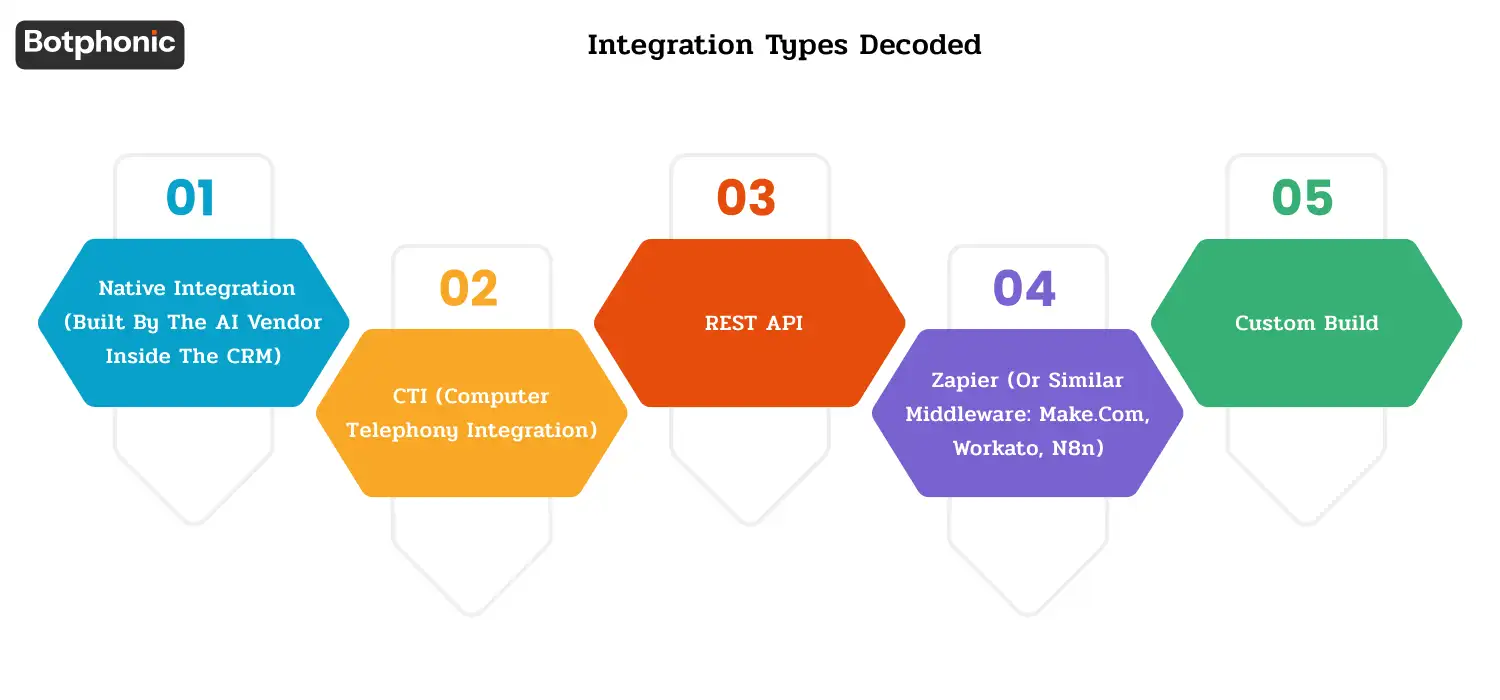
Type 1: Native integration (built by the AI vendor inside the CRM)
What it does: The AI call platform is a managed app/extension that’s embedded in the CRM (Salesforce AppExchange, HubSpot App Marketplace, Zoho Marketplace). OAuth 2.0 authentication; data is passed through the CRM’s official data flow mechanism.
Limits:
- Only available for major CRMs the vendor has invested in
- No bi-directional real-time sync
- No deep coverage (only touches contact, account, opportunity, case, custom objects)
- Vendor maintenance when CRM changes, vendor will take care of it
When to accept: When available, always preferred.
Type 2: CTI (Computer Telephony Integration)
What it does: The industry standard telephony framework that CRMs expose for voice-platform integration. Examples: Salesforce Open CTI, Salesforce Service Cloud Voice, Microsoft Dynamics 365 Channel Integration Framework v2.
Limits:
- Native CRM screen pops, click-to-dial, call control
- Real-time call event streaming to CRM
- Mature framework with documented best practices
- Specifically for telephony use cases (less for non-voice automation)
- Vendor must implement correctly on the CTI side (not all do)
When to accept: when the platform of the AI is primarily voice-first and the CRM has a CTI framework.
Type 3: REST API
What it does: Directly calls the CRM’s REST API to read/write records, using the AI platform. Authentication typically is OAuth 2.0 or API key.
Limits:
- Available for any CRM with a documented REST API
- Bidirectional is possible
- The depth of integration relies on the investment of the AI vendor in getting the integration to work—for some, it is read-only, for others, bidirectional, for some, full object coverage, etc.
- The maintenance risk for the AI vendor is that if the CRM API changes, the AI vendor must update
- Real-time sync relies on webhook support (varies by CRM)
When to accept: When the native option is not available (mid tier CRMs – Pipedrive, Freshsales, Insightly).
Type 4: Zapier (or similar middleware: Make.com, Workato, n8n)
What it does: Third party automation platform sits between the AI and the CRM. Zapier receives data from AI and passes it on to CRM.
Limits:
- Almost any CRM can be used, with near-real-time sync (15-60 seconds are possible delays), depending on the mapping
- Priced by task on Zapier (high volume usage will become expensive, $300-$2K/month)
- Two-vendor dependency (one outage affects both vendors)
- Mapping fragility; when fields on the CRM change, so do the mappings on Zapier, which renders them useless
- Limited object coverage (not as many or as simple as native or REST API)
When to accept: If you’re waiting for the native CRM or using it as an alternative to less-popular ones, or as an intentional approach for small-scale use cases, you’ll want to consider when to accept. Not suggested for use as main integration in production at scale.
Type 5: Custom build
What it does: An engineering project to connect your unique CRM with the AI platform by using custom code, ETL pipeline, or middleware platform.
Limits:
- The problem is that while this approach gives you the highest level of flexibility, it comes with a long-term maintenance burden.
- It means you’ll need to maintain the engineering team forever, as the CRM API changes and the AI platform updates.
- This approach means you’ll be maintaining the engineering team for the lifetime of the program, and adding extra costs to your initial investment of $50k to $500k plus, as the CRM API changes and the AI platform updates.
When to accept: If your CRM is proprietary or so specialized that there is no commercial integration. Yes, for mainstream CRMs, this is nearly always bad, so choose a vendor that has native or REST API.
Quick decision table
| Your situation | Recommended integration type |
| The major CRM Systems include Salesforce, HubSpot, Zoho, and Microsoft Dynamics. | A native confirm vendor is available. |
| Use case with focus on voice + CTI-supported CRM.Voice focused use case + CTI supported CRM. | CTI |
| Mid-tier CRM that has a well-documented REST API. | REST API verify is compatible with your particular CRM. |
| Less-common CRM, low volume, willing to pay middleware tax | Zapier / Make.com |
| Proprietary or niche CRM | Custom build (last resort) |
CRM-Specific Deep-Dives
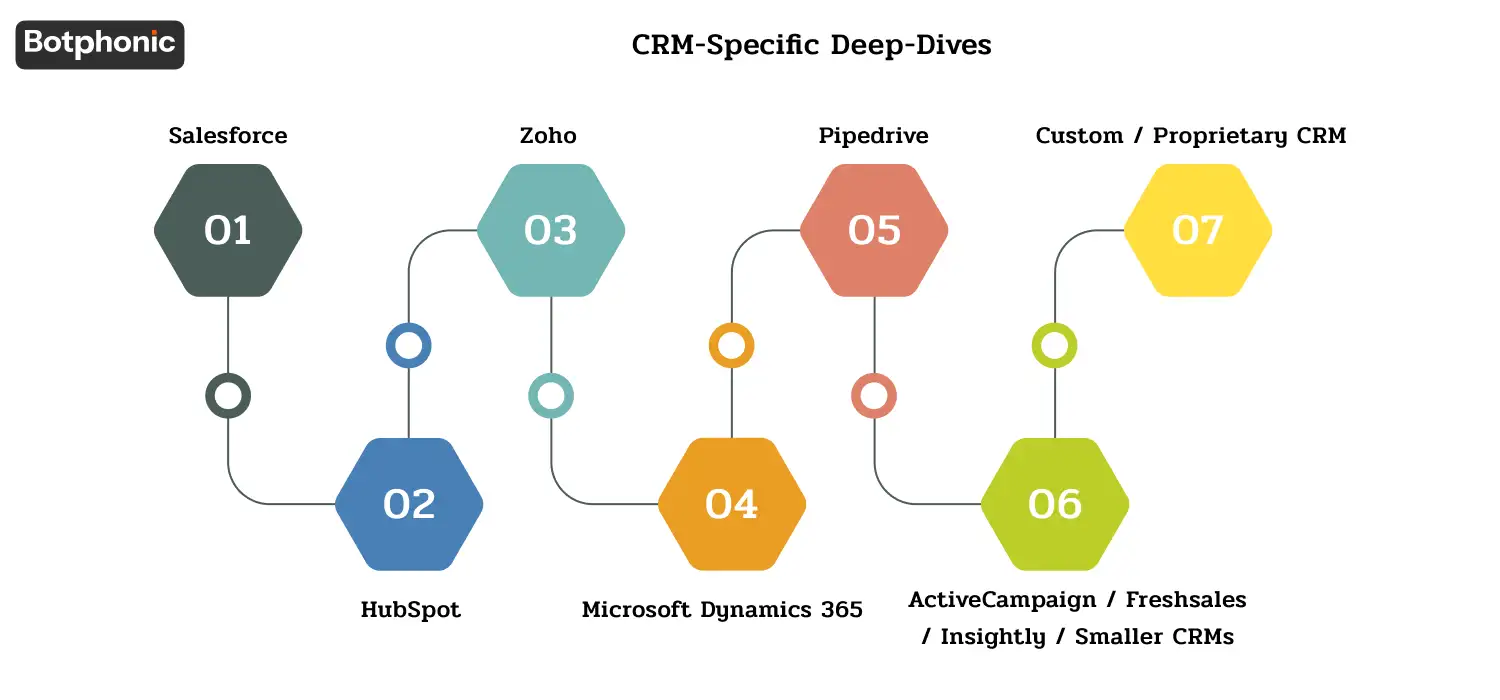
1. Salesforce
Know the variants: – Salesforce Sales Cloud, most common B2B sales CRM – Salesforce Service Cloud, case management and customer service; includes Service Cloud Voice, native CTI, Salesforce Financial Services Cloud (FSC), wealth/banking-specific extension; integration is more complex, Salesforce Health Cloud, healthcare-specific extension; integration introduces HIPAA scope considerations
Best integration type: Native CTI via Open CTI or Service Cloud Voice.
What good integration looks like:
- Click to dial from any Salesforce record
- Custom objects supported (not just contact/accounts)
- Real-time screen pop with the customer record when they call in
- Auto-logging of call recordings, transcripts to the contact/account/opportunity
- Two-way data flow (AI updates Salesforce, Salesforce updates AI knowledge base)
- Advancements of permissions to the Salesforce account/customer record (OAuth 2.0 SSO)
- Audit trail flows into Salesforce Event Monitoring (required for FINRA/SOC 2 record-keeping)
Implementation timeline: Sales Cloud / Service Cloud: 3-7 days (CTI configuration, managed package installation, testing and training) Financial Services Cloud: 1-2 weeks (FSC-specific objects + advisor workflows + compliance routing) Health Cloud: 1-2 weeks (HIPAA scope verification, BAA execution, PHI handling rules)
Red flags specific to Salesforce:
- Vendor says “Salesforce integration” but actually it’s based on Zapier, verify that’s the case and it is listed on the AppExchange
- “Native” but missing important objects
- Confirm there’s a list of which objects are supported,
- It uses Salesforce classic, this is a dated product, so get a list of which objects it covers or walk away.
Botphonic’s Salesforce support: Botphonic-Salesforce native integration, managed app on AppExchange, real-time bidirectional sync, full object coverage. Including Salesforce Service Cloud Voice support.
To maintain high-quality lead and customer data within Salesforce, many organizations use a Salesforce email verification tool to validate email addresses before records are synced across sales, service, and marketing workflows.
2. HubSpot
Know the variants: Variants are the different applications that can be integrated with the HubSpot CRM, which are not part of the CRM itself.Variants include different applications that you can integrate with the HubSpot CRM, not part of the CRM itself.
Best integration type: Native via HubSpot Calling Extensions API.
What good integration looks like:
- AI is now a calling provider in HubSpot’s call interface
- Calls from HubSpot trigger AI flow; calls received from AI automatically log to the HubSpot timeline
- Bidir sync of contacts, deals, tickets in real-time
- Support for HubSpot custom properties + workflows
- Inherit HubSpot permissions + Oauth 2.0
- High volume of calls and HubSpot Operations Hub data-sync compatibility
Implementation timeline: 2-3 days for HubSpot Native (via Calling Extensions API); 1 week for HubSpot (via data sync via operations hub—high-volume is better); 1 day for HubSpot (via Zapier—tradeoffs with middleware)
Red flags specific to HubSpot:
- “HubSpot integration” but it’s just a Zapier connector; easy to check by seeing if the vendor is in the HubSpot App Marketplace
- Calls don’t automatically log to the HubSpot timeline, the key value of the integration is defeated
- No support for HubSpot custom properties, this will restrict flexibility in the HubSpot CRM
- Pricing is based on HubSpot Marketing Hub when you have only Sales Hub, this is an example of vendor over-bundling
Botphonic’s HubSpot support: Botphonic-HubSpot native integration, can be found on HubSpot App Marketplace and it utilizes Calling Extensions API for native calling experience.
3. Zoho
Know the variants: Zoho CRM is a core sales/support CRM, Zoho One is a package (CRM + Desk + Books + 40+ apps), Zoho Bigin is a lighter version of CRM (service-specific, often included as an add-on to CRM), and Zoho Desk is a service-specific CRM.
Best integration type: Native via Zoho CRM Telephony Provider API.
What good integration looks like:
- AI acts as a telephony provider within Zoho CRM call interface
- Real-time call screen-pop with context of Zoho contacts, leads or deals
- Auto-logging of calls, transcripts, summaries to Zoho records
- Integration with Zoho custom modules (Zoho’s ‘custom objects’ equivalent) as required –
- Bidirectional sync, Zoho contact and lead/deal updates are passed to AI; AI call data is passed back to Zoho
- Integration with the Zoho One ecosystem, Zoho Desk, Zoho Books, Zoho Projects, etc. as required
Implementation time: Zoho CRM Native: 2-3 days, Zoho One ecosystem (multi-app): 1 week, Zoho via Zapier: 1 day.
Red flags specific to Zoho:
- Generic mentioning of “Zoho integration” without specifying which product of Zoho (Zoho CRM ≠ Zoho Desk ≠ Zoho Books)
- No support for Zoho’s data residency requirement on EU data centers (Zoho EU vs US data centers)
- No support for Zoho custom modules, limits flexibility for businesses that customize Zoho heavily
- Pricing based on number of Zoho users, verify with Zoho One’s pricing structure
Botphonic’s Zoho support: Zoho native integration (which is listed on Zoho Marketplace) is based on the Telephony Provider API.
4. Microsoft Dynamics 365
Know the variants: – Dynamics 365 Sales — B2B Sales CRM – Dynamics 365 Customer Service — case management – Dynamics 365 Field Service — service-dispatch (HVAC, home-services) – Dynamics 365 Marketing — marketing automation (apart from Sales CRM)
Best integration type: Native via Channel Integration Framework v2 (CIF v2).
What good integration looks like:
- AI registers as a channel provider through CIF v2
- Unified Service Desk integration for service centres
- Real-time data streaming of call events and screen pop
- Bidirectional data sync between Dynamics entities
- Support for Common Data Service / Dataverse custom entities
- Azure AD SSO + role-based access
- Power Automate workflow integration for cross-app automation
- Custom Dynamics 365 Support Services for ongoing maintenance, platform optimization, issue resolution, and seamless integration updates across evolving business workflows
Estimated implementation time: – Dynamics 365 Sales / Customer Service via CIF v2: 5-10 days – Dynamics 365 with Power Automate integrations: 1-2 weeks – Dynamics 365 with custom Dataverse extensions: 2-4 weeks
Red flags specific to Microsoft Dynamics:
- Vendor claims “Dynamics integration” but doesn’t support CIF v2, probably is built on Zapier
- No support for Dataverse / Common Data Service, restricted advanced use cases
- No support for Azure AD SSO, security problem for enterprise customers
- Pricing is per Dynamics user, not aligned with Dynamics tiers, limits advanced use cases
5. Pipedrive
Know the variants: Pipedrive Essential / Advanced / Professional / Power / Enterprise — there are tiers of variants
Best integration type: REST API + webhooks (Pipedrive doesn’t have a native CTI framework like Salesforce or Microsoft).
What good integration looks like:
- Outbound call that does not trigger AI flow if it is not an inbound call
- Inbound call that does not have contact/deal context through Pipedrive API lookup
- Auto-logging of an activity to the Pipedrive call log, and not the deal timeline
- Inbound call that does not update Pipedrive via webhook events
- Pipedrive custom fields that are not supported.
Implementation timeline: Pipedrive via API: 1-3 days Pipedrive via Zapier: < 1 day (but don’t hesitate to embrace the middleman compromises)
Red flags specific to Pipedrive:
- Pipedrive API rate limits, high-volume teams may hit limits with poorly-written integrations
- Vendor sync only at deal-creation, not deal-update, limits ongoing context refresh
- No support for Pipedrive custom fields
Botphonic’s Pipedrive support: REST API integration. Always check object coverage prior to signing.
6. ActiveCampaign / Freshsales / Insightly / smaller CRMs
Pattern: Most of the little smaller CRMs will have REST APIs but no native CTI frameworks. Integration approaches:
| CRM | Best integration |
| ActiveCampaign | REST API + webhooks; explicitly check vendor lists (not “Zapier-compatible”) |
| Freshsales (Freshworks) | If you do not have a listing on Freshworks Marketplace, REST API is preferred |
| Insightly | REST API + webhooks |
| Connect with the right people.Get in touch with the right people. | Typically require Zapier only — take joys in the middlemen |
| Bigin is Zoho’s SMB CRM. | Use Zoho Telephony Provider API in accordance to §3.3 |
Implementation timeline:1-5 days, depending on the extent of the objects to be implemented.
Red flags: When a company says that it supports 100+ CRMs, it typically means “only Zapier. Always check to see if the vendor lists your particular CRM in their documented native integrations.
7. Custom / proprietary CRM
Reality check: When you use a proprietary/in-house CRM, the integration is a custom-built solution for each AI vendor.
What to ask the vendor:
- Do they provide professional services for custom integrations?
- What is the cost ($X per hour or $Y fixed-fee)?
- Will the integration continue to work as your platform evolves? One-time and we own maintenance?
- Can you integrate with our REST API, our SOAP API, or our database directly?
- What is the typical timeline for a custom integration (this type of this CRM, this scope of objects)?
- Will the integration code be open sourced or proprietary to the vendor?
Implementation timeline: 1-4 weeks (typical custom build), 2-4 months (complex bidirectional with deep object coverage).
Cost reality: Initial custom build of $50K-$500K & maintenance.
If your CRM is truly custom, also ask yourself if it’s time to make the move to a mainstream CRM, the cost of integrating your CRM will multiply on each SaaS purchase you make if you are still a captive of a proprietary CRM.
The 6 CRM-Integration Evaluation Criteria
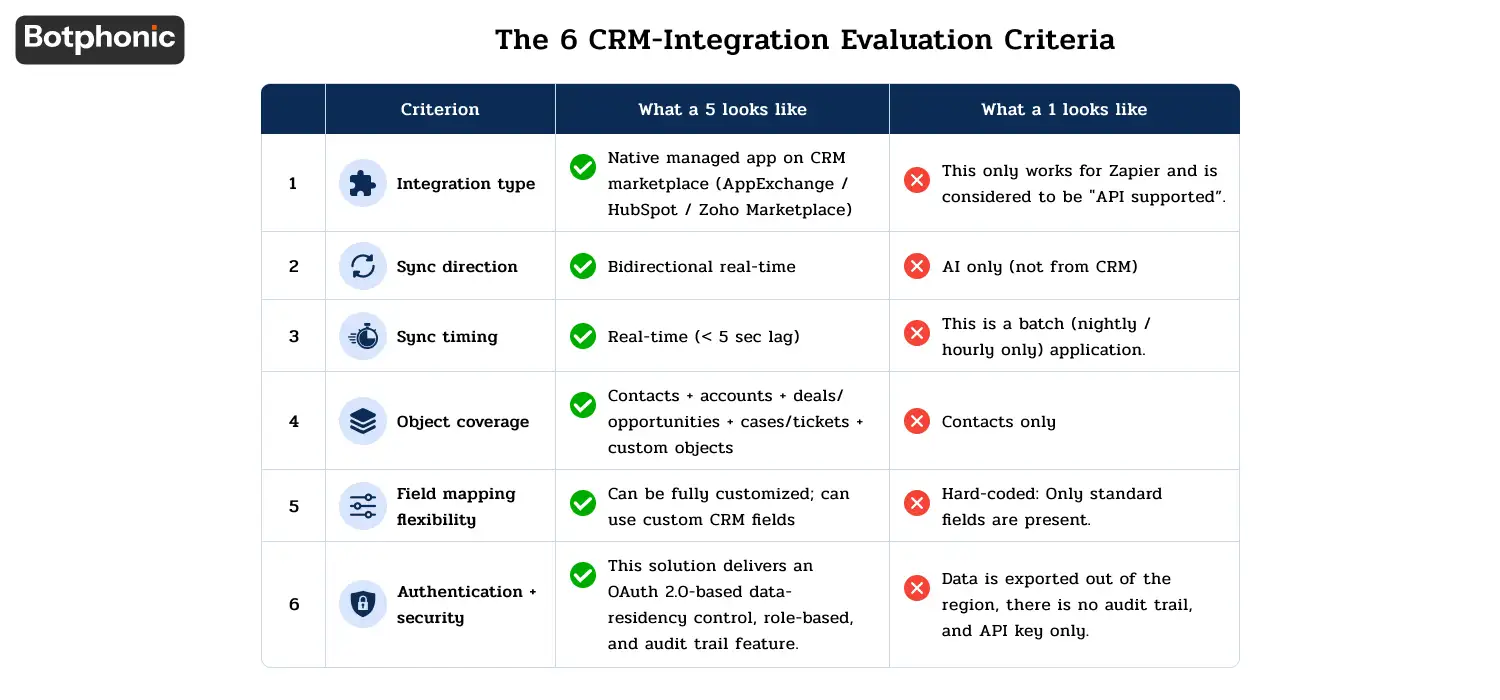
When selecting an AI call center vendor + your CRM, check on these 6 points. Score each 1-5; weight to your priorities.
| # | Criterion | What a 5 looks like | What a 1 looks like |
| 1 | Integration type | Native managed app on CRM marketplace (AppExchange / HubSpot / Zoho Marketplace) | This only works for Zapier and is considered to be “API supported. |
| 2 | Sync direction | Bidirectional real-time | AI only (not from CRM) |
| 3 | Sync timing | Real-time (< 5 sec lag) | This is a batch (nightly / hourly only) application. |
| 4 | Object coverage | Contacts + accounts + deals/opportunities + cases/tickets + custom objects | Contacts only |
| 5 | Field mapping flexibility | Can be fully customized; can use custom CRM fields | Hard-coded: Only standard fields are present. |
| 6 | Authentication + security | This solution delivers an OAuth 2.0-based data-residency control, role-based, and audit trail feature. | Data is exported out of the region, there is no audit trail, and API key only. |
 PRO TIP
| Criterion | Weight |
| Integration type | 25% |
| Sync direction | 15% |
| Sync timing | 15% |
| Object coverage | 20% |
| Field mapping flexibility | 10% |
| Authentication + security | 15% |
For scheduling-specific decision frameworks, see the AI scheduling buyer’s guide. For feature-specific evaluation with Problem → Bad → Good framing, see 12 must-have features.
Per-CRM cost of ownership (rough ranges)
Total cost = CRM license + AI platform + integration cost. For SMB-to-mid-market scenarios (verify current pricing against vendor pages):
| Your CRM | CRM license (per user/month) | AI platform addition (Botphonic SMB tier) | Integration setup cost (one-time) | Total Year 1 (10-user team estimate) |
| Salesforce Sales Cloud | $80-$150 | $29-$249 | $0 (native) | $11K-$21K |
| Salesforce Service Cloud + Voice | $150-$300 | $29-$249 | $0-$2K | $20K-$40K |
| Salesforce Financial Services Cloud | $300+ | $29-$249 | $2K-$5K | $40K+ |
| HubSpot Sales Hub Professional | $100-$120 | $29-$249 | $0 (native) | $13K-$16K |
| HubSpot Service Hub Professional | $90-$120 | $29-$249 | $0 | $12K-$16K |
| Zoho One | $40-$60 | $29-$249 | $0 (native) | $5K-$10K |
| Zoho CRM Enterprise | $50-$70 | $29-$249 | $0 | $6K-$11K |
| Microsoft Dynamics 365 Sales | $95-$125 | $29-$249 | $1K-$3K | $13K-$18K |
| Microsoft Dynamics 365 Customer Service Enterprise | $125-$210 | $29-$249 | $1K-$3K | $16K-$28K |
| Pipedrive Power | $65-$80 | $29-$249 | $0-$1K | $9K-$13K |
| Custom CRM | (your existing cost) | $29-$249 | $50K-$500K | $50K+ |
For your specific business volume + use case, run the math on the Botphonic ROI calculator and the ROI calculation methodology.
Red flags across all CRMs
Regardless of the CRM you’re using, these 8 red flags should get you to reconsider your AI call center vendor.
- If you see “Supports 100+ CRMs” but your CRM isn’t named typically this means Zapier only and does not imply that they’ve actually tested it with your CRM specifically.
- No surprises on invoicing costs are based on your CRM size, not calls made; paid per-record sync with the vendor.
- If no OAuth scope was provided, security audit will fail; vendor might be asking for more access than required.
- You will be hit with no warning by the CRM API usage, as your other tools will start to fail because of the AI using up the API budget.
- Sync will not pause for system maintenance; cannot replay missed events on the AI vendor’s schedule.
- In the case where your CRM is stored in the EU (GDPR scope), the AI provider is required to guarantee the processing of EU data.
- Even if it’s a native integration that requires $5K-$25K in vendor setup, it will still require vendor’s professional services to implement.
- No documented breakage handling when CRM API changes, if Salesforce/HubSpot/Zoho introduce any changes in their API, who will tell you? Who does the integrating?
If 3+ red flags fire on a vendor, walk away regardless of price.
The Complete Decision Flow In 7 Steps
1. Determine your CRM and any sub-product (if applicable) (e.g., Salesforce → Service Cloud Voice; HubSpot → Sales Hub)
2. You will need to check in CRM-specific deep-dives, which integration type you should use for your CRM.
3. Check if the AI provider has a native integration available on your CRM’s marketplace (AppExchange / HubSpot Marketplace / Zoho Marketplace / Microsoft AppSource)
4. Record the vendor’s score on the 6-criterion evaluation sheet
5. Eliminate any vendor that has 3-6 red flags.
6. Estimate Per-CRM cost of ownership cost of ownership for your team size: 6. Top 2-3
7. Top 1-2 deeper score with a wider 28 criterion assessment matrix: pilot
Tools for each step:
| Step | Tool |
| Step 4 (CRM-specific scoring) | Check “The 6 CRM-integration evaluation criteria” in this blog |
| Step 5 (red flags) | Check “Red flags across all CRMs” in this blog |
| Step 6 (cost of ownership) | Botphonic ROI calculator + ROI methodology |
| Step 7 (deeper scoring) | AI receptionist evaluation matrix free template (28 criteria) |
| Vendor testing | Our test of 5 platforms |
| Feature understanding | 12 must-have features (with Problem → Bad → Good framing) |
| Scheduling-specific buying | AI scheduling software buyer’s guide |
What this guide is not
This CRM-first approach doesn’t cover a number of things:
- It is not responsible for selecting the CRM. This article doesn’t help you choose between Salesforce vs HubSpot vs Zoho, if that is your question.
- It does not take the place of the vendor’s sales process. After shortlisting 2-3 AI vendors that suit your CRM, the actual demo, POC and procurement process still take place.
- Does not cover Year 2 questions. These, such as Vendor support degradation, CRM-API-change handling, contract-renewal pricing must be evaluated separately.
- Not B2C-specific CRMs (like Salesforce Marketing Cloud, Klaviyo and Mailchimp). The framework structure remains intact, but the criteria weighting is adjusted to features that are unique to marketing automation.
If you are using a risk side evaluation, refer to Botphonic security and compliance documentation. To implement a playbook: How to build an AI call center for your business in 2026.
Where Botphonic fits
We’ve released this framework as CRM-AGNOSTIC, which can be applied to any AI call center vendor and your CRM. While the above is true, Botphonic AI phone call has been designed to meet the §4 requirements of SMB-to-mid-market businesses in the most popular CRMs:
- Salesforce, Botphonic-Salesforce native integration on AppExchange (Sales Cloud, Service Cloud, Service Cloud Voice supported; FSC available with verification)
- With this integration, you can connect to HubSpot using the Calling Extensions API from HubSpot native apps and send a message to HubSpot via App Marketplace.
- Import Zoho contacts as BOTs into Zoho CRM using Zoho Telephony Provider API on Zoho Marketplace.On Zoho Market Place, import zoho contacts as Zoho bots using Zoho Telephony Provider API.
- Use Pipedrive – REST API integration with webhook event handling.Use Pipedrive REST API integration with webhook event handling.
- Microsoft Dynamics 365 + smaller CRMs — check with the Product team for the latest support
These are areas where Botphonic is less differentiated: – Custom proprietary CRMs we can do a REST API integration, but will cost you for custom builds – Enterprise CRM ecosystems (multi-CRM Federated, Dataverse-heavy Dynamics customizations) RingCentral or other UCaaS-tier vendors may have more depth – Marketing-automation-specific scenarios — Botphonic is voice-first; for marketing-automation-driven workflows, evaluate based on the broader cluster
Compare your system against our CRM-centric evaluation process outlined in this article
Request a Free Demo