
Summarize Content With:
What You’ll Learn
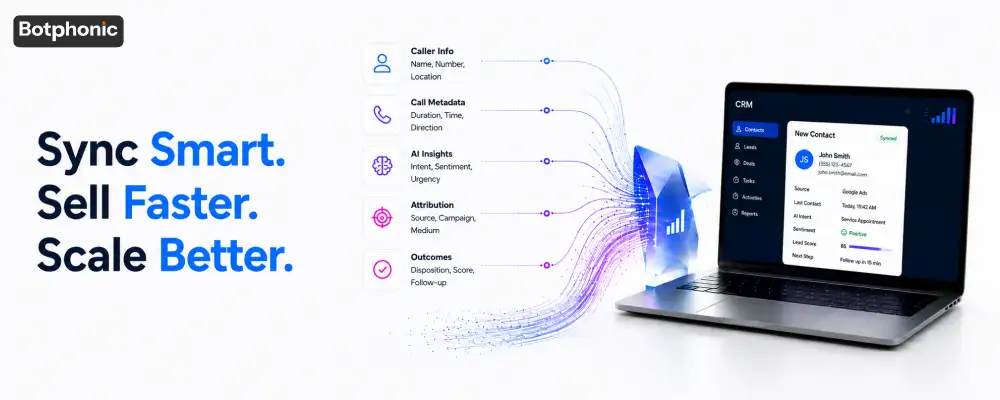
This guide breaks down ai phone call crm data sync field by field. You’ll see how crm integration should map call metadata, which dedupe logic prevents ghost records, how phone-to-CRM attribution works, and the four failure modes that corrupt customer crm data most often.
Most teams treat AI phone call CRM data sync as a one-time setup, not an ongoing data pipeline. That assumption is wrong. This guide is for sales operations leaders and dealership GMs who need call data to behave like structured CRM data, not loose notes.
Why Do AI Phone Calls Break CRM Data Instead of Improving It?
AI phone call CRM data sync is the process of moving call transcripts, metadata, and intent signals into your CRM system in a structured, reusable format. Here’s what that means for sales teams: a sync failure doesn’t just lose a call record, it pollutes every report built on top of it.
The disconnect starts with expectations. Most vendors describe crm integration as plug-and-play, a checkbox you flip once. In practice, it’s a high-velocity pipeline that runs every time the phone rings, and pipelines break under volume.
Poor data quality already costs U.S. businesses an estimated $3.1 trillion a year, and the average company believes 32 percent of its own data is inaccurate (Experian Data Quality, 2014). Add a live AI voice channel writing into that same database, and the error rate compounds fast.
From Activity Logging to Operational Intelligence
A basic phone system logs a timestamp and a duration. An AI phone call CRM data sync should log sentiment, urgency, and intent category alongside that timestamp. The difference determines whether your CRM capabilities can actually drive a phone call workflow or just store a transcript nobody reads.
 PRO TIP
Botphonic Data Benchmark: Where Dealership Syncs Actually Fail
Botphonic’s internal review of roughly 10,000 dealership calls processed through AI phone integrations found that sync errors cluster around a small set of root causes, not a wide spread of random faults. The breakdown below reflects internal Botphonic call-log analysis and is meant as a directional benchmark, not a third-party audit.
| Root Cause | Share of Sync Errors | Most Common CRM Affected |
| Duplicate record creation (fuzzy match failure) | 14% | DealerSocket, CDK |
| Dirty field injection (unstructured text in fixed fields) | 22% | HubSpot, Salesforce |
| Missing attribution data (no UTM/GCLID passthrough) | 31% | VinSolutions, Reynolds & Reynolds |
| API rate-limit failures (infinite loop triggers) | 9% | CDK, HubSpot |
| Orphan record handling errors | 24% | All systems, most common on unmapped lead sources |
What Should Dealers Look For in a CRM Integration Architecture?
A sound crm integration architecture is one where every call payload has a defined home before the call ends. Here’s what that means for buyers evaluating vendors: ask to see the field map, not just the demo.
The Payload Is More Than a Transcript
The “what” of the sync isn’t the raw transcript. It’s the structured metadata layer: a sentiment score, an urgency flag, and an intent category like “service appointment” or “trade-in inquiry.” Most popular crm systems were not built with these fields by default.
System Fields vs. Custom Fields
Standard CRM fields like phone number and last contact date already exist in VinSolutions, DealerSocket, and CDK. AI-extracted insights need new homes. A “Buying Intent Score” or “Primary Objection” field has to be built as a custom object, not forced into a notes box.
Real-Time Sync vs. Batch Processing
Real-time API sync pushes data the moment a call ends, which matters for instant lead routing. Batch processing runs on a schedule and suits deeper transcript analysis where speed matters less than completeness.
| Sync Method | Best For | Typical Delay | Risk if Misused |
| Real-time API sync | Hot lead routing, urgent callbacks | Seconds | API rate-limit exhaustion under high call volume |
| Batch processing | Sentiment analysis, reporting, QA | 15 minutes–24 hours | Stale data for time-sensitive follow-ups |
| Hybrid (event-triggered batch) | Most dealership and SMB workflows | 1–5 minutes | Requires tuned trigger logic to avoid duplicate writes |
Workflow Triggering From Call Data
The payoff of clean field mapping is automation. If the AI detects the word “budget” in a call, that should trigger a “High-Priority Follow-up” task in HubSpot or Salesforce automatically. Without structured fields, that trigger has nothing reliable to read.
In practice, what dealerships actually experience is a partial version of this: the transcript syncs fine, but the intent score sits in a generic notes field no automation rule can parse. The call gets logged. The opportunity gets missed anyway.
Why Do Duplicate Records Keep Appearing After Every Call?
Duplicate records, sometimes called ghost records, are created when your customer crm fails to match a caller to an existing profile. Here’s what that means operationally: every missed match doubles your follow-up risk and splits your call history.
Beyond Exact Match
Standard email or phone-number matching fails constantly in customer relationship management. A customer calling from a different mobile number, or a spouse calling on a shared landline, creates a second record under standard matching rules. Duplication rates between 10 and 30 percent are common for companies without active data quality programs (HubSpot, 2025).
Fuzzy Logic Architecture
AI-driven matching should account for partial identifiers, like matching a mobile number against a landline tied to the same household. AI call assistant should also catch alias detection, linking “ABC Motors” and “ABC Motors LLC” to one parent account.
Survivorship Rules Decide the Master Record
When a lead record and a contact record share a phone number, you need a fixed rule for which one absorbs the call history. Most teams skip this step and let whichever record syncs first win, which is rarely the right answer.
 NOTE
NOTE
How Does Phone Call Attribution Actually Work in a CRM?
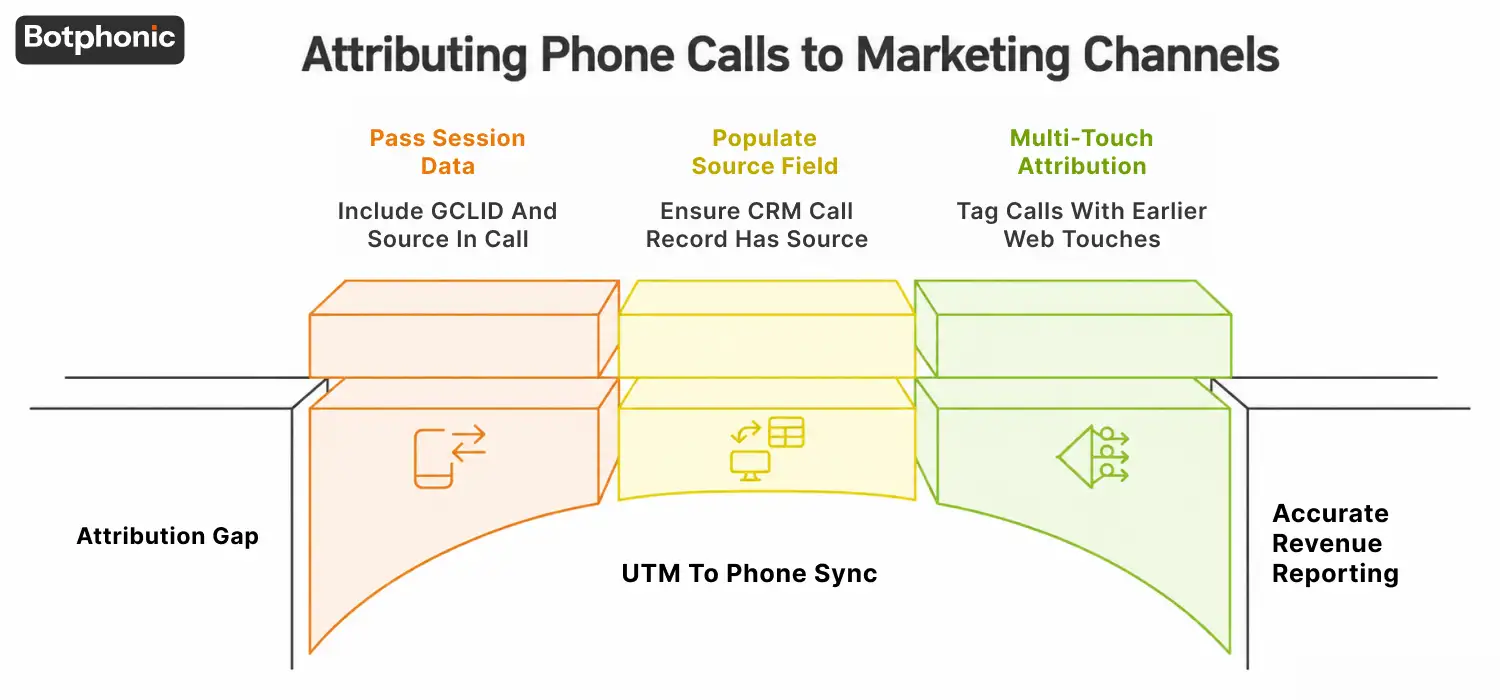
Phone call attribution is the practice of tying an inbound call back to the marketing channel that generated it. Here’s what that means for revenue reporting: without it, your best-converting channel looks invisible in every dashboard.
The Attribution Gap
Offline phone calls are often called the “last mile” of marketing data because the call itself carries no campaign tag by default. A customer clicks a paid ad, browses a landing page, then picks up the phone instead of filling out a form. That session data needs to travel with the call.
UTM to Phone Sync
A correctly built phone system passes session data, including GCLID and landing page source, into the call record before it reaches the CRM. This is the step most hubspot call integration setups skip, leaving the call logged with no source field populated.
Multi-Touch Impact on Revenue Reporting
When the final close happens on a call instead of a web form, multi-touch attribution models need that call tagged with the same campaign data as the earlier web touches. Otherwise the deal appears to close from “direct,” and the marketing spend that earned it gets no credit.
CRM-Specific Implementation Guide: How Do You Connect Each Platform Correctly?
Each CRM system handles custom fields and API limits differently. Here’s what that means in practice: the same sync logic that works on HubSpot can throttle or silently fail on VinSolutions without platform-specific adjustments.
VinSolutions
VinSolutions requires custom field requests to go through its Connect API partner program before AI-extracted fields like intent score can be written. Plan for a vendor approval step, since fields can’t be added through the standard admin panel alone.
DealerSocket
DealerSocket supports custom objects but enforces stricter API call limits than most CRMs in this list. Batch non-urgent writes, like sentiment scoring, and reserve real-time API calls for lead routing to avoid throttling during peak hours.
CDK
CDK’s webhook architecture is well suited to monitoring sync health, since it exposes detailed logs for failed and successful writes. Use those logs to catch infinite-loop triggers early, before they exhaust rate limits across the dealership group.
Reynolds & Reynolds
Reynolds & Reynolds integrations typically run through certified third-party connectors rather than direct API access. Confirm your AI phone system’s connector is certified before mapping custom fields, since uncertified writes can be rejected or silently dropped.
HubSpot and Salesforce
Both platforms support flexible custom properties, making field mapping for intent score and sentiment straightforward through hubspot call integration tools. The main risk on these platforms is workflow automation looping, not field availability, so write-once flags matter more here than elsewhere.
What Are the Most Common Reasons AI-to-CRM Syncs Fail?
Sync failures usually trace back to one of four repeatable patterns. Here’s what that means for your team: each one is preventable with the right safeguards in place before launch.
Failure/Resolution Matrix
| Failure Mode | What Happens | Resolution |
| 1. The Infinite Loop | An AI field update triggers a workflow, which triggers another AI response, which updates the field again, exhausting API rate limits within minutes during peak call volume. | Add a write-once flag per call ID so each record can only trigger one automated update cycle. |
| 2. Dirty Field Injection | Raw, unstructured LLM-generated summaries get pushed into standardized fields, breaking reports built for short, fixed values. | Route AI summaries to a dedicated long-text field; keep structured fields like “Status” populated only by validated, fixed values. |
| 3. The Orphan Record | An unknown caller has no existing profile, leaving the system to decide between creating a lead or discarding the call data. | Validate the call source before auto-creating a lead; route unverified or spam-flagged numbers to manual review instead. |
| 4. PII/Compliance Blind Spots | Sensitive voice content syncs into unencrypted CRM notes fields, especially in fast hubspot call integration setups built without compliance review. | Apply automatic redaction rules for financial and medical mentions before any text reaches a notes field. |
The infinite loop and dirty field injection failures tend to surface fastest, often within the first week of go-live, since both depend on call volume to trigger. Orphan records and PII blind spots build more slowly, which is why they’re easy to miss without active monitoring.
Run an audit of what your current AI phone system writes into notes fields today. If you find unredacted personal details, that’s a fix to schedule this week, not next quarter.
Request a Free DemoIs It Worth Investing in a Properly Architected CRM Sync?
A properly architected sync is worth the setup cost for any team running consistent call volume. Here’s what changes: call data stops being a record nobody opens and starts feeding pipeline forecasts and coaching directly.
System Audit Checklist
Before scaling call volume, confirm your CRM system can handle high-frequency API traffic without throttling. Confirm custom fields exist for intent and sentiment data. Confirm a dedupe rule runs on every new contact created from a call.
Human-in-the-Loop Confidenc e Scoring
Auto-updating CRM fields only when AI confidence is above 90 percent reduces dirty data significantly. Calls scored below that threshold should route to a human reviewer instead of writing directly to the record. This single rule prevents most of Failure 2 above.
Monitoring Sync Health Proactively
Set up alerts for failed syncs, not just successful ones. A silent failure that goes unnoticed for two weeks can mean dozens of missing call records by the time anyone checks. Reynolds & Reynolds and CDK both expose webhook logs for this purpose if your integration uses them.
Reps using clean, attributed call data report fewer wasted callbacks and faster qualification, since they’re working from a record that actually reflects what the customer said, not a stale guess. See how Botphonic structures call-to-CRM field mapping for dealership and service-based teams.
