
Summarize Content With:
What You’ll Learn
Onboarding AI phone calls means setting up, testing, and implementing your AI voice assistant into production calls. The guide is targeted at operations managers, CTOs, and business owners. It includes use case definition, AI architecture creation, speech to text AI tuning, phone companies integration, stress tests in a sandbox environment, and 30 days tuning, all you need to implement AI on voice without botched up calls.
If you’re new to AI voice automation, this introductory guide on AI phone calls explains how modern voice assistants work, common use cases, and what businesses should expect before deployment.
Why Do Most AI Voice Deployments Fail Within First 7 Days?
Most AI voice deployment efforts fail in the first 7 days because companies confuse pilot success and production-ready status. Pilots work well with imperfections, while productions don’t.
The difference is real. Internal pilots operate with clean data, patient testers, and favorable conditions. Real-world callers are rushed, speak with an accent, call from noisy locations, and disconnect after 4 seconds of silence. The difference between them is what kills most AI implementation initiatives.
The bad call isn’t a minor UX issue. It is an event that occurs around your brand. According to research by PwC’s Future of CX report, 32% of customers abandon a brand they adore after only one negative customer experience. Your AI agent which loops, misses your voice and does not make proper handoffs creates exactly such an experience.
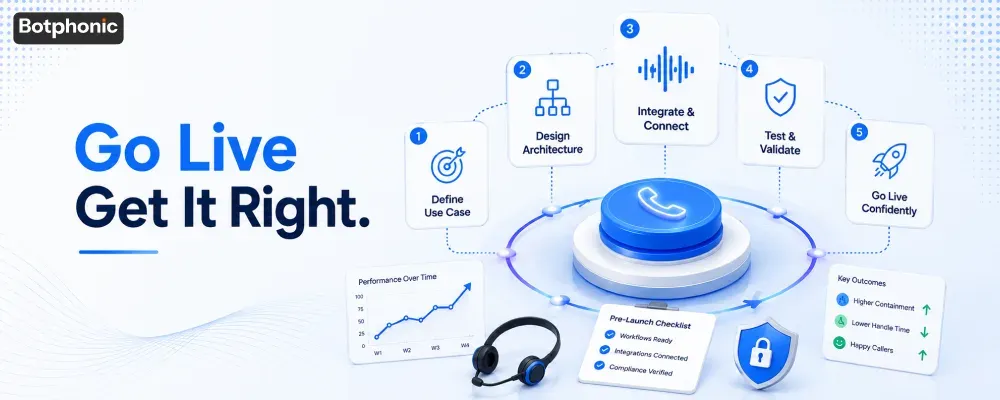
Below, you’ll find a realistic 5-stage software implementation timeline to avoid any of those issues on Day 1.
Step 1: How to define the right use case before you deploy AI?
Defining the use case is about picking up one narrow, repeatable type of calls and starting automation with it. This means the following thing regarding technology adoption: you automate chaos if you try to automate everything at once. For organizations evaluating an AI call assistant, starting with a single high-volume, repeatable workflow creates a stronger foundation before expanding automation across multiple call types.
Don’t Design AI Based on a Flawed Workflow
Before you choose a platform; Botphonic, Twilio Flex, or any workflow automation platform, write down the steps in your current manual workflow. Make a note of every decision point: What questions does the agent ask? What answers does the customer give? What about when the answer isn’t clear?
If your people are being inconsistent, then your AI will be inconsistent, too. Improve the workflow first.
Define Key Performance Indicators Before Writing Your First Prompt
Make sure you define success in quantifiable metrics before ai implementation. Important metrics can include:
- Containment rate: What percentage of calls is the AI successfully handling without passing to a live agent?
- First call resolution: Is the caller satisfied on the first attempt?
- Average handle time: How fast is the AI in relation to the human agent doing this job?
- Escalation accuracy: When the AI passes to an agent, is it sending it to the right one?
Define a target for all four. Check progress weekly for the first 30 days.
 PRO TIP
Step 2: What Should Good AI Voice Architecture Look Like?
Good voice AI architecture is an AI call flow that considers possible failures on every branch — not just the happy path. Companies transitioning from chatbot prompts to conversational AI will need logic that caters to the 30-40% of calls that do not follow the happy path. A well-designed AI call assistant relies on structured conversation flows, fallback logic, and contextual decision-making to deliver reliable customer experiences at scale.
Expert Insight – Voice AI Architect: “The biggest architectural mistake I come across time and again is companies building for the confirmed intent and nothing else. In reality, 30-40% of the time, callers’ utterances are either partial, ambiguous, or compound. Your fallback logic cannot be an ‘I did not understand that.’ If that’s the case, you are building an AI agent in name only. First design for failure. You’ll figure out the happy path eventually.” – Perspective gathered from Botphonic Implementation Team experience with 200+ enterprise voice AI solutions
Designing Logic Beyond the Happy Path
Companies usually design for the optimal caller — clear speech, direct answers, and no interruptions. In reality, people talk constantly, use filler words, change topics, and ask questions the agent isn’t prepared for.
What Features Does Your Architecture Need To Implement?
- Conditional logic: Multiple branches for multiple responses, including partial matches.
- Fallback intents: An “I didn’t understand you” response that isn’t a simple re-prompt of the same intent twice.
- Clarification questions: If a caller says something unclear, the agent will pose one clarification question rather than guessing.
How Should You Calibrate Speech-to-Text AI for Real World Calls?
Calibration of speech to text AI is the adjustment of your NLU (Natural Language Understanding) system to recognize vocabulary, accents, and noise that your callers bring to the table. Out-of-the-box accuracy of the speech to text AI degrades significantly in noisy environments.
Key calibration steps:
- Domain vocabulary injection: Feed your speech model all the product names, services, and industry-specific jargon. Generic models will interpret “VinSolutions” as “win solutions.”
- Regional accents testing: If you have callers with different regional accents, test your call flow using the same profile prior to deployment.
- Noise threshold settings: Teach your platform how to deal with the noise level. Your customer will not be calling from the office, but perhaps from the car.
Botphonic and Google CCAI provide custom vocabulary injection. Make use of this feature.
Why Does the Human Handoff Become the Most Crucial Piece of Your AI Implementation?
Human handoff occurs when AI understands that it cannot help the customer and hands over the call to a human agent smoothly, while transferring all context with the call. Without handoff criteria set, the human agent loops. Looping agents lead customers to hang up frustrated.
A proper handoff consists of:
- Handoff trigger (when a customer says “please speak to someone” or becomes negative in sentiment)
- Smooth handover which will include passing on conversation transcript to the human agent
- Announcement to a customer: “I am now connecting you with a specialist who will know all about our conversation.”
This is not a back-up strategy. This is a feature. Successful implementation of an AI voice agent takes human handoff as a carefully designed element of the solution, rather than something bad that might happen.
Step 3: How Do You Implement Integration of AI Calls with Your Current Phone System and CRM?
Technical integration means connecting your AI voice layer with current telephony and CRM stack, providing the agent with a context of every call. Without technical integration, your AI handles every incoming call blindly. If you’re still comparing implementation options, this complete AI phone call automation software buyer’s guide covers the essential platform capabilities, integration requirements, and evaluation criteria before selecting a solution.
Prepping Your Phone Company for AI Traffic
The configuration of your telephony provider needs to happen before go-live. This is always underestimated. Things you need to do:
- Number Whitelist: Ensure your outbound numbers used by the AI don’t get tagged as spam by carriers. You’ll work with your provider — or a verified third party — to add those numbers to the Free Caller Registry and STIR/SHAKEN compliance programs.
- Latency Minimization: Aim for sub-300ms round trip latency between your telephony layer and the AI engine. More than 500ms is going to result in audible dead time. Consider leveraging regional infrastructure.
- SIP Trunk Setup: In the event you are using SIP trunking as opposed to a hosted telephony option, make sure you configure the firewall and QoS rules for voice traffic.
How to Connect With Your CRM Without Disrupting Your Model
Your AI agent has access to customer’s account history, active tickets, and last interaction in real time, before the first sentence. Without that, the agent is flying blind.
Use webhook-based integration when possible. Polling creates latency. Webhooks are event-driven.
 NOTE
NOTE
Security and Compliance Are Not Optional
Software solutions for implementing voice AI agents should meet certain criteria before even a single live call is made. It’s a pre-launch gate, not a post-launch audit.
Technical minimums:
- TLS 1.2 or higher for all in-transit data
- AES-256 for in-rest call recording
- Policy of processing PII (name, description, retention policy, authorized persons) before launch
Requirements Depending on the Jurisdiction:
- FTC (United States): Under the FTC Act and the FTC’s 2023 Policy Statement on AI, any deceptive behavior of AI voice agents — such as not disclosing the use of AI when asked to do so — is considered an unfair or deceptive act or practice. AI greetings must have a disclosure in place.
- CCPA/CPRA (California): CCPA/CPRA (amended in 2023) requires you to disclose voice data collected, opt-out, and delete it upon request. If you receive calls from California residents, you should comply with this rule regardless of your company’s state of incorporation.
- GDPR (European Union): Should any of your callers be residents of the European Union, you have to have a lawful justification to process voice data, notify about data breaches within 72 hours, and implement data minimization rules. Making recordings of phone calls without prior consent is illegal in most EU states.
- HIPAA (Healthcare): Any voice AI which processes PHI has to be installed via a BAA agreement between you and the provider of the software used. All PHI should be hosted in HIPAA-compliant environment.
- Two-party consent states: There are eleven US states requiring consent from both parties in a call (such as California, Florida, and Illinois). Your voice AI must ask both parties for their consent to make the recordings.
PRO TIP
Step 4: How Do You Stress Test Your AI Voice Agent Before Launch?
Stress testing your AI agent is a defined internal testing process intended to break the agent before real-world users break it. Get your internal testing team to “break” your bot – do not let your customers do it. Never take a live call until you have completed a minimum of 50 test calls.
The Mock Call Process
Complete a minimum of 50 internal test calls before soft launch. Designate test roles:
| Tester Role | Behavior to Simulate | What You’re Testing |
| The Interrupter | Talks over the agent mid-sentence | Barge-in handling, NLU recovery |
| The Mumbler | Speaks quietly, uses filler words | Speech recognition thresholds |
| The Angry Caller | Uses frustrated or aggressive language | Sentiment detection, escalation triggers |
| The Off-Topic Caller | Asks questions outside the agent’s scope | Fallback intents, graceful deflection |
| The Silent Caller | Doesn’t respond for 3–5 seconds | Silence detection, reprompt logic |
Log all failures. Categorize each failure based on type: Intent Mismatch, Audio Quality Failure, Hand-off Trigger Failure, or Incorrect Response.
What Are The Top Three Call Scenarios For Bad First Calls?
The top three AI phone call onboarding failures in production are all due to scenarios that were not properly stress tested internally:
- Post-Greeting Silence: In case the agent cannot deal well with the 2-second pause, it either restates the prompt or makes a mistake. Configure silence reprompt after 1.5 seconds.
- Multi-intent utterance: “I would like to reschedule my appointment and also update my address” – there are two intents in one sentence. Most agents can process only the first one. Configure multi-intent parsing or recognize both intents in the beginning.
- Emotion: An initially neutral caller who becomes frustrated during the call. Train sentiment detection to detect tone change, not only such triggers as “I want to speak to a manager.”
Step 5: What Does a Responsible AI Deployment Look Like After Launch?
A responsible AI deployment after launch is treating your voice agent as a living product – not as a fully baked one. The performance of your agent 30 days from the launch should be better compared to the day 1 performance, and for that you need a consistent review process.
Soft Launch: Deploy with 10-20% of Total Volume
Do not send all your inbound calls to the AI agent on the first day.
Route a selected portion of calls – 10 to 20 percent of your call volume – while keeping the rest of your calls with human agents.
This helps ensure the blast radius of any configuration problem will be limited.
Specify a clear escalation plan. If your containment rate falls below the set threshold, route any additional calls to human agents.
The 30-day Tuning Process
Week 1: Daily monitoring of escalation rate and containment rate. Increased number of escalations means you have some missing intent or fallback problem.
Week 2: Daily monitoring of speech recognition confidence scores. Low scores for some utterances point at the gaps in your vocabulary or acoustic models.
Week 3: Handoff review. Is there a transcript sent to agents? Do callers repeat themselves after transferring?
Week 4: Benchmarks KPIs against your pre-launch intent targets. Makes necessary intent adjustments using actual caller speech data – not the intent assumptions.
The very first week post-go-live will inevitably reveal an intent which the team did not anticipate. Teams with graceful fallbacks will handle such calls gracefully. Teams without them will have the call loop twice and drop. A dedicated 30 days tuning period makes all the difference here.
Once you’ve gone live for one week, arrange for weekly 30-minute reviews of your call logs. Select the calls which had the lowest NLU confidence score below your set threshold and analyze five per week. With this single step, you will eliminate 80% of the intent gaps which would otherwise occur quietly. Get started with Botphonic’s setup guide for AI phone calls.
Build vs Buy AI Voice Agent?
The only scenario when building an in-house voice AI is a must is your use case is so unique that no platform can handle it. All other cases require a specialized platform solution. This is the complete build vs buy matrix below.
| Dimension | Build Your Own (Rasa / Dialogflow CX / custom) | Buy a Platform (Botphonic) |
| Time to first live call | 3–6 months minimum | 2–4 weeks with structured onboarding |
| Engineering requirement | Dedicated ML/NLP engineer required | No ML engineer needed; configuration-based |
| Telephony integration | Build from scratch or stitch with Twilio | Native telephony stack included |
| Speech model | Must train or fine-tune independently | Pre-trained; custom vocabulary injection available |
| CRM integration | Custom-built per CRM | Pre-built connectors for Salesforce, HubSpot, and others |
| Compliance tooling | Must build consent flows, PII handling, audit logs | Compliance features included; BAA available for HIPAA use cases |
| Ongoing maintenance | Internal team responsible for model drift, updates | Platform team maintains; client tunes call flows |
| Cost structure | High upfront (engineering time); lower marginal cost at scale | Subscription-based; predictable per-minute or per-seat pricing |
| Best for | Highly specialized use cases; large enterprises with ML teams | Operations teams, SMBs, and enterprises prioritizing speed to value |
| Recommended if | You have 6+ months, a dedicated ML engineer, and a use case no platform handles | You want live calls in 30 days and a partner to support ongoing tuning |
The simple truth: less than 10% of organizations really need to develop their voice AI. Everyone else picks “build” because it seems safer, then spends 6 months realizing Botphonic solved their problem.
What Are the Three Most Common Errors in Implementing AI on Phone Calls?
The three most common ai phone call setup mistakes are data quality problems, neglecting latency, and faulty handoff logic. In order of frequency, each mistake is easy to avoid and only becomes apparent once a user encounters it.
Neglecting Data Quality Dooms Your Agent Before Deployment
Low-quality training data creates a low-quality agent, and there’s nothing you can do about it after the fact. Poorly training your NLU system on bad training data means your agent will generate inappropriate or incorrect responses to users.
Make sure your training data set has been cleaned and standardized before going live. This means eliminating duplicate data, standardizing your terminology, and using real-world data for intent labeling.
Latency Wrecks Customer Faith Faster Than Mismatched Responses
“Dead air” beyond 700 ms indicates a lost connection to the customer – and he will hang up long before the system processes the input. The time lag from when the customer speaks to when the agent replies is the quickest clue that something has gone awry.
Strive for sub-400 ms round-trip response latency. This demands that your telephony vendor, your AI inference engine, and your CRM are close together. Geography does matter. If your customers are in the United States and your AI system is based out of Europe, you’ll have a latency problem.
Bad Handoff Process Makes for the Worst Customer Experience
A looped response where the system asks the same clarifying question three times in a row does more damage to the caller’s faith than even a straightforward IVR that simply directs the call to a live person. Callers are not tolerant testers; they will hang up and not call back.
Define your trigger points for escalation clearly: number of failed intents before escalation, sentiment score that triggers automatic transfer, and reaction to the caller saying “agent” or “representative” at any point during the conversation. The caller should never have to work hard for access to an agent.
For a deeper look at how Botphonic structures its voice AI call flows, see our platform architecture overview.
What Does Success Look Like in Numbers?
Botphonic clients that adopt the 5-step onboarding framework presented above achieve concrete KPIs within 60 days after implementation. These are not forecasts – these are actual numbers we have seen in production implementations spanning industries such as healthcare scheduling, financial services, and enterprise SaaS customer support.
| Metric | Baseline (Human-Only) | Month 1 Post-Launch | Month 2 Post-Launch |
| Average handle time | 4–6 minutes | 3–4 minutes (–25%) | 2.5–3.5 minutes (–35%) |
| AI containment rate | 0% | 45–55% | 65–75% |
| First-call resolution | 68% (industry avg.) | 61% (adjustment period) | 74% |
| Escalation accuracy | N/A | 78% | 89% |
| Caller wait time | 90–120 seconds | 8–15 seconds | 5–10 seconds |
| After-hours coverage | 0% | 100% (AI handles) | 100% |
It takes three key elements to achieve such KPIs: clear use case definition prior to deployment, sandbox phase that uncovers gaps in understanding caller intents prior to going live, and 30-day tuning phase. Teams that skip the sandboxing phase generally get Month 1 containment rate 20-30 percentage points below the figures shown in the table above.
See it in your context: Calculate your projected ROI using Botphonic’s deployment estimator, input your current call volume and average handle time to get a 90-day projection specific to your operation. Check Botphonic’s ROI calculator.
Common Failure Mode: Bad Setup vs. Good Setup
Every ai phone call onboarding failure maps to a specific decision made before go-live. This table gives you the patterns to recognize and avoid.
| Failure Category | Bad Setup | Good Setup | Impact of Getting It Wrong |
| Use case scope | “AI handles all inbound calls from Day 1” | “AI handles appointment scheduling only, one use case, one queue” | Agent fails on 60%+ of calls; containment rate collapses |
| Process documentation | Team describes the workflow verbally during kickoff | Full call flow mapped in writing with decision nodes before vendor selection | AI mirrors inconsistent human behavior at scale |
| Speech model training | Default vocabulary; no domain terms added | Custom vocabulary injected with product names, service codes, and regional terminology | Mishears brand names, product numbers, and key intents |
| Fallback logic | Single generic “I didn’t understand” reprompt | 3-tier fallback: rephrase → offer menu → escalate to human | Callers hit dead ends; 40%+ abandon rate on failed intents |
| Latency configuration | AI inference hosted in single region; no QoS rules | Regional infrastructure; SIP QoS configured; sub-400ms target enforced | Dead air exceeds 700ms; callers assume disconnection |
| Handoff design | Human escalation only on explicit “agent” keyword | Sentiment-triggered + intent-failure-triggered + keyword-triggered escalation | Frustrated callers loop 3–4 times before reaching a human |
| Compliance setup | Consent disclosure added post-launch after legal review | FTC disclosure, consent recording, and PII policy in place before first live call | Regulatory exposure; recording inadmissible in two-party consent states |
| Launch strategy | Full traffic routed to AI on Day 1 | 10–20% soft launch; human agents handle overflow | No rollback path when Day 1 misconfiguration hits all callers at once |
| Tuning cadence | “Set and forget”, reviewed quarterly | Weekly 30-minute call-log review for first 60 days | Intent gaps accumulate silently; containment rate stagnates |
