
Summarize Content With:
What You’ll Learn
- What customer service automation really means in 2026
- Why most automation initiatives fail before delivering ROI
- The 5-stage roadmap from basic IVR systems to AI voice agents
- Real-world customer service automation examples across industries
- How customer service analytics and sentiment intelligence improve support quality
- Where AI voice agents fit into modern customer support strategies
- How to build a scalable customer service automation roadmap for long-term growth
For years, businesses viewed customer service automation as a way to reduce operational expenses. The goal was simple: automate repetitive tasks, decrease call volumes, and lower the number of support agents required to manage customer inquiries. While those benefits still exist, customer expectations have evolved dramatically, forcing organizations to rethink how they approach automation.
Today’s customers expect immediate answers, personalized experiences, and seamless communication across every channel. A customer may begin a conversation through live chat, follow up through email, and later call customer support expecting the company to remember the entire interaction history. Meeting these expectations manually becomes increasingly difficult as customer volumes grow and service channels multiply.
This shift has transformed AI customer service from a cost-saving initiative into a customer experience strategy. Businesses are no longer investing in automation simply to reduce workloads. They are investing because customers demand faster, smarter, and more consistent support experiences. Organizations that fail to modernize their support operations often struggle with longer resolution times, inconsistent service quality, and declining customer satisfaction.
The company’s leading customer experience today understands that automation is not about replacing human support teams. It is about creating an operational foundation that allows support agents to focus on complex customer needs while technology handles repetitive interactions efficiently and consistently.
Why Customer Service Automation Matters More Than Ever
Customer support teams face increasing pressure from both customers and business leaders. Customers want immediate responses, while organizations expect support teams to improve efficiency without significantly increasing costs. These competing demands have created a challenge that traditional support models often struggle to solve.
Research from Forbes found that 96% of customers say customer service is important in their choice of loyalty to a brand. This highlights a major shift in how customer service is perceived. Support is no longer a post-purchase function. It has become a critical component of customer acquisition, retention, and brand reputation.
At the same time, support teams are managing larger volumes of inquiries across more channels than ever before. Customers expect businesses to provide context-aware support regardless of whether they contact the company through phone, chat, email, or social media. Maintaining this level of continuity manually can quickly overwhelm even well-staffed support teams.
Customer service automation helps organizations close this gap. By automating repetitive support requests, streamlining workflows, and enabling intelligent customer interactions, businesses can improve both efficiency and customer satisfaction simultaneously. Rather than forcing support teams to do more with less, automation creates systems that allow organizations to scale service quality as customer demand grows.
What Is Customer Service Automation?
Customer service automation refers to the use of technology to streamline customer interactions, reduce manual workloads, and improve service delivery across the customer journey. While many people associate automation primarily with chatbots, modern customer service automation encompasses a much broader set of technologies and workflows.
Today’s automated customer service ecosystem may include intelligent call routing, ticket assignment workflows, self-service knowledge bases, AI answering service, customer service analytics platforms, and conversational AI voice agents. Together, these technologies create an environment where routine customer inquiries can be handled efficiently while human agents focus on more complex and emotionally sensitive situations.
One of the biggest misconceptions about customer support automation is that it exists solely to eliminate human involvement. In reality, the most successful implementations combine automation and human expertise. Automation excels at speed, consistency, and scalability. Human agents excel at empathy, judgment, and relationship building. The goal is not to replace people but to ensure that human effort is applied where it creates the greatest value.
As customer expectations continue to rise, businesses are increasingly viewing customer service automation software as a strategic investment rather than a support tool. Organizations that successfully integrate automation into their customer experience strategy often see improvements in response times, resolution rates, agent productivity, and customer satisfaction.
Learn more: Why Enterprises Are Investing In AI For Customer Service Before Scaling Support Teams
Why Do Most Customer Service Automation Projects Fail?
Despite the growing popularity of automated customer service, many initiatives fail to achieve their intended results. The problem is rarely the technology itself. More often, the issue stems from how organizations approach automation.
A common mistake is automating inefficient processes without addressing their root causes. For example, if customers repeatedly contact support because billing information is confusing, automating responses to billing inquiries may reduce workload temporarily. However, it does not solve the underlying issue generating customer frustration. The organization ends up processing complaints more efficiently while continuing to create the same problems.
Another challenge occurs when businesses focus exclusively on cost reduction. Customers can quickly recognize when automation is designed primarily to keep them away from human assistance. Poorly designed chatbots, complicated IVR systems, and endless self-service loops often create frustration rather than convenience.
Successful customer experience automation initiatives begin with a different question. Instead of asking what can be automated, leading organizations ask why customers are contacting support repeatedly. This perspective helps identify opportunities to improve customer experiences before introducing automation. As a result, automation becomes a tool for enhancing service rather than simply reducing expenses.
Types of Customer Service Automation
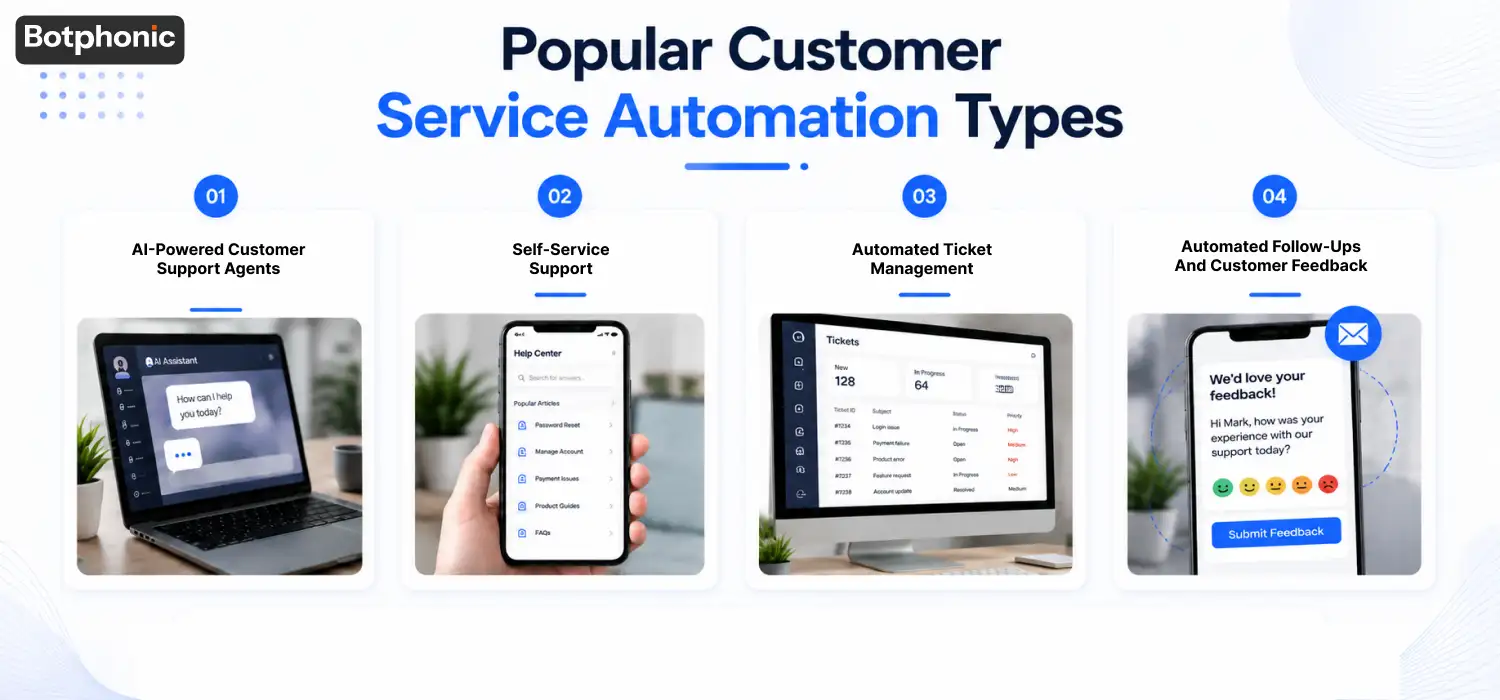
Customer service automation is no longer limited to simple chatbots or automated replies. Modern businesses use a combination of AI-powered tools, self-service systems, and workflow automation to deliver faster and more consistent support experiences.
During peak periods such as holiday seasons, product launches, or major sales events, support teams often struggle to keep up with rising customer inquiries. Long wait times, agent burnout, and inconsistent service can quickly impact customer satisfaction. Customer service automation helps businesses handle growing support demands without compromising service quality.
Below are the most common types of customer service automation used by modern support teams.
1. AI-Powered Customer Support Agents
AI-powered support agents have become one of the most valuable tools in customer service automation. Unlike traditional chatbots that follow scripted responses, modern AI agents can understand customer intent, interpret natural language, and provide context-aware responses.
These intelligent systems can answer frequently asked questions, provide order updates, assist with account management, and guide customers through troubleshooting processes without requiring human intervention. Because AI agents can handle thousands of conversations simultaneously, businesses can significantly reduce response times while maintaining consistent service quality.
Another major advantage is that automated call centers capture customer interactions and organize relevant information. Support teams no longer need to manually document every conversation, allowing agents to focus on more complex issues that require human judgment and empathy.
As AI technology continues to evolve, customer service teams are increasingly using AI agents as the first point of contact, ensuring customers receive immediate assistance regardless of the time of day.
2. Self-Service Support
Modern customers prefer solving simple problems on their own whenever possible. In fact, many customers would rather find an answer immediately than wait for a support representative to become available.
Self-service automation empowers customers to access information, complete tasks, and resolve common issues without contacting support. When designed effectively, self-service tools improve customer satisfaction while reducing the workload placed on support teams.
Common self-service automation solutions include:
Password Reset Systems
Password-related issues account for a significant percentage of support requests. Automated password reset tools allow users to securely regain account access without waiting for assistance, improving both convenience and efficiency.
Knowledge Bases and FAQs
A well-structured knowledge base provides customers with instant access to answers, tutorials, and troubleshooting guides. This helps customers resolve issues independently while reducing repetitive inquiries.
Product Documentation and Training Resources
Interactive guides, help centers, and onboarding materials help customers better understand products and services. The more informed customers are, the fewer support requests businesses need to manage.
AI-Powered Virtual Assistants
Unlike static FAQs, AI-powered assistants can guide users through specific issues and provide personalized responses based on customer questions and behavior.
When combined, these self-service resources create a support ecosystem where customers can find solutions quickly without relying on human intervention for every inquiry.
3. Automated Ticket Management
As customer interactions increase, manually organizing support requests becomes inefficient and error-prone. Automated ticket management systems help businesses capture, categorize, prioritize, and route customer inquiries automatically.
This ensures that support teams can focus on resolving issues rather than managing administrative tasks.
Automatic Ticket Creation
Modern customer service automation platforms can generate support tickets automatically whenever customers submit requests through email, chat, forms, or phone calls.
Customer information, conversation history, and issue details are captured instantly, reducing manual data entry and ensuring that agents have the context they need before engaging with customers.
Automatic ticket creation also improves response consistency by ensuring every customer inquiry is properly documented and tracked.
Intelligent Ticket Routing and Escalation
Not every support request requires the same level of expertise. Some inquiries can be handled quickly, while others require specialized knowledge or senior-level intervention.
Automated routing systems analyze incoming requests and assign them to the most appropriate department or agent. More advanced AI systems can identify urgency, customer sentiment, and issue complexity to prioritize cases effectively.
For example, if a customer expresses frustration or reports a critical service issue, the system can automatically escalate the ticket to a senior support representative, reducing delays and improving resolution times.
This capability becomes especially valuable during high-volume support periods when manually prioritizing requests can be challenging.
4. Automated Follow-Ups and Customer Feedback
Customer service doesn’t end when a ticket is closed. Follow-up communication plays an important role in measuring satisfaction, building trust, and identifying opportunities for improvement.
Automation allows businesses to maintain consistent communication without adding extra work for support teams.
Automated workflows can send:
- Customer satisfaction surveys
- Feedback requests
- Resolution confirmation emails
- Service review invitations
- Follow-up messages after support interactions
These automated touchpoints help businesses gather valuable customer insights while ensuring customers feel heard and supported even after their issue has been resolved.
Over time, this feedback becomes a valuable source of data for improving support processes, identifying service gaps, and enhancing the overall customer experience.
The Customer Service Automation Maturity Roadmap
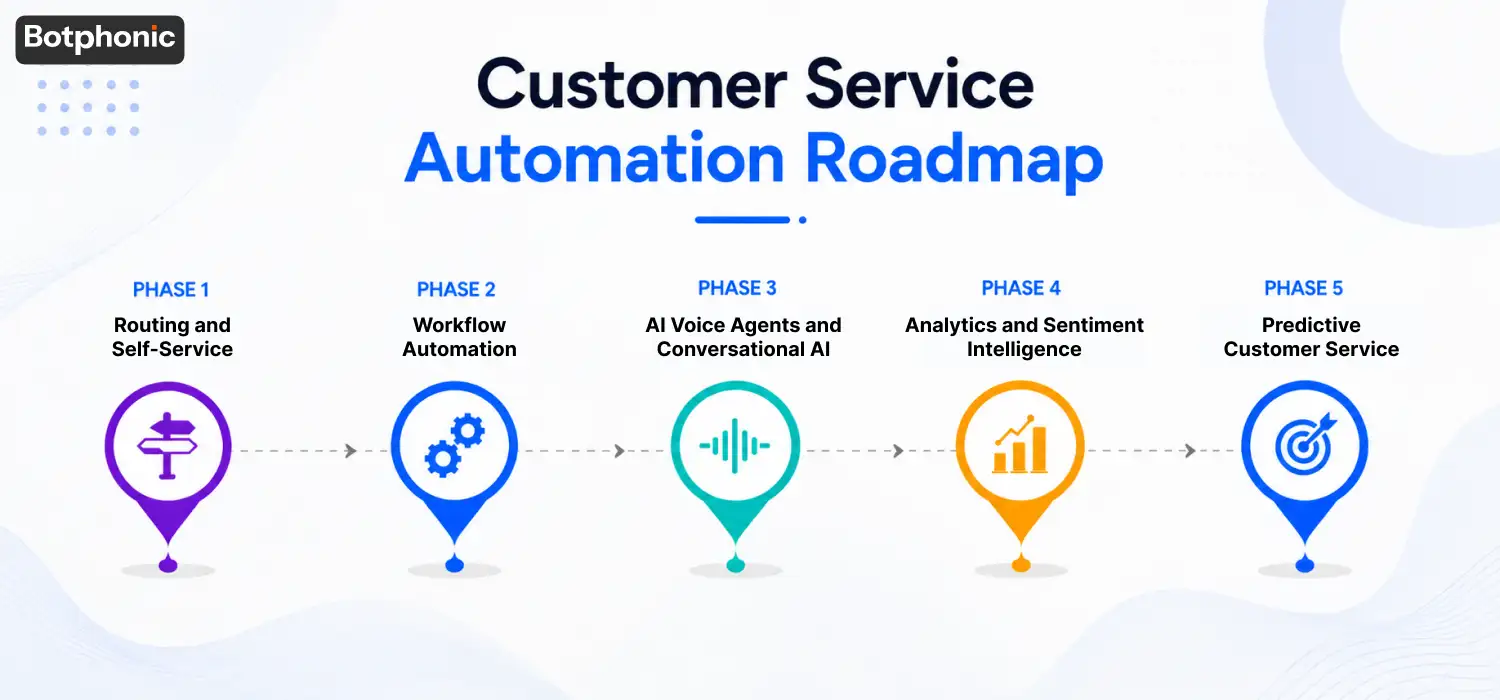
One of the biggest reasons organizations struggle with automation is attempting to implement advanced AI solutions before building a strong operational foundation. Customer service automation works best when deployed in stages, with each phase building upon the previous one.
The maturity model below provides a roadmap that organizations can use to develop a scalable and sustainable customer service automation strategy.
| Phase | Primary Goal | Technologies |
| Phase 1 | Reduce support friction | IVR, routing, self-service |
| Phase 2 | Eliminate manual tasks | Workflow automation |
| Phase 3 | Automate conversations | AI voice agents |
| Phase 4 | Generate insights | Customer service analytics |
| Phase 5 | Prevent issues proactively | Predictive customer service |
Phase 1: Routing and Self-Service
The first stage of customer service automation focuses on helping customers find answers quickly while reducing unnecessary support interactions. Technologies such as intelligent AI IVR System, FAQ portals, knowledge bases, and ticket categorization tools help direct customers to the right resources without requiring agent involvement.
When implemented correctly, self-service solutions can significantly reduce support volume while improving customer satisfaction. Customers appreciate having access to information when they need it rather than waiting in a queue for assistance. At the same time, support teams benefit from fewer repetitive inquiries and greater capacity to focus on complex cases.
However, self-service should never become a barrier between customers and human support. Organizations that achieve the best outcomes ensure customers can easily escalate issues when self-service options are unable to provide a satisfactory resolution.
Phase 2: Workflow Automation
Once basic self-service capabilities are in place, organizations can focus on automating internal support processes. This stage emphasizes efficiency by reducing administrative work that consumes agent time without directly improving customer outcomes.
Examples of customer service workflow automation include ticket assignment, status updates, escalation triggers, appointment confirmations, and customer notifications. These tasks are essential for maintaining service quality but rarely require human judgment.
Workflow automation creates consistency across support operations. It ensures that requests are routed correctly, deadlines are tracked automatically, and customers receive timely updates throughout the resolution process. As a result, support teams spend less time managing workflows and more time solving customer problems.
Phase 3: AI Voice Agents and Conversational AI
This is where customer service automation begins to feel intelligent rather than procedural. Traditional automation systems rely heavily on menus, predefined workflows, and structured inputs. Customers often need to adapt their behavior to fit the system.
AI voice agents reverse this dynamic by allowing customers to communicate naturally. Instead of navigating complex menus, customers can simply explain their issue in their own words. The AI analyzes intent, retrieves relevant information, and responds conversationally.
For example, an eCommerce customer may call to check an order status. Rather than navigating multiple menu options, the customer can simply say, “I ordered a package last week and want to know when it will arrive.” The AI voice agent understands the request, accesses order data, and provides an immediate update.
This ability to handle real conversations makes AI customer support significantly more effective than traditional IVR systems. It reduces customer effort while enabling businesses to deliver support at scale.
Phase 4: Customer Service Analytics and Sentiment Intelligence
Many businesses stop at automation. The most advanced organizations go further by turning customer interactions into actionable intelligence.
Every customer conversation contains valuable insights about service quality, customer expectations, product issues, and operational inefficiencies. Customer service analytics platforms help organizations identify these patterns at scale.
Modern customer service AI systems can analyze sentiment, detect frustration signals, identify recurring complaints, and highlight escalation triggers. These insights help support leaders understand not only what customers are saying but also how they feel.
By leveraging customer service analytics, businesses can proactively improve support experiences, optimize workflows, and reduce the likelihood of future issues. This transforms automation from an operational tool into a strategic source of customer intelligence.
Phase 5: Predictive Customer Service
The future of customer service automation is proactive rather than reactive. Instead of waiting for customers to report problems, businesses are increasingly using automation to identify and resolve issues before customers need assistance.
Imagine an online retailer automatically notifying customers about shipping delays before they check order status. Consider a SaaS platform detecting unusual account activity and proactively offering support. These scenarios represent predictive customer service in action.
Predictive service combines automation, analytics, and AI to anticipate customer needs. As technology continues to evolve, organizations that embrace proactive support will be better positioned to deliver exceptional customer experiences while reducing support volumes.
 NOTE
NOTE
Real-World Customer Service Automation Examples
Customer service automation is already transforming support operations across industries. In healthcare, automated appointment reminders and follow-up notifications help reduce missed appointments while improving patient engagement. Healthcare providers can maintain consistent communication without increasing administrative workloads.
In eCommerce, businesses use automation to handle order tracking, delivery notifications, return requests, and refund inquiries. These high-volume interactions are often repetitive and well-suited for automation. Customers receive faster responses, while support teams spend less time answering routine questions.
SaaS companies frequently use AI customer service tools to streamline onboarding, answer product questions, and support account management. Automation helps ensure customers receive timely guidance while allowing customer success teams to focus on strategic relationships.
Insurance providers use customer support automation to manage claims updates, policy renewals, and customer inquiries. This improves transparency while reducing the administrative burden associated with policy servicing.
How to Build a Customer Service Automation Strategy
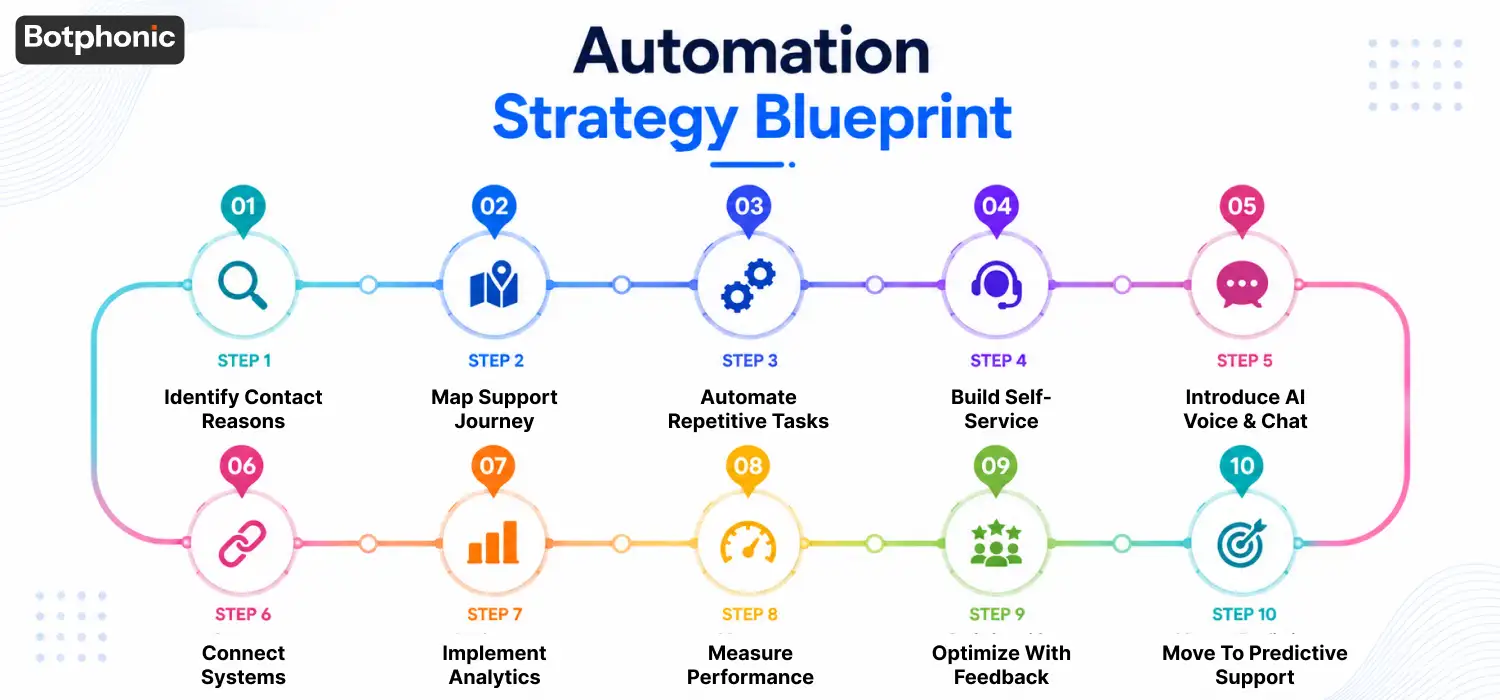
Implementing customer service automation successfully requires more than simply purchasing new software. The most effective organizations follow a structured approach that aligns automation with customer needs, business goals, and support operations. Instead of automating everything at once, businesses should build a roadmap that delivers measurable improvements at each stage.
Step 1: Identify Why Customers Contact Support
Before introducing any automation, analyze your support data to understand the most common reasons customers reach out. Review support tickets, call transcripts, live chat conversations, emails, and customer feedback to identify recurring requests.
Look for high-volume, repetitive interactions such as:
- Order status inquiries
- Appointment scheduling
- Password resets
- Billing questions
- Account updates
- Refund requests
These interactions typically provide the quickest automation opportunities because they follow predictable workflows and require minimal human judgment.
Step 2: Map the Customer Support Journey
Once you understand why customers contact support, map the entire customer journey from inquiry to resolution. This helps identify friction points where customers experience delays, confusion, or unnecessary effort.
For example, ask questions such as:
- Where are customers waiting the longest?
- Which processes require multiple follow-ups?
- Which tasks consume the most agent time?
- Where do support escalations occur most frequently?
By visualizing the support journey, businesses can prioritize automation initiatives that create the greatest customer impact.
Step 3: Automate Repetitive Workflows First
Many organizations jump directly into AI before fixing manual processes. A better approach is to automate repetitive workflows before introducing conversational AI.
Start with:
- Ticket routing
- Automatic ticket assignment
- Status notifications
- Appointment confirmations
- Escalation workflows
- Follow-up reminders
Workflow automation immediately reduces administrative workload and creates a stronger foundation for more advanced automation initiatives.
Step 4: Build Self-Service Capabilities
Many customers prefer solving simple issues themselves rather than contacting support. Self-service options help reduce support volume while improving customer convenience.
Examples include:
- Knowledge bases
- FAQ portals
- Help centers
- Customer portals
- Guided troubleshooting tools
The goal is not to eliminate support interactions but to make answers easily accessible when customers need them.
Step 5: Introduce AI Voice Agents and Conversational AI
After workflow automation and self-service systems are functioning effectively, businesses can begin deploying AI voice agents.
AI voice agents can handle:
- Order tracking
- Appointment scheduling
- Billing inquiries
- FAQ responses
- Account information requests
- Customer follow-ups
Unlike traditional IVR systems, conversational AI allows customers to speak naturally, creating a smoother and more efficient support experience.
Step 6: Connect Automation With Existing Systems
Automation becomes significantly more valuable when connected to your existing technology stack.
Integrate customer service automation software with:
- CRM platforms
- Help desk systems
- Order management systems
- Appointment scheduling tools
- Billing platforms
- Customer databases
These integrations ensure automated systems can access real-time information and provide accurate responses without requiring manual intervention.
Step 7: Implement Customer Service Analytics
Automation should not only execute tasks, it should generate insights.
Use customer service analytics to monitor:
- Response times
- Resolution rates
- Escalation trends
- Customer sentiment
- Frequently asked questions
- Agent performance
These insights help businesses understand what’s working, identify bottlenecks, and continuously improve service quality.
Step 8: Measure Automation Performance
Every automation initiative should be tied to measurable outcomes.
Track key performance indicators (KPIs) such as:
| KPI | Why It Matters |
| First Contact Resolution | Measures issue resolution efficiency |
| Average Response Time | Indicates support speed |
| Customer Satisfaction (CSAT) | Measures customer experience |
| Ticket Volume Reduction | Shows automation impact |
| Escalation Rate | Identifies automation limitations |
| Agent Productivity | Measures operational efficiency |
Regular measurement ensures automation efforts remain aligned with business objectives.
Step 9: Optimize Based on Customer Feedback
Customer expectations evolve constantly. Automation strategies should evolve with them.
Review:
- Customer surveys
- Call recordings
- Chat transcripts
- Sentiment reports
- Support team feedback
This feedback helps identify areas where automation can be improved, expanded, or adjusted to better serve customers.
Step 10: Move Toward Predictive Customer Service
The most advanced organizations use automation proactively rather than reactively.
Examples include:
- Sending delivery delay alerts before customers ask
- Reminding customers about upcoming renewals
- Detecting service issues automatically
- Providing proactive support recommendations
At this stage, customer service automation becomes a strategic advantage rather than simply a support tool.
 PRO TIP
Customer Service Automation ROI Framework
Many executives evaluate automation incorrectly. They focus only on labor savings. The bigger value often comes from customer experience improvements.
| Metric | Before Automation | After Automation |
| Response Time | High | Lower |
| Resolution Time | Slow | Faster |
| Customer Satisfaction | Variable | More Consistent |
| Agent Productivity | Moderate | Higher |
| Repeat Contacts | High | Reduced |
Conclusion
Customer service automation has evolved far beyond chatbots and IVR systems. The organizations leading customer experience today are building intelligent support ecosystems that combine workflow automation, AI voice agents, customer service analytics, and predictive service strategies.
The companies that gain the greatest advantage from automation are not necessarily the ones automating the most tasks. They are the ones using automation to create faster, more personalized, and more efficient customer experiences. By following a structured roadmap from routing and workflow automation to AI-powered conversations and predictive support, businesses can build a customer service operation that scales alongside customer expectations and drives long-term growth.
Botphonic helps businesses move beyond traditional support operations by automating customer conversations, reducing response times, and scaling service without sacrificing quality.
Ready to build a smarter customer service operation?
Request a Free Demo