
Summarize Content With:
What You’ll Learn:
- Why Traditional IVRs Fail Their Customers By Design
- How Contextual AI IVR Identifies Intention Instead Of Pressing Buttons
- What Customer-Centric Support Looks Like In Reality
- How AI Boosts Human Performance And Not The Other Way Around
- What Business Do Wrong While Implementing Conversational AI IVR
Conversational AI IVR replaces touch-tone menus with natural language understanding (NLU). Callers speak freely; the system identifies intent, retains context, and routes accurately, without requiring customers to self-diagnose their problem. The result is faster resolution, fewer transfers, and better-prepared human agents.
Why Is Traditional Phone Support So Irritating?
The fact that traditional phone support irritates its customers stems from the difference between the company structure and how consumers interact with it. In other words, phone support was not develope based on customers’ experience. Instead, it reflects how businesses have divided the departments into certain groups.
Thus, while calling the company regarding a failed payment, people do not ask themselves, “What department should be called?” On the contrary, they think: my payment did not go through; I need help!
Consumers Have Never Viewed Issues in Terms of Menu Options
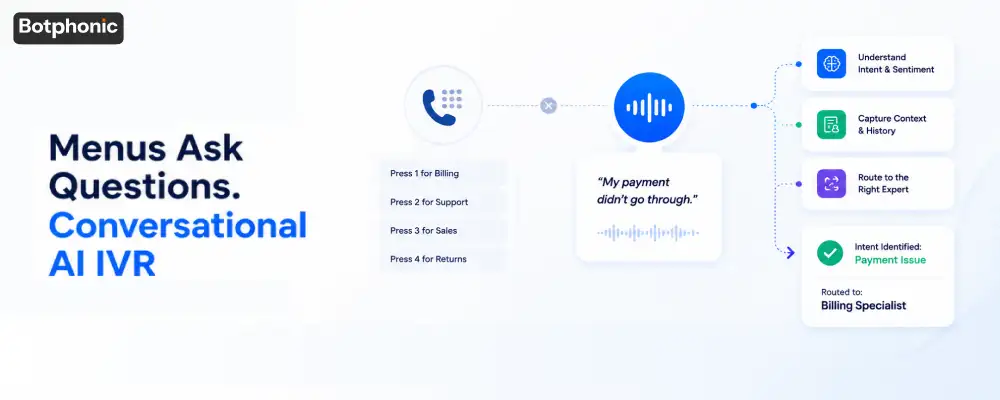
The typical IVR prompts consumers to choose among:
- Press 1 for Billing
- Press 2 for Technical Support
- Press 3 for Sales
- Press 4 for Returns
Consumers do not come with menu items. They come with issues.
“I cannot access the internet. The package did not reach me. My account is block.” These are not labels to be put on various departments. These are issues customers face. And asking them to diagnose themselves and route themselves before getting help is actually quite a burden.
What Is the Hidden Cost Behind Making Consumers Make the Wrong Choice?
The hidden cost lies in multiple transfers, loss of context, and reduced consumer trust. Each wrong choice sets off a chain reaction.
Most callers end up repeating the same problem to multiple agents before reaching the right destination. He/she will wait again. He/she may need to transfer once more. By the time he/she finds the relevant person, he/she loses faith in the brand.
According to research conducted by Salesforce, 76% of customers expected consistent interactions among different departments yet the vast majority of IVR systems assure just the opposite with each hand-off. The issue here is not the outdatedness of IVR; the issue is that customers are ask to do things that an IVR system should have been doing itself.
What is Conversational AI IVR and How Does it Work?
Conversational AI IVR is a voice service that recognizes a caller’s intention based on listening to what he or she says in conversational language, without any menu choices, digit entries, or predetermined categories.
To make it clearer, traditional IVR might prompt the caller to “Press 1 for billing.” Instead, Conversational AI IVR would ask “How may I assist you today?” Caller says “My payment did not go through,” and AI-based IVR recognizes his/her intention, routing calls, capturing context and performing action.
How Does it Transition from Navigating to Interpreting?
Navigating through a call flow becomes interpreting a caller’s intention.
Unlike traditional IVR systems, which wait for callers to act, Conversational AI IVR listens to the customer actively, changing everything about call center operations further along the way.
The concept behind Botphonic’s AI IVR System can be described by the following approach: speak normally, your intention will be understood, and a relevant resource will be called instantly. No need for menu searches.
Why Is Natural Interaction More Than a Luxury Feature?
Intent recognition, powered by NLU (Natural Language Understanding), means the system identifies why someone is calling, even when the caller’s phrasing is vague, emotional, or inconsistent. Sentiment analysis adds a second layer: the system detects frustration or urgency in tone and can escalate accordingly. Context awareness means information gathered at the start of the call travels with the caller through every handoff, a capability central to CX containment strategies in CCaaS deployments.
The system determines not only why but also how urgent it is that someone is calling, even when it is said unclearly, emotionally, or inconsistently. Awareness of context refers to the fact that information received during the initial stages of the call accompanies the caller all the way until a relevant specialist receives the call. The agent will know everything beforehand.
This is not an attempt to make the process friendlier to the caller. This is a redistribution of efforts from one side to another.
A no-menu approach will always prove to be superior to even the best menu in situations where quick resolution is the priority. Every choice from a menu equals additional effort on behalf of the customer to get some help.
The Concierge Principle: Who Should Open the Door?
Here’s how two versions of a hotel concierge work.
IVR Traditional Approach: You come in. You look at the various doors marked as Reservations, Room Service, Maintenance, Events, etc. You choose one based on your needs. But you might be choosing the wrong door.
IVR Conversational AI Approach: You come in and tell the concierge what you need. The concierge opens the right door for you.
The end goal is the same. The approach is completely different. One expects the customer to make the effort. While another makes sure that effort is done for the customers.
This is the essence of the Conversational AI IVR solution approach, not better menus but no menus necessary at all.
Which Feature Provides the Most Value Even Though the Customer Never Notices It?
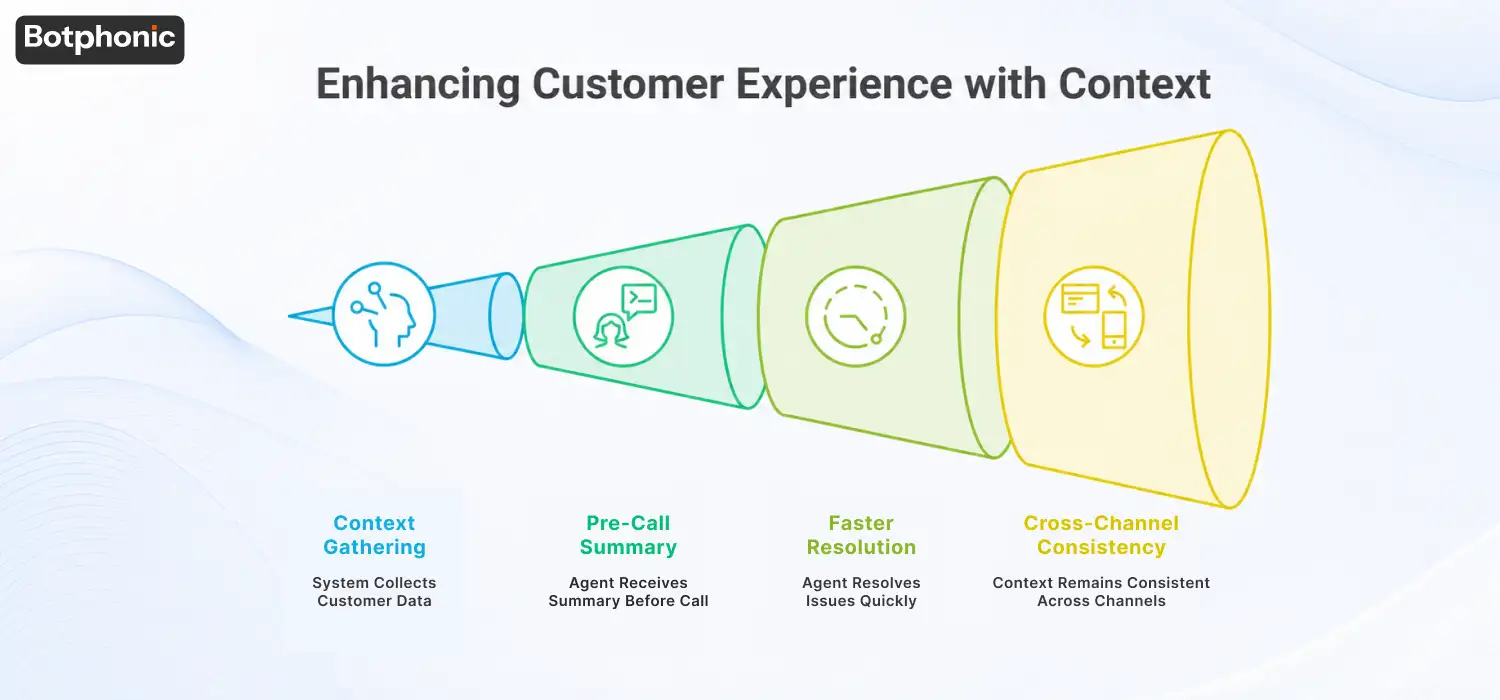
The best value comes from context that follows the caller wherever he goes, the caller’s history, the interaction, and the channels used to communicate.
The customers rarely see it happen. But they can definitely feel the effect it produces.
When a customer calls a business using a Botphonic AI Call Assistant, the system surfaces account history, prior contacts, and known issues before a human agent ever picks up. The agent receives a pre-call summary. Resolution starts faster because the setup work is already done. In CCaaS environments, this context also travels across channels, voice, chat, email, so callers never start from zero regardless of how they reach out.
Why is Repetition Harmful to Trust?
Repetition doesn’t just mean more work; it means the organization has failed.
Each repetition of a name, account number, or problem demonstrates implicitly that nothing was kept from the previous time around. That the organization does not run itself by the customers’ needs.
Among the recurring customer frustrations in Zendesk’s Customer Experience Trends Report are repetitions of previously conveyed information. Repetitions reduce customer trust and decrease confidence levels. This issue is addressed not through improved agent training, but rather by shifting the responsibility for carrying context onto the conversation.
How Does Conversational AI IVR Change The Roles Of Human Agents?
Conversational AI IVR does not replace human agents; rather, it shifts what they will be doing.
They spend less time on information gathering and more time resolving issues.
Is Automation the Destination?
Automation is not the goal. Better human performance is the goal.
The prevailing notion across industries regarding AI implementation is that it results in decreased headcount. However, this mindset overlooks the operational reality: by the time agents interact with customers, all the relevant context is gathered. The agents know the intent behind the call and can begin working right away.
Botphonic’s AI customer service works based on this concept.
What Is the Human-in-the-Loop Advantage?
The human-in-the-loop advantage is measurable across four dimensions:
| Factor | Traditional IVR | Conversational AI IVR |
| Agent preparation | Caller repeats everything | Pre-call summary provided |
| Average handle time | Longer (intake + resolution) | Shorter (resolution only) |
| First-call resolution | Lower | Higher |
| Customer repetition | Frequent | Rare to none |
Agents aren’t replaced. They’re given a head start.
What Is Good Technology If It Becomes Invisible?
Good technology becomes invisible. Customers no longer pay attention to it since it no longer asks anything of them.
Electricity doesn’t require an understanding of circuits to flip a light switch on. GPS systems no longer demand an understanding of geography to set a destination. Search engines no longer require knowledge of Boolean operators to yield relevant information. Such technology was created to simplify things.
At What Point Is the Customer Done Thinking About the System?
Customers stop paying attention to a system when it stops making them think.
The future of customer service is not about creating better artificial intelligence. The future is creating support experiences which are so smooth that customers will stop paying attention to the technology behind their support experience altogether. They called. Their problems were solved. Period.
That’s what Conversational AI IVR can do for you.
 PRO TIP
What Are Business Firms Getting Wrong in Conversational AI IVRs?
The biggest mistake is viewing Conversational AI IVR as a means of reducing costs, not as something valuable in terms of improving the customer experience.
It’s the wrong perspective that leads to incorrect deployment and new frustrations added to old ones.
Is Speed More Important Than Accuracy in IVR Solutions?
The speed of the interaction is not important here. Accuracy is the main focus. It’s better when the call isn’t solved fast but correctly.
Firms that use solutions which prioritize containment rate over the transfer rate often discover that customer satisfaction is declining in line with the transfer rates.
Does Automate Mean No Emotion in Conversational AI IVRs?
Automate means a new type of frustration: efficient coldness.
Those calling when under stress – from a service outage, billing dispute, or emergency – have a critical need to be heard and understood, not just handled. An IVR solution that connects calls correctly but speaks impersonally is failing a considerable percentage of its users. The way it speaks and listens is a design choice, not an add-on.
What Is the Measure of True Success?
True success should be measured on resolution success, not containment success.
It’s not “how well did we keep these people off the phone?” but rather “how successful were our callers in resolving their issue and what was their experience like afterward?” They are not the same metrics. One necessitates that you pay attention to customer feedback; the other requires that you do the same thing as your customers, using conversational AI IVR.
 NOTE
NOTE
And What Will the Future Look Like?
It will look like reduced customer effort.
AI voice, human knowledge, customer information, and customized services are coming together, not to make a better system but a simpler one that needs less of the consumer. Less navigating through systems. Less repetition of questions. And more understanding.
The call that once seemed like a quiz, where consumers had to find the right answer in order to state their problem, is being replaced by an interaction that involves diagnosis by the machine and simply explaining the problem to the system.
This is not something we can predict. It is the current direction that companies deploying such services are taking.
Conclusion: Build Systems That Adapt to Humans
The legacy support system was one that forced people to adjust themselves to the machine’s design. Customers learned to memorize menu paths simply to get basic support.
However, conversational AI IVR is a completely new approach to building automated systems.
It is a system designed for humans, not the systems forcing people into predefined categories.
It’s not just an improvement on a technical level but an actual flipside of the process – a change in who performs tasks.
It’s eliminating the need for menus altogether.
See how Botphonic uses Conversational AI IVR to understand caller intent, preserve context, and help agents start every conversation with the information they need.
See Conversational AI IVR in Action