
Summarize Content With:
What You’ll Learn
- Why after hours lead capture matters more for home services than any other industry
- What happens financially when emergency callers hit voicemail instead of a live answer
- How AI phone calls triage urgent jobs from routine ones without a human on the line
- How to connect after-hours booking directly into your field service management software
- Which KPIs prove the return on an after-hours answering strategy
After hours lead capture home services is the practice of answering, qualifying, and booking emergency calls outside normal business hours. It matters for plumbers, HVAC technicians, and electricians because homeowner emergencies do not wait for office hours, and every unanswered call is a job handed to a competitor.
The 128-Hour Blind Spot
A standard business week covers 40 working hours. The remaining 128 hours, nights, weekends, and holidays, are when most home service companies go dark. Burst pipes, dead HVAC units, and sparking panels do not check the clock before they happen.
Homeowners facing these problems are not casual browsers. They are stressed, ready to book, and unlikely to shop around once someone finally picks up the phone.
If your team is still routing after-hours calls to a shared voicemail box, start by auditing how many calls arrive between 6 PM and 7 AM this month. That number is your starting point for the AI phone call assistants for contractors and field teams built to close this gap.
Behind the Scenes: What a Missed Call Actually Costs
Home services businesses run on high-ticket emergency jobs, and missing the call means missing the ticket. Invoca’s platform data on home services callers found that fewer than 3 percent of people sent to voicemail actually leave a message (Invoca, 2024). Across all industries, an average of 26 percent of inbound calls from potential customers go unanswered, and only 2 percent of those callers leave a voicemail (Invoca, 2021).
The U.S. home services market generates more than 524 billion dollars a year, and cost-per-lead for categories like HVAC now runs close to 93 dollars (CallRail, 2026). Every missed call after hours is paid media spend that produced nothing.
Scaling a night shift to cover this gap is expensive and unreliable. Human staff get tired, scripts drift, and a customer call service built around per-minute billing rarely pencils out against the value of a single after-hours emergency ticket.
 NOTE
NOTE
Voicemail was designed for a world where people were comfortable waiting for a callback. Emergency callers are not in that mindset. Someone standing in two inches of water does not want to record a message and hope for the best.
Traditional call queues make this worse. A homeowner who is already anxious hears, holds music, waits, and hangs up before ever reaching a person. Each abandoned call is a silent signal that your customer support channel failed at the exact moment it mattered most.
Legacy call centers add another layer of friction. Generic operators without trade-specific knowledge often cannot tell the difference between a routine filter replacement question and a gas leak, which means urgent calls get logged the same way as everything else.
 PRO TIP
Inside the Workflow: How AI Phone Calls Handle Triage
Modern AI phone calls pick up in seconds and remove the call queue entirely. The system functions as a help desk solution that never puts a caller on hold, listens for context, and routes the conversation based on what it hears.
The flow below shows how a single after-hours call moves from ring to booked job, or to a logged request for the next business day.
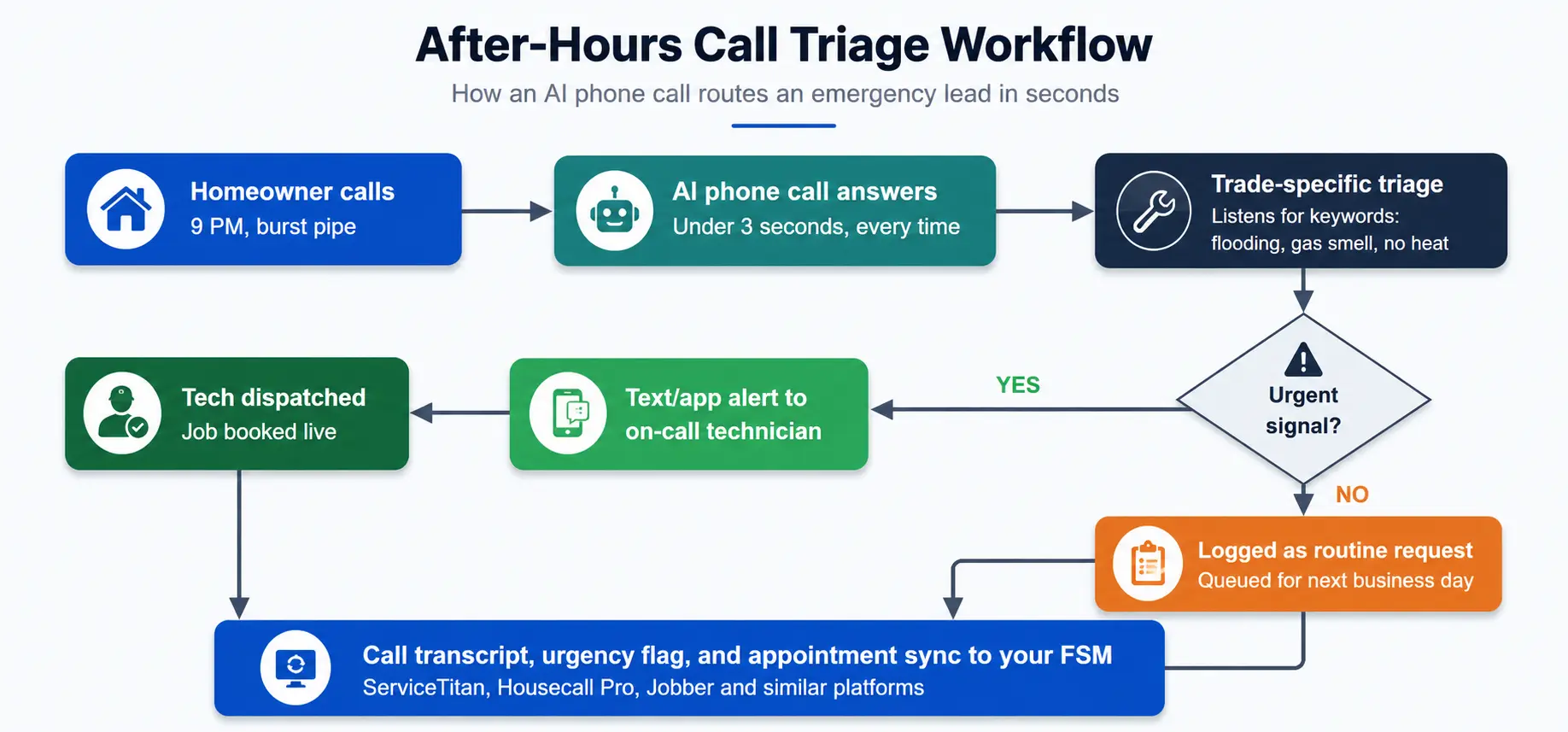
Trade-specific triage means the system listens for words like flooding, gas smell, or total system failure, and separates those from routine booking requests. Urgent calls get pushed straight to an on-call technician by text or mobile alert. Non-urgent requests get logged cleanly for the morning crew.
Triage Decision Tree: How the AI Sorts Every Call
The logic behind the diagram above breaks into four decision points. A call moves through this sequence in under a minute.
- Listen for hazard keywords. Flooding, gas smell, sparking, no heat during a freeze warning, and sewage backup trigger an immediate urgent flag.
- Score severity from context. Phrases like “right now,” “getting worse,” or “can’t shut it off” raise urgency even without a hazard keyword present.
- Check on-call coverage for that trade. The system confirms a technician is actually on call before deciding how to route the alert.
- Route or log. Urgent calls trigger a live text or app alert to the on-call technician. Everything else is logged with a transcript and a suggested appointment window for the next business day.
This runs the same way at 7 PM or 3 AM, with no queue and no human deciding in the moment which call matters more.
Learn more: See how this triage logic compares across platforms in the best AI phone call software for home service companies breakdown before you commit to a vendor.
Real-World Results: The Speed-to-Lead Math
Speed matters as much as availability. The original Lead Response Management study from MIT’s Sloan School of Management and InsideSales.com analyzed more than 15,000 leads and 100,000 call attempts, and found that the odds of contacting a lead drop 100 times when the callback happens at 30 minutes instead of 5, while the odds of qualifying that lead drop 21 times over the same window (Oldroyd, MIT Sloan and InsideSales.com, 2007).
Applied to home services, that math is brutal for anyone relying on a next-morning callback. An emergency caller at 11 PM who gets a return call at 8 AM has almost certainly already hired someone else.
An AI voice engine that answers immediately removes that gap entirely. There is no delay between the call and the response, because the response is the call.
Contractor Case Study: What This Looks Like in Practice
Botphonic’s own deployment data offers a verifiable example of this pattern in a home service business, even outside plumbing specifically. Morrow’s Carpet Cleaning, a 30-year-old residential and commercial floor care company, faced the same after-hours gap described in this article. Calls at 10 PM on weekends went straight to voicemail, and callers rarely called back (Botphonic, Morrow’s Carpet Cleaning case study).
After deploying an AI voice agent, Morrow’s saw total appointment bookings increase by 43 percent, unanswered calls drop by 60 percent, and response time improve threefold, without adding headcount (Botphonic, Morrow’s Carpet Cleaning case study).
A dedicated plumbing or HVAC case study was not available at the time of writing, so the Morrow’s numbers are shared here on the record rather than an invented plumbing example. The underlying problem, and the fix, are structurally the same across home service trades.
A mid-sized plumbing operation running comparable call volume, roughly 40 to 60 inbound calls a week with a meaningful share landing after hours, would reasonably expect a similar lift once voicemail is replaced with live triage. Contractors can review current results across trades directly in Botphonic’s success stories.
What Changes After Implementation: FSM and Scheduling Sync
Answering the call is only half the job. The other half is getting that information into the tools your crew already uses without anyone re-typing it.
A well-built AI phone system checks real-time availability and books the appointment directly into field service management software such as ServiceTitan, Housecall Pro, or Jobber while the customer is still talking. Call transcripts, customer details, and urgency flags populate automatically, which cuts out manual data entry and the errors that come with it.
This also changes how the business itself runs day to day. Owners can review after-hours metrics from a dashboard instead of staying tethered to a desk phone, and some contractors now structure part of their coordination around work from home jobs customer service roles that monitor these dashboards remotely. For a multi-location operation, this is what it takes to genuinely work for a home service brand with decentralized dispatching across several markets. The full picture of how this fits a distributed team is covered in Botphonic’s home services overview.
NOTE
FSM Integration Checklist: Verify Two-Way Sync Before You Commit
Work through this four-point checklist with any vendor before connecting an AI phone system to your field service management software.
- Confirm real-time availability pull. The system should read open technician slots directly from your FSM calendar, not a static schedule template.
- Confirm write-back on booking. A confirmed call should create or update the appointment in your FSM automatically, not just send a notification for manual entry.
- Test conflict handling. Have two calls attempt to book the same slot, then check whether the system blocks the double-booking or flags it for review.
- Verify transcript and urgency-flag delivery. The call transcript and urgency flag should land in the same job record your dispatcher already opens, not a separate log.
Before You Buy: KPIs That Prove ROI
Track a small set of numbers before and after you switch from voicemail to an automated after-hours system:
- After-hours lead capture rate: answered calls divided by total inbound calls, multiplied by 100
- Mean speed-to-answer, measured in seconds
- After-hours conversion-to-booked-job percentage
- Cost per booked emergency job compared to your current customer call service or answering vendor
PRO TIP
The Architecture That Matters: Trust, Not Just Automation
The businesses that get the most value from this shift are not replacing empathy with a script. They are using AI for customer care in a way that reassures a panicked homeowner instead of stonewalling them with a menu of button presses.
A natural-sounding voice that confirms details, sets expectations, and books a real appointment does more for brand perception than a robotic message ever could. This is the difference between customer experience platforms that feel like a barrier and ones that feel like a person who happens to be available at 2 AM.
Compare this against a standard answering service in the AI answering service overview to see how the two approaches differ in practice.
Audio Transcript Excerpt: De-Escalating a Midnight Emergency
The exchange below is a sample script, not a recording of a real customer, illustrating how a calm, structured AI voice flow handles a panicked homeowner.
- Homeowner: It’s midnight and water is pouring out from under my kitchen sink, I don’t know what to do.
- AI Voice Agent: I hear you, and I can help right now. Do you know where your main water shutoff valve is, so we can slow this down while I get someone to you?
- Homeowner: I think it’s by the water heater, I’m not sure.
- AI Voice Agent: That’s okay. Head there now if it’s safe, and turn the valve clockwise. I’m alerting our on-call plumber while you do that.
- Homeowner: Okay, I found it. I turned it.
- AI Voice Agent: Good work, the leak should slow now. Our technician is being dispatched and will call to confirm arrival time within 10 minutes.
The pattern matters more than the exact wording. Acknowledge the emergency, give one clear immediate action, confirm dispatch is already underway, and set a specific follow-up expectation. That sequence keeps a caller calm instead of letting the panic escalate.
Turning the Off-Hours Into a Profit Center
The math is straightforward once the data is in front of you. Emergency calls after hours are high-margin, high-intent, and currently going to whichever competitor answers first. Closing that gap with an AI phone system converts 128 dead hours a week into revenue instead of writing them off.
Give homeowners an instant response with AI-powered call handling built for plumbing, HVAC, and electrical teams. Book more jobs without adding another night shift.
See How AI Answers After Hours