
Summarize Content With:
What You’ll Learn
This AI receptionist trial guide walks you through a day-by-day testing framework, covering call handling accuracy, lead capture, CRM integrations, and escalation flows, so you can move from trial activation to a confident purchase decision in seven days.
An AI receptionist trial is a structured evaluation window for businesses testing automated call-handling software. Whether you’re evaluating an AI receptionist, virtual phone assistant, or an AI answering service, a structured testing process helps ensure the platform performs reliably in real-world conditions.
What Is an AI Receptionist Trial and Why Does It Matter?
An AI receptionist trial is a time-limited access period that lets you test a virtual phone agent against your actual call volume and business workflows. It matters because most businesses evaluate the wrong things, they check whether calls get answered, not whether the system captures leads, syncs with their calendar, or hands off to staff correctly.
Businesses evaluating an AI receptionist should focus on measurable outcomes rather than demo experiences. Reviewing independent AI receptionist software reviews can also help identify common strengths and limitations before committing to a provider.
The trial window is your one chance to stress-test before you commit. Use it poorly and you end up with a three-month contract and a system your team doesn’t trust.
What Should You Do Before Your Trial Starts?
Day 0 is about establishing a baseline. Without it, you have no way to measure whether anything improved.
Before you activate your AI receptionist, document these six numbers:
- Inbound calls per week
- Missed call rate
- Average response time
- Appointment booking volume
- Lead conversion rate from phone inquiries
- Staff hours spent answering calls
Then write down what “success” looks like for your business. Fewer missed calls? More booked appointments? Reduced front-desk workload? Define it now, not after the trial ends.
 PRO TIP
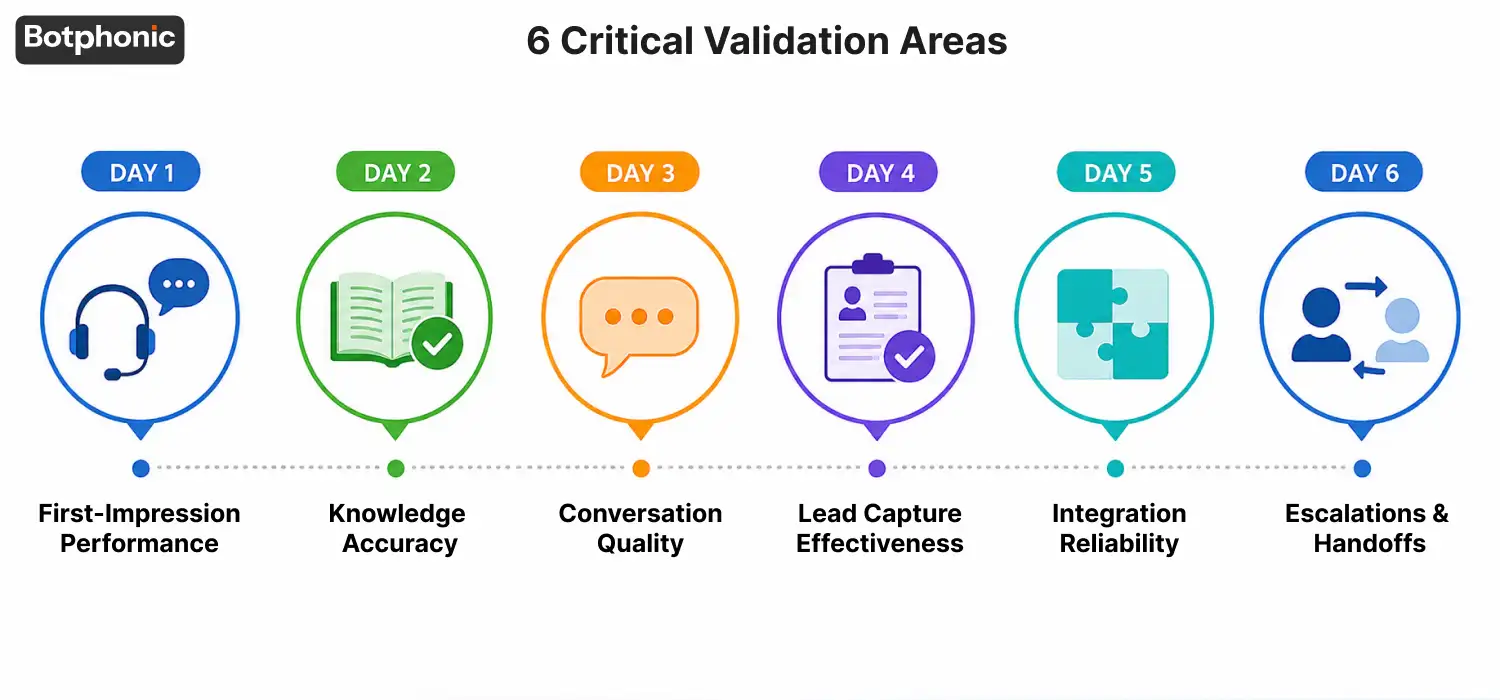
The Complete 6-Day AI Voice Agent Testing Checklist
Missed calls remain a major revenue challenge for service businesses. Industry research shows that many businesses fail to answer a significant portion of inbound calls, creating lost sales opportunities and customer churn.
How Do You Test First-Impression Performance on Day 1?
First-impression performance is whether the AI receptionist sounds like it belongs to your business, not just whether it answers. Here’s what that means for any business fielding inbound calls.
Run at least five call scenarios on Day 1:
- New customer inquiry
- Existing customer follow-up
- Appointment request
- Pricing question
- General information request
Listen for pronunciation of your company name and service names. Check whether the tone matches your brand. A system that sounds robotic or corporate when your business is casual will cost you callers before you even know it.
Document every inaccuracy. These are configurable, but only if you catch them early.
How Do You Verify Knowledge Accuracy on Day 2?
Knowledge accuracy is whether the AI gives correct, consistent answers to the questions your real customers ask. Inconsistency is a bigger red flag than a single wrong answer.
Testing for Knowledge Gaps
Ask the AI your ten most common inbound questions. Then ask five edge-case questions, policy exceptions, location-specific details, multi-part service questions.
Testing for Consistency
Ask the same question four or five times across separate calls. If answers vary meaningfully, the system isn’t reliable enough for production. One strong answer doesn’t prove reliability. Repetition does.
How Do You Stress-Test Conversation Quality on Day 3?
Conversation quality is how the AI performs when calls don’t follow a predictable script. Most demos show ideal conditions. Day 3 is about pressure-testing.
Run these four difficult scenarios:
- Impatient caller: Interrupt mid-response. Does it recover or loop?
- Confused caller: Ask an unclear question. Does it ask a clarifying question or stall?
- Talkative caller: Let the caller ramble. Does the AI lose context or guide the call back?
- Unexpected request: Ask for something outside the AI’s scope. Does it acknowledge limitations clearly?
An AI phone call that handles edge cases well is worth far more than one that only handles clean scenarios.
 NOTE
NOTE
How Effective Is the Lead Capture on Day 4?
Lead capture effectiveness is whether the AI accurately records caller information and qualifies prospects before handing them off. Small errors here, a wrong digit in a phone number, a misspelled email, cascade into missed follow-ups.
Verify the AI accurately captures:
- Full name
- Phone number
- Email address
- Service requirements
- Appointment preferences
If lead qualification is enabled, test whether it identifies urgent inquiries and routes them correctly. The quality of captured data matters more than call volume.
Does the AI Integrate Properly With Your Business Tools on Day 5?
Integration reliability is whether the AI passes data correctly to your calendar, CRM, and other systems. A system that answers calls but creates orphaned data is not saving you time, it’s creating new problems.
What to Check in Your Calendar
Confirm that bookings appear in the right calendar, include complete details, and avoid duplicate entries. Test at least three different booking scenarios. Relying on a single test appointment is not enough.
What to Check in Your CRM
Verify that contacts land correctly, notes are populated, lead sources are tagged, and custom fields transfer. Botphonic connects with common business tools, making it easier for businesses using an AI answering service to sync call data, appointments, and customer records across their existing workflow stack.
How Does the AI Handle Escalations and Team Handoffs on Day 6?
Escalation quality is whether the system transfers calls to human staff without dropping context or frustrating callers. A poor handoff experience undoes the goodwill the AI built at the start of the call.
Answer these questions during testing:
- Does the transfer happen quickly?
- Does the staff member receive context before picking up?
- Does the caller have to repeat themselves?
- What happens when the transfer fails?
Review your internal notification setup too. Staff should receive new lead alerts, appointment confirmations, and escalation requests in near real time. Slow internal alerts reduce the value of fast AI response.
How Do You Evaluate Business Impact at the End of the Trial?
The Day 7 review is a comparison of your post-trial numbers against your Day 0 baseline. No baseline, no comparison, which is why Day 0 preparation matters so much.
Calls Answered vs. Trial Performance Comparison
| Metric | Before Trial | During Trial | Change |
| Calls answered (weekly) | Baseline number | Trial number | +/- % |
| Missed call rate | Baseline % | Trial % | +/- % |
| Appointments booked | Baseline count | Trial count | +/- count |
| Leads captured | Baseline count | Trial count | +/- count |
| Staff hours on phones | Baseline hours | Trial hours | +/- hours |
Fill this in with your real numbers. The results tell you whether the AI call assistant paid for itself, before you pay for it.
Sorting Functions Into Three Categories
Assign every function you tested to one of three buckets:
- Ready for Production, worked reliably, needs no changes.
- Needs Improvement, works with gaps, needs additional configuration or training data.
- Potential Deal Breaker, failed in ways that would affect customer experience or operational efficiency.
What Warning Signs Should You Watch For Before Signing a Contract?
Contract warning signs are platform limitations that won’t show up in standard demos but will affect your business at scale. Watch for these five specifically.
- Limited customization, if the AI can’t be updated as your services change, it becomes outdated fast.
- Poor handling of complex calls, if performance drops significantly when conversations deviate from a clean script, that’s the system’s real capability level.
- Incomplete reporting, you should be able to review call recordings, full transcripts, and outcome data without needing to contact support.
- Unclear pricing, watch for usage caps, per-minute billing structures, or feature tiers that only appear in the fine print.
- Weak support response times, ask specifically how long post-deployment issues take to resolve. Ask for examples.
See how Botphonic handles AI phone calls, and start your evaluation with a system built for real business call volume, not just demos.
Schedule A Demo