

Summarize Content With:
The Operational Reality of AI Voice Automation
Most resources on the “AI call workflows in n8n” are about the happy path: webhook trigger -> llm node -> twilio call -> log result. It can be done for a demo. It is not suitable for use in production.
This guide identifies the top 10 specific ways those workflows fail in the real world with real load, real customer data, and real edge scenarios. You will get an idea of what will fail, why it is difficult to debug, the fix (config + architecture) and the engineering cost for each failure mode. End: An honest decision flow about building it or managed alternative.
Having already created one of these, and seeing it fail, go to the failure mode that fits your situation.
What These 10 Workflow Failures Actually Teach You
In production, 10 failure modes have been spotted with n8n + Twilio + LLM AI call workflows.
Each gets: what breaks → why it’s hard to debug → the fix → engineering cost → managed alternative
Honest Decision Framework at the end — DIY if you have engineering bandwidth; managed if not
Patterns used in code/configuration that are related to authoritative sources, such as n8n docs, Twilio docs, OWASP, and the Stripe idempotency pattern.
The Botphonic transparency, which is published as a comparison reference, detailing how Botphonic responds to each failure mode.
Why n8n AI Call Workflows Break in Production
You have created a great AI call flow in n8n. Twilio places the call. The LLM takes turns to speak. Results get logged. You demonstrate it to your teammates. Everyone’s impressed.
Once you get it to production you push it out and see how it fails, in some manner not covered in the tutorial.
There are three types of stories in the DIY-AI-call-workflow.
- The initial enthusiasm that comes with pre-building “n8n + Twilio + an LLM API, what could go wrong?”.
- Webhooks duplicate, LLM API rate-limits, calls timeout, debugging takes hours.
- Post deployment regret: Production incident, hard to trace failures, eventually a rebuild
Builder’s this is useful for any of those stages. It’s also authored by Botphonic – a managed AI call platform that has addressed all of these failure points by default. We have published this guide because the facts, not marketing, are the basis for the choice of DIY or managed. At the end of the decision flow there is an honest sentiment: Sometimes it’s right to do it yourself, sometimes it’s right to do it together.
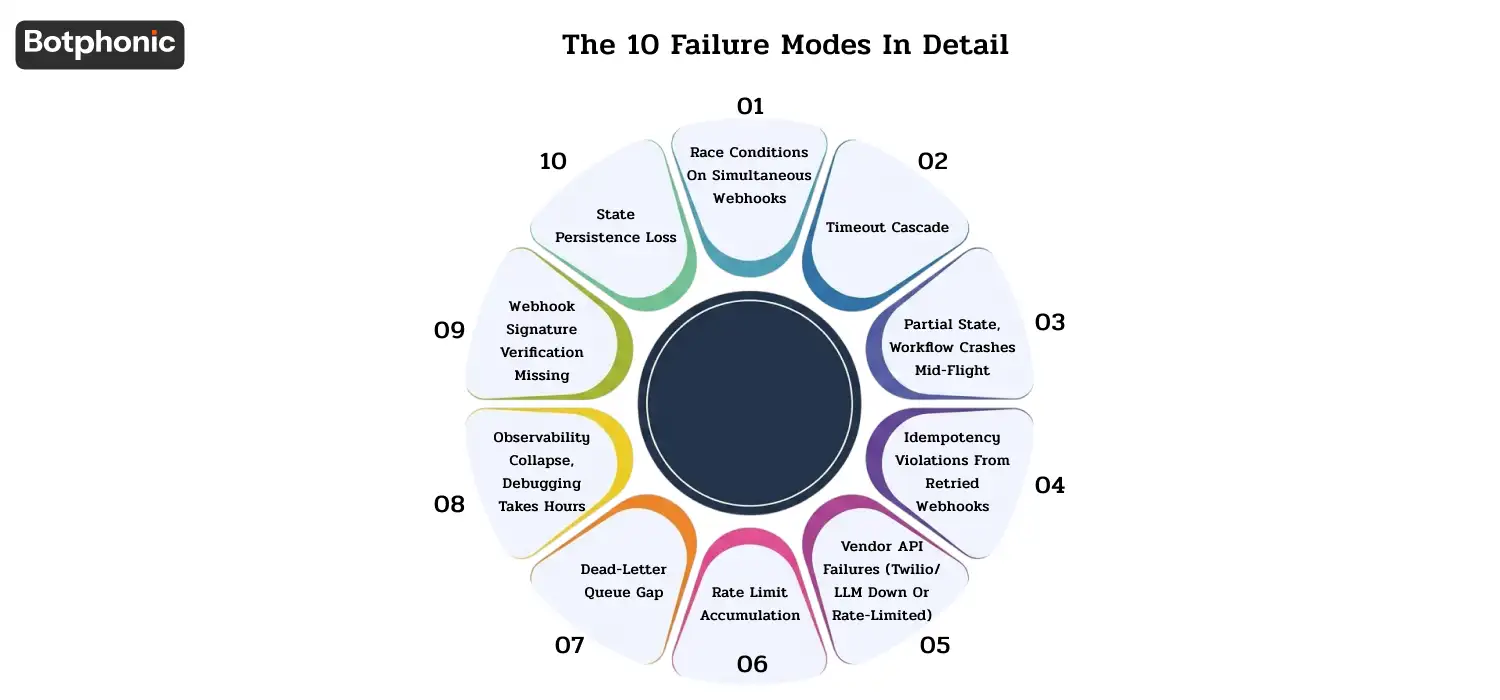
The 10 failure modes at a glance
| # | Failure mode | What breaks | Engineering effort to fix |
| 1 | Race conditions | Duplicate calls if webhooks are received at the same time. | 1-2 days |
| 2 | Timeout cascade | When n8n reaches its execution timeout, it will end the workflow in the middle of the call. | 2-3 days |
| 3 | Partial state | If a workflow crashes after calling is placed, but before the CRM update, the processing is halted. | 3-5 days |
| 4 | Idempotency violations | The main point to remember about Twilio retries is that they will cause the workflow to process a particular event again. | 1-2 days |
| 5 | Vendor API failures | Success when Twilio/LLM is down / rate-limited | 3-5 days |
| 6 | Rate limit accumulation | If an n8n fails, the next will not execute until the previous is successful; no errors. | 2-3 days |
| 7 | Dead-letter queue gap | Failed executions will not be replayed. | 1-3 days |
| 8 | Observability collapse | Troubleshooting production problems is hours of detective work | 1-2 weeks |
| 9 | Webhook signature missing | A webhook can be spoofed security gap: | 1 day |
| 10 | State persistence loss | This means that, in the case of self-hosted n8n, the execution state is lost on crash, while n8n Cloud has limits. | 1 week |
Total engineering effort to make a simple happy path workflow production ready: ~6-12 weeks.
Not marketing math, that’s approximately what a senior engineer spends developing a 5-step n8n tutorial to be able to endure a peak Tuesday, 500 concurrent calls and a Twilio incident. Plan accordingly.
The 10 failure modes in detail
Failure #1: Race conditions on simultaneous webhooks
What breaks: Two webhook events arrive in the same second at n8n for the same lead, that’s why 2 parallel executions are spawned in n8n. Each makes an LLM call, each makes a Twilio call. The lead gets two calls in 30 seconds. Your Customer Support inbox goes off, in your name.
Why it’s hard to debug: The first time that occurs, you think it’s some kind of fluke. What you will find when the pattern forms is that you will have sent multiple calls to dozens of leads.
The solution: Add a deduplication layer, in front of the workflow, this is either Redis SET NX or database UNIQUE constraint on lead+timestamp – Remove executions of same leads by using n8n’s Wait + Resume node pattern – If high volume, use n8n’s queue mode + Redis for ensuring single-execution-per-key
Engineering cost: 10-20 minutes for 100,000 records.Application cost: 20-25 minutes for 100,000 records.
Botphonic alternative: By default, all dedupes at the API gateway level. By default, single call per (lead, intent, time window) and can be configured per workflow.
 PRO TIP
Failure #2: Timeout cascade
What breaks: Your AI call takes 4-7 minutes when it comes to complex conversations, while the default execution timeout of n8n is 5 minutes. Workflow dies mid-call. Twilio finishes the call but n8n never processes the result. Webhook for call-end that goes to a dead workflow.
Why it’s hard to debug: n8n displays “stopped”, but the call recording is still in Twilio. Until you check the timestamps, you believe that it is a Twilio problem.
The solution: Make EXECUTIONS_TIMEOUT env variable (or executions.timeout in config) in n8n larger than your expected call duration – Better: split the workflow at the call placement boundary Workflow A places the call and exits, Workflow B is webhook-triggered by the call-completed event from Twilio, and processes the result.
Engineering cost: The project’s engineering cost is two to three days of the architecture split and testing.
Botphonic alternative: Botphonic’s AI phone call automatically separates call placement and result processing. All calls, of any duration, are dealt with cleanly through the platform’s event structure.
Failure #3: Partial state, workflow crashes mid-flight
What breaks: Workflow runs the AI call (Twilio confirms), then crashes in the post call step to update the CRM. The call happened. It’s not visible on the CRM. Now you have orphaned customer interactions that are not recorded.
 NOTE
NOTE
Why it’s hard to debug: No single error log can document “call placed but never logged. You find it when someone mentions a conversation your CRM hasn’t had.
The solution: Use n8n’s Error Trigger workflow to get all failed executions and store their context – Make sure to have explicit state checkpoints (write to durable storage between each stage) so that if something crashes, you can go back and review the event for the failed state, and a workflow can be resumed again – If it’s mission critical, use event sourcing, where every state change is an immutable event in a queue.
Engineering cost: This will take 3-5 days of engineering time to implement the checkpointing + error workflow + recovery scripts.
Botphonic alternative: Botphonic continues the state of the call through all of its transitions. If executions fail, they will be recovered automatically from the last consistent checkpoint. You can even see a CRM-keyed buying guide.
Failure #4: Idempotency violations from retried webhooks
What breaks: Twilio’s webhook retry policy is aggressive — if your endpoint returns 5xx or it fails to respond within a certain time, Twilio will try up to 4 times. This means your n8n workflow runs this webhook 3 times. Result: 3 CRM entries, 3 follow-up SMS messages and 3 calendar invites.
Why it’s hard to debug: Individual events seem to be OK. This duplication only appears when you run a query on “how many times did we follow up with X today” and get 3 rows.
The solution: Implement idempotency keys following the Stripe Idempotency-Key pattern, Check for CallSid being processed (Twilio will send a unique CallSid) in n8n’s IF node as early in the workflow as it can be done, if yes, then exit early – Persist a (CallSid, event_type) to execution_id mapping in Redis with 24 hours TTL
Engineering cost: The time for the idempotency layer is 1-2 days.
Botphonic alternative: By default, Botphonic deduplicates by Event ID. Side effects from webhooks don’t happen twice if they are retried.
Failure #5: Vendor API failures (Twilio/LLM down or rate-limited)
What breaks: Twilio has a problem. Your LLM rate-limit you during the call. You have no graceful degradation logic in your workflow, it simply fails the execution. No fall-back to voicemail, no retry queue, no human-handoff alert.
Why it’s hard to debug: Vendor APIs go down occasionally. When yours does, everything that you work on, fails at once, your support inbox explodes, and you’re triaging vendor status pages while your customers gripe.
The solution: Circuit breaker pattern: Keep a log of failures over the last 5 minutes, if more than 5 is detected, fail fast for 5 minutes and then rotate back to normal (don’t keep testing the down vendor) – Fallback chain: Twilio → fallback Twilio sub-account → SMS-only mode → human-handoff queue – LLM fallback: primary LLM (e.g., GPT-4) → fallback LLM (e.g., Claude Sonnet) → fail-safe response from cache – Customer-facing status: If in fail-safe, change the IVR message to say that they are experiencing degraded service
Engineering cost: 3-5 days of circuit breakers + fallback chain + status integration.
Botphonic alternative: Botphonic multi-region, primary/fallback for telephony and for LLM. The degradation of customer facing is automatic, without any engineering efforts.
Failure #6: Rate limit accumulation
What breaks: n8n is running 200 simultaneous executions because you’ve uploaded a 200-row CSV containing leads. All executions hit LLM API. The LLM API, slows you down! The other half of all your executions are unsuccessful. Your CSV import is partially complete and hangs the remainder undone.
Why it’s hard to debug: It works fine in testing (10 leads at a time). It falls at the production stage (when you go into real production).
The solution: Token bucket rate limiter in front of the LLM call – Limit to N calls per second by API tier — avoid using up your API budget in one go of bad calls – Queue-based execution: send LLM calls to a queue (Redis Streams, AWS SQS) and have a worker process the queue that respects the rate limits – Cost guard: limit the number of concurrent executions per workflow instance — don’t try to consume your API budget in one shot
Engineering cost: 2-3 days for rate-limit layer, queue, and monitoring.
Botphonic Alternatives: paces all outbound campaigns automatically based on vendor rate limits, via Botphonic queues. Customer never exceeds LLM limits due to Botphonic having the LLM relationship.
Failure #7: Dead-letter queue gap
What breaks: An execution of a workflow has failed. You can see it in your n8n dashboard as it is red. It is not noticed by you. At the time of a check, 47 leads have not been called.
Why it’s hard to debug: n8n self-hosted doesn’t show failures other than in the executions list. No alerts. No replay queue. There are no “click here to retry all failed.
The solution: Set up the Error Trigger workflow in n8n to send failed executions to PagerDuty / Slack / your monitoring tool – Create a dead-letter queue: Error executions → durable storage → review queue every day – Add a replay UI: show failed executions with context, enable operator to fix data and then retry – If you are self-hosting n8n, activate the n8n binary data mode to store data from the execution context in durable storage, so that failed executions can be replayed later.
Engineering cost: Dead-letter queue + alerting + replay UI is 1-3 days.
Botphonic alternative: All failed executions on the dashboard, replay buttons + auto alerts to designated email/Slack/PagerDuty. Built in.
The problem is that the software is not observable, and the debugging process requires hours.
Failure #8: Observability collapse, debugging takes hours
What breaks: A customer states that your AI has called them yesterday asking silly questions. When you execute a workflow, n8n’s execution log displays that the workflow was executed but not the LLM prompt, the LLM response, the conversation transcript or the recording of the conversation. You are required to spend 3 hours to understand what happened based on the logs from Twilio and LLM API usage + n8n execution details.
Why it’s hard to debug: These tools (n8n, Twilio, LLM API) all have their own logs, which are not automatically correlated. There’s no single pane of glass.
The solution: Distributed tracing: Each workflow execution is assigned a trace ID and that ID is carried through Twilio (custom parameters) and calls to the LLM (metadata). Aggregate logs by trace ID – Centralized log aggregation: Datadog / Honeycomb / DIY ELK stack ingesting from n8n + Twilio + LLM API – Customer-facing audit trail: If a customer is saying that he doesn’t like a call, you should be able to pull all the information you had captured within 30 seconds and not 3 hours.
Engineering cost: 1-2 weeks for distributed tracing + log aggregation + audit trail.
Botphonic alternative: Botphonic offers a single dashboard that includes an LLM prompt/response history, disposition, call recording, and a full transcript of the conversation for each call. Quick response to audit built in (30 seconds).
Failure #9: Webhook signature verification missing
What breaks: You expose your n8n webhook endpoint publicly that Twilio can hit. An attacker finds the endpoint and issues fake “call completed” webhooks with malicious payloads. Your CRM becomes polluted, your customers receive false follow-up SMS, your workflow is likely to be compromised.
Why it’s hard to debug: Looks like spurious activity in your CRM. You think it’s a CRM bug. By the time you trace it back, you’ve leaked customer-facing artifacts to attackers.
The solution: Check for Twilio signatures on all webhooks — All Twilio requests are signed with the X-Twilio-Signature header, which needs to be checked in n8n via a custom Function node. Twilio webhook signature validation – verify origin IP as defense in depth (Twilio publishes their ranges) – rate limit at your reverse proxy layer – audit access logs on webhook endpoints; warning on IP signature validation failures.
Engineering cost: Plus IP allowlist + alerting, which takes 1 day of engineering.
Botphonic alternative: By default, Botphonic’s webhook endpoints validate signatures. Customers don’t have to create custom validation code – security defaults are correct “out of the box”.
Failure #10: State persistence loss
What breaks: Your self-hosted n8n instance crashes (OOM, infrastructure issue, deployment). All workflow executions in flight are lost. If a customer is already in the middle of a conversation with the AI, he/she suddenly hears silence.
Why it’s hard to debug:Everything is back to normal post-restart. The lost executions can’t be seen, because n8n does not have an error message saying “I lost 47 in-flight workflows when I crashed.”
The solution: You can keep your automation workflows running smoothly without interruption by taking a few key steps. First, choose a powerful database like PostgreSQL or MySQL instead of the default SQLite to store your data safely. Next, turn on n8n’s queue mode to separate your task starters from the actual work. This setup ensures that if one computer crashes mid-task, the system instantly pushes that work back into a digital waiting line for other computers to finish. To handle heavy workloads, place a load balancer in front of multiple helper computers to distribute the traffic evenly, and use Redis to manage the shared waiting line. Finally, if you choose the cloud-hosted version, check the official service agreement to see exactly how the platform backs up your data and how many tasks you can run at the same time.
Engineering cost:1 week in Queue mode, HA deployment, and database backend.
Botphonic alternative: Managed multi-region high-availability environment: Botphonic runs by default in this environment.
The decision: DIY or managed?
You’ve read the 10 failure modes. The honest decision matrix:
Build it yourself with n8n + Twilio + LLM if:
- You have a senior engineer with 6-12 weeks of dedicated bandwidth
- You want deep customization not provided by a managed vendor.You require something more customized than what a managed vendor provides.
- Your call volume is small enough where the overhead is acceptable
- OnCall rotation provided to deal with incidents in production
- You do have observability infrastructure in place
- You’re willing to accept the maintenance costs (updates n8n, updates vendor APIs, dealing with the above failure modes)
If you use an alternative to the phones, such as:
- You have to get production AI calls up and running in 30 mins and not 12 weeks.
- You don’t have engineering bandwidth to build + maintain the orchestration
- You don’t want to operate on-call infrastructure
- You’re not just looking for compliance out of the box, you need compliance posture (SOC 2, HIPAA, TCPA) that the DIY approach simply cannot provide.
- You can easily solve a major business need by investing $50,000 to $200,000 in your own engineering team. Alternatively, an outside vendor can handle the exact same task for just $29 to $249 per month.
For the managed option analysis framework, refer to the AI scheduling buyer’s guide and the 28-point comparison matrix. For the financial calculations around return on investment for the DIY versus managed options, see how to calculate AI appointment booking ROI.
The 5-Question Pre-Build Audit
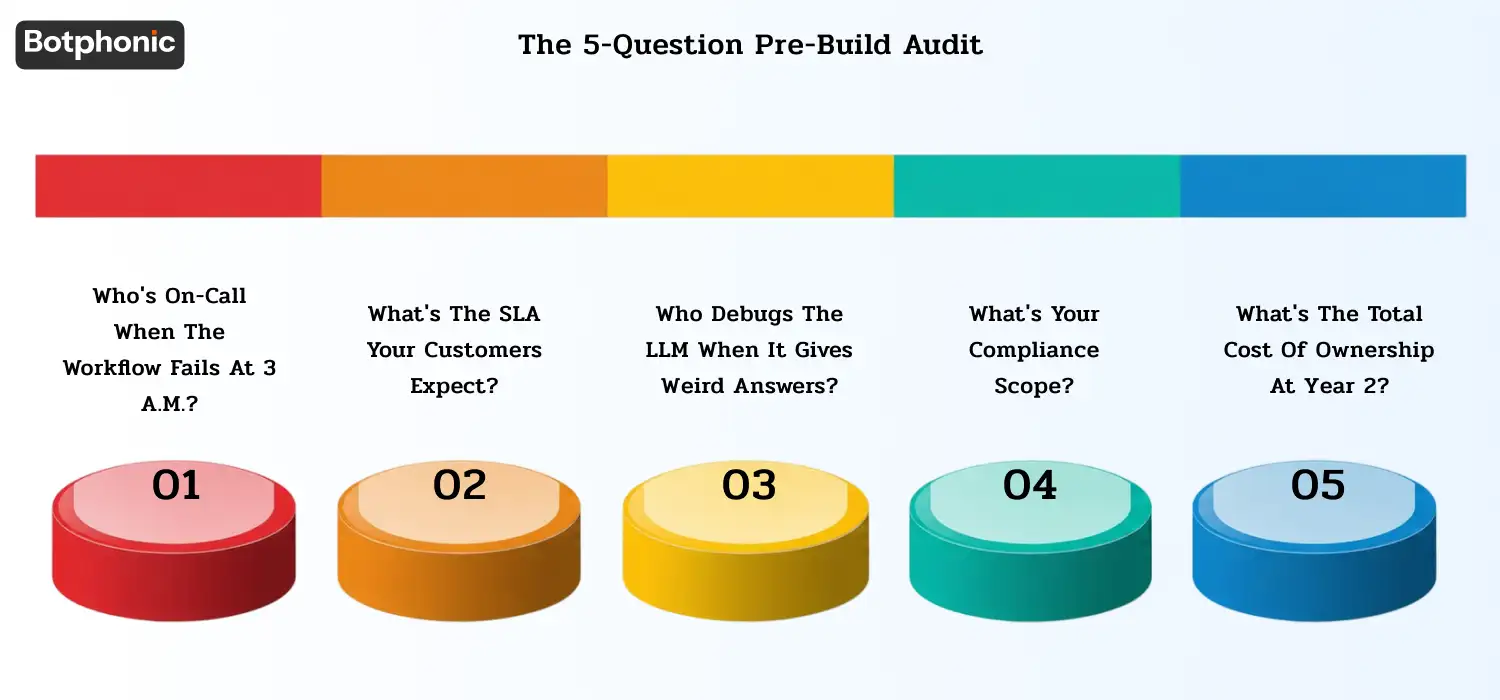
Answer these five questions before writing line #1 of n8n configuration. If one answer is a “no-brainer,” the DIY road is an ill-fitting solution.
1. Who’s on-call when the workflow fails at 3 a.m.?
Unless the answer is “nobody, we’ll check it Monday,” your company most likely doesn’t require 24/7 AI calling. If it is “me,” determine the rotation so that the incident doesn’t happen again.
2. What’s the SLA your customers expect?
The DIY route’s realistic SLA is the one you can run. When customers need 99.9% uptime for AI calls, HA infrastructure + monitoring + on call is required. Do not cost the operational layer, just the build.
3. Who debugs the LLM when it gives weird answers?
LLMs can sometimes hallucinate, go out of tone or fail on edge cases. That operational responsibility falls on your team if you take the DIY route. Draw out a plan for how to catch + fix LLM-quality issues.
4. What’s your compliance scope?
The DIY route takes the compliance obligation with it if you are in the healthcare (HIPAA), financial services (SEC/FINRA/SOX), recruiting (EEOC AI hiring) or insurance (state regulators) line of business. This page refers to the compliance work, which is included in your engineering work.
5. What’s the total cost of ownership at year 2?
First build is one price. Year-2 maintenance, vendor-API change handling, scaling work, and operational overhead are the bigger cost. Managed platforms are generally 5-10 times less expensive when spread out over 24 months, compared to a DIY, fully-loaded platform.
If you can’t comfortably answer these, default to managed.
n8n configuration patterns referenced
Specific patterns are referred to in the fixes above. Quick-reference links to the authoritative documentation:
| Pattern | Reference |
| Wait + Resume nodes for serialization | n8n Wait node docs |
| Decoupled architecture: Sub-workflow. | n8n sub-workflows docs |
| Errors can trigger a workflow to handle the failure. | The error handling documentation for n8n. |
| Watson is in queue mode on HA + persistence. | n8n queue mode docs |
| To store and replay binary data.To save/load binary data. | n8n binary data docs |
| Webhook signature verification | Twilio webhook security |
| Idempotency-Key pattern | Stripe Idempotency-Key reference |
| Twilio Voice API | The Twilio Voice API docs. |
| TCPA compliance for outbound | FCC TCPA guidance |
| HIPAA scope for healthcare AI calls | HHS HIPAA guidance |
Where Botphonic Fits
Botphonic’s claim here is honest – if you don’t want to invest engineering time in DIY, come and join us. Above are all of the 10 failure modes we’ve addressed without any choice — it’s not a feature, it’s expected behavior from AI calling in production.
We’re not for you if you are a developer who would like to have the call infrastructure for deep customization. Draft for production with n8n.
You might be a business that requires production AI calling to be active in 30 minutes, and you don’t want to maintain the orchestration.You may be a business that requires production AI calling to be active within 30 minutes and need not have to maintain the orchestration. Try for free with no credit card required. Test for your particular use case.
The Real Cost of DIY AI Call Infrastructure
Developers can successfully run production-ready AI call flows using n8n, Twilio, and LLM APIs. However, engineers must integrate reliability engineering into the system architecture from day one rather than treating it as an afterthought.
Failures rarely happen due to the AI component. Failures stem from lack of orchestration: retries, state loss, rate limiting, duplicated webhooks, poor observability, and brittle infrastructure under load.
For organizations that have the engineering capacity, a DIY stack provides maximum freedom. Specialized companies offer managed solutions because engineering teams find scaling AI voice infrastructure far more difficult than building a basic demo.
The happy flow makes the demo work. The recovery flow makes the business work.
Building AI calls in n8n? This guide is your production-readiness checklist. Need a managed alternative?
Request a Free Demo