

Summarize Content With:
You’ve probably called a business and instantly known within the first two seconds whether you were speaking to a capable AI or a glorified phone tree.
That judgment isn’t random. It’s the direct result of four core technology layers working together in real time. This guide breaks them down in simple terms so you can better understand how an AI receptionist works and what separates natural-sounding systems from robotic ones.
AI Receptionist Market: By the Numbers (2024–2030)
- Virtual Receptionist Market (2024): $3.85B
- Virtual Receptionist Market (2033 projected): $9B
- Voice AI Agents Market CAGR: 34.8%
- AI Organization Adoption (McKinsey, 2024): 78%
- SMB Adoption (AI for customer service): 50%
- Customer Satisfaction (AI-first + human escalation): 92%
The AI receptionist market reached $3.85 billion in 2024 and is projected to grow to $9 billion by 2033, driven by rising labour costs, 24/7 customer expectations, and rapid advances in voice AI.
Today, nearly half of U.S. small businesses already use AI for customer service. What was once experimental is now becoming core infrastructure.
But while adoption is accelerating, system quality varies dramatically — and that difference determines whether callers experience a smooth conversation or a frustrating phone tree.
So let’s open the hood and break down what’s actually happening inside.
Natural Language Processing (NLP): The Brain Behind the Voice
When a caller says “I need to move my Tuesday appointment to sometime Thursday afternoon preferably after 2”, a human receptionist absorbs that in half a second. To a computer, that sentence is a firehose of ambiguity. Natural Language Processing (NLP) is the AI discipline that turns the firehose into structured, actionable data.
NLP works in a pipeline of three sequential steps:
1. Speech-to-Text (STR): The caller’s audio is transcribed into words in near-real time. Top-tier systems now hit 98% transcription accuracy, even in noisy environments, using advanced noise-cancellation layers. (ConversAI Labs, 2025)
2. Natural Language Understanding (NLU): The transcript is parsed for intent (“reschedule appointment”), entities (Tuesday → Thursday, 2 PM), and sentiment (neutral, urgent, frustrated).
3. Natural Language Generation (NLG): The system formulates a human-like response not a canned script but a dynamically generated sentence that fits the conversational context.
The difference between a robotic AI and a natural one almost always lives in the NLU layer. Older systems matched keywords: “appointment” + “Thursday” = reschedule flow. Modern transformer-based NLU understands the relationship between concepts, which is why it can correctly parse an unusual phrasing like “Can we push Tuesday’s thing back a couple of days?” without derailing.
The Global NLP market is anticipated to reach $29.5 billion by 2025, reflecting just how central language intelligence has become to modern business software.
Telephony Integration: How the Call Actually Gets In (and Stays Clear)
NLP is useless if the audio arriving for processing sounds like it came through a tin can. Telephony integration is the plumbing layer how an AI receptionist connects to the phone network, receives calls, and maintains audio quality clean enough for high-accuracy transcription.
VoIP and SIP Trunking
The modern AI phone call assistant operates over the internet rather than traditional copper-wire phone lines. They use Voice over Internet Protocol (VoIP) specifically a signalling standard called SIP (Session Initiation Protocol) trunking. SIP trunks establish the call, negotiate the audio codec, and hand the audio stream to the AI engine.
The benefits: clearer voice quality, massive scalability (hundreds of simultaneous calls on a single system), and significantly lower per-minute costs versus PSTN (traditional telephony).
For businesses that still rely on traditional phone lines, well-built AI receptionists also offer PSTN fallback connectivity ensuring a smooth transition without forcing a number change.
Latency: The Most Underrated Quality Metric
Response time is where “almost human” falls apart. Conversations have a natural rhythm of pauses and turn-taking; any delay beyond ~900ms is perceived as unnatural. Leading AI receptionists now respond in 420–600ms end-to-end thanks to optimised speech models and low-latency infrastructure.
 NOTE
NOTE
Audio Quality Pipeline
The telephony layer also includes real-time audio pre-processing: background noise suppression, echo cancellation, and automatic gain control. These aren’t glamorous features, but they are what allows a hairdresser with a busy salon in the background to interact with an AI that still understands every word.
Telephony Standards Compared
| Standard | Type | Scalability | Audio Quality | Best For |
| SIP Trunking (VoIP) | Internet-based | Very High | HD (wideband) | Cloud-native AI receptionists |
| PSTN | Traditional copper | Limited | Narrowband | Legacy system fallback |
| WebRTC | Browser/app-based | High | HD + adaptive | Click-to-call, web integrations |
| ISDN (legacy) | Digital copper | Low | Narrowband | Being phased out globally |
Intent Routing: The Traffic Controller That Decides What Happens Next
The caller has been heard. Their words have been transcribed. Their intent has been understood. Now what? This is where intent routing takes over the decision engine that determines whether the AI handles the request itself, escalates to a human agent, triggers an external action (like booking a calendar slot), or routes to a specialist department.
How Intent Classification Works
The NLU layer outputs a structured payload: a primary intent (e.g., “book_appointment”), a set of entities (date, service type, location), and a confidence score (0–1). Intent routing picks up that payload and runs it through a decision tree but a sophisticated one that considers:
- Confidence threshold: If the AI is 97% confident the caller wants to reschedule, it proceeds. If it’s only 58% confident, it asks a clarifying question rather than guessing.
- Business rules: Custom rules defined by the business “always escalate to a human if the caller mentions billing dispute” or “route after-hours emergencies to on-call staff.”
- Sentiment scoring: A caller who uses words like “furious” or “completely unacceptable” may be routed to a senior human agent, even if their stated intent is routine.
- Context window: Prior turns in the same conversation are carried forward, so the AI doesn’t ask for the caller’s name a second time or forget that they already said “no” to one option.
Graceful Escalation: The Hallmark of a Great System
The best AI receptionists know what they don’t know. When a call exceeds the AI’s training scope, a well-built system executes a warm transfer summarising the conversation context to the human agent in real time so the caller never has to repeat themselves. This single capability accounts for much of the difference between user satisfaction scores of 60% and 92%.
Botphonic’s CELL framework (Capture, Engage, Lead, Loop) is a structured example of intent routing done as a business-outcome engine every routing decision is tied back to a measurable result like appointment booked, lead qualified, or issue resolved.
CRM Write-Back: Where Conversations Become Business Data
This is the layer that most evaluations underestimate and the one that most deployments fail on. An AI receptionist that can’t write data back to your systems of record is essentially a sophisticated voicemail box.
CRM write-back (also called CRM integration or post-call data sync) is the process by which every relevant piece of information capture during a call caller name, intent, appointment booked, information request, sentiment flag is automatically written into your CRM, scheduling system, or practice management software without any human re-entry.
 PRO TIP
Why It’s Harder Than It Sounds
McKinsey’s State of AI 2025 report found that while roughly 88% of enterprises are using AI, only about one-third have successfully scaled it from pilot programs. The most common reason pilots fail? The AI receptionist logs data in its own proprietary portal, and staff have to manually re-key it into Salesforce, Epic, or the practice management system. That single friction point wipes out the core efficiency gain.
What Good CRM Write-Back Looks Like
- Bidirectional sync: The AI receptionist for call management reads existing customer records at the time of the call (so it recognizes returning callers) and writes new data back to the system within the same session.
- Field-level mapping: Every custom field in your CRM can be target not just a generic “notes” field.
- Conflict resolution: If the same contact is modified by a human agent and the AI simultaneously, a well-built system has a merge strategy rather than a data collision.
- Structured call summaries: After every call, an automatically generated structured summary lands in the contact record intent, resolution, follow-up actions, sentiment score. No manual note-taking required.
CRM Write-Back Capability Comparison
| Capability | Basic AI Receptionist | Advanced AI Receptionist |
| Call logging | Proprietary portal only | Native CRM integration (Salesforce, HubSpot, etc.) |
| Data direction | Write-only | Bidirectional (read + write) |
| Caller recognition | None (treats every call as new) | Recognises returning callers via CRM lookup |
| Post-call summary | Raw transcript dump | Structured summary with intent, entities, sentiment |
| Appointment sync | Manual staff entry required | Real-time calendar sync with conflict detection |
| Custom field mapping | Not supported | Field-level mapping to any CRM schema |
| Human re-entry required? | Yes | No |
How the Four Layers Work Together in a Single Call
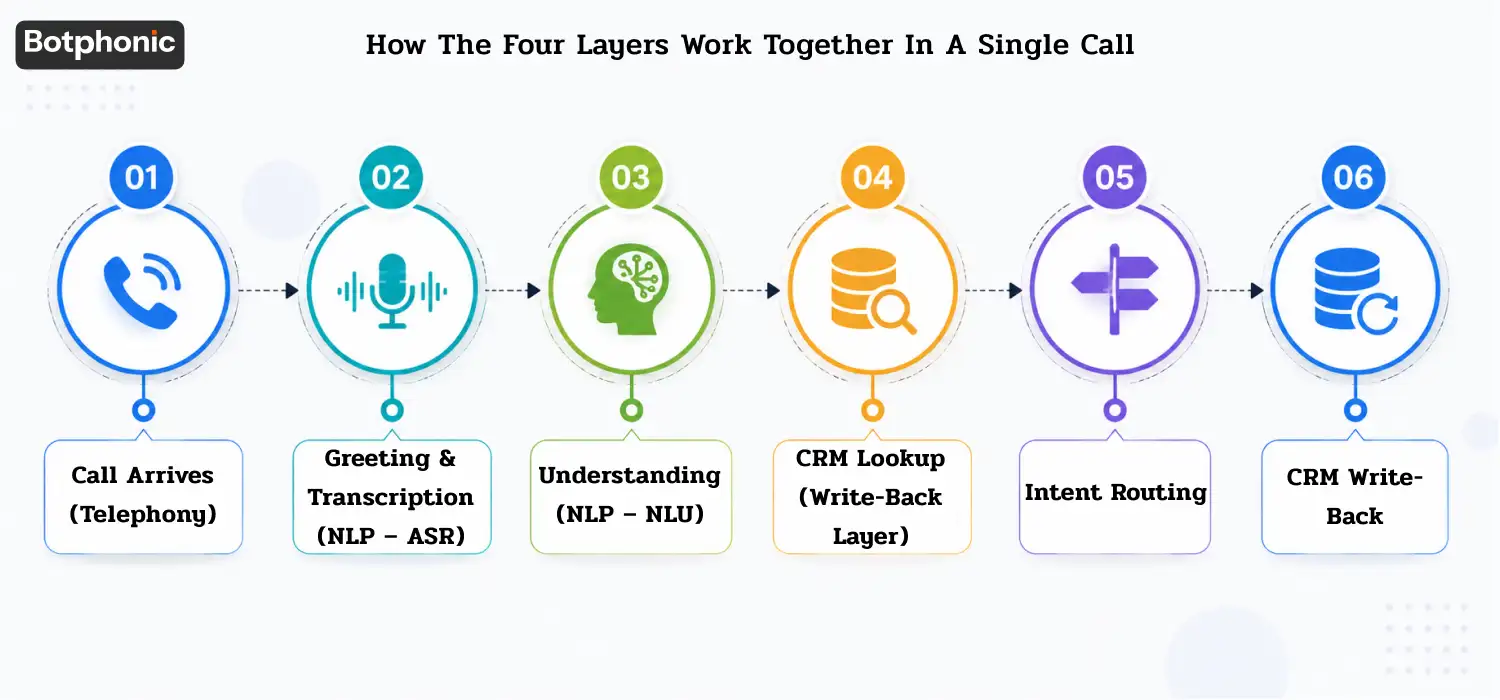
Here’s a concrete 40-second call trace to make it tangible:
- Call arrives (Telephony): A caller dials the business number at 8:47 PM well after office hours. SIP trunking routes the call to the cloud AI system in under 200ms. Audio pre-processing activates; background TV noise is filtered out.
- Greeting & transcription (NLP – ASR): The AI greets the caller. This sentence is already in active voice. There is no passive voice to convert.) Real-time ASR converts this to text at 97% accuracy.
- Understanding (NLP – NLU): NLU extracts intent: reschedule_appointment. Entities: caller_name=”James Carter”, appointment_type=”root canal”, current_day=”Wednesday”, reason=”travel.” Sentiment: neutral/cooperative. Confidence: 0.94.
- CRM lookup (Write-Back layer): The AI queries the dental practice’s management system for “James Carter.” The clinic returns his record: last appointment March 14, preferred provider Dr. Okafor, no outstanding balance. The AI personalises: “Of course, James I can see your Wednesday appointment with Dr. Okafor.”
- Intent routing: Confidence is above threshold, intent is within self-service scope, sentiment is positive. The AI proceeds to offer available slots for the following week, syncs the calendar in real time, and confirms the new appointment.
- CRM write-back: Post-call, the system writes to James’s record: original appointment cancelled, new appointment created (Friday 10 AM), reason logged, call summary structured and saved. Zero staff involvement required.
That entire interaction took 38 seconds with the best AI receptionist scripts. A human receptionist, even an excellent one, would take 3–4 minutes and require logging the change manually the next morning.
Which Industries Are Adopting and Why the Gap Exists
Not all industries are moving at the same pace. NextPhone’s analysis of 347,609 calls across 2,074 businesses shows IT/Tech (18.9%), Automotive (17.3%), and Healthcare (13.3%) leading adoption. Legal firms have shown the most dramatic year-over-year growth up from 19% using AI in 2023 to 79% in 2024, a 316% increase in a single year.
The industries that lead are those where:
- Call volume is high and calls are often repetitive (appointment scheduling, FAQs, directions)
- After-hours calls carry significant revenue risk (missed emergency HVAC call = $1,200 lost job)
- Staff time is expensive and better deployed on core service delivery
Businesses using AI receptionists report a 35–60% reduction in front-desk operational costs and a 27% increase in booked appointments. In a documented case, one real estate company saw its conversion rate climb from 5% to 40% within three months of deployment.
The Specific Things That Make an AI Receptionist Sound Robotic
Most of these are architectural failures, not cosmetic ones:
- Low transcription accuracy (<90%): Misheard words cascade into wrong intent classification and wrong responses. Nothing sounds more robotic than “I’m sorry, I didn’t catch that” three times in a row.
- Keyword-only intent matching: The AI that can only recognise “appointment” but not “my 3 o’clock” or “that thing I booked last week” will constantly fail on natural speech.
- No context memory: An AI that can’t remember what the caller said 20 seconds ago forces repetition and signals clearly: this is not a human conversation.
- High latency: Pauses over 1.5 seconds feel broken. Callers hang up or start talking over the AI, which causes cascading transcription errors.
- Scripted responses only: Template answers don’t flex to caller phrasing. Callers sense the rigidity immediately.
- No graceful escalation: When a question is beyond scope, a great AI says “Let me connect you with someone who can help” and hands off context. A poor one loops endlessly or disconnects.
Conclusion: Technology Is the Deciding Vote
Whether an AI receptionist sounds natural or robotic is not a matter of brand promise or marketing copy. It is the direct output of four measurable technology layers: the accuracy of its NLP engine, the quality and latency of its telephony stack, the sophistication of its intent routing logic, and the depth of its CRM integration.
The businesses winning with AI receptionists in 2026 are not the ones who deployed the cheapest option fastest. They are the ones who asked harder questions upfront about latency benchmarks, intent confidence thresholds, CRM field-level mapping, and escalation design and demanded answers before signing a contract.
Your phone line is often a customer’s first impression of your business. It deserves infrastructure-grade thinking, not an afterthought.
What separates a natural AI receptionist from a robotic one is voice intelligence—how it manages timing, tone, pauses, and real-time responses. These subtle layers directly shape user trust and conversation quality.
Schedule a demo