

Summarize Content With:
Summary
The typical article about the “benefits of an AI receptionist” consists of a flat list of benefits, without the benefit of knowing when any of them is going to be present in the business. This is a special one.
Here are the top 10 benefits you’ll see after your first 30 days using an AI receptionist, not what sounds good in the sales pitch. Day 1 is the day of the obvious wins. After Day 30, you’ll witness these more subtle changes that you won’t find in any vendor demo: How your humans spend their time, how your data finally tells you something useful, and how your business handles a hectic week without anyone noticing.
When thinking of evaluating Botphonic, or any other AI receptionist platform, this is the expectation-setter you should take into consideration: not “you will receive all these benefits once you go live”, but “here is the sequence in which you’ll receive these benefits.
- Day 1 benefits are the obvious ones: day and night availability, intelligent call routing, they’re right before your eyes when your AI takes the first call.
- Enter the date of the appointment booking deflection and multilingual reach is measurable from Week 1 onward.
- In Week 2, it’s time to get personal, your AI begins identifying repeat customers since the CRM history has been building up.
- Not until week 3, when there is enough data to detect real trends, and not in the week-to-week noise, but in the overall consistency of customer service, do you see it.
- The deeper benefits occur on Day 30: scalability under real load + your people visibly moving onto higher value work.
Introduction
You’ve signed the contract, set up the dashboard, mapped the call flows and pressed “go live”. So what’s next?
The straightforward response is not all 10 benefits are experienced at once. Some are visible the first hour. Others take 2-3 weeks of accumulating call data before they become measurable. The vendors don’t have to tell you that, as the “benefits over time” is not something that can be put in a feature comparison chart. However, coming to terms with the timeline is important, because it can help set the right expectations, and it will let you know the first place to look at the benefits.
The following is a quick note before we get to the 30 days: For this article, a typical deployment of a small to mid-market with reasonable call volume (several hundred calls a week or so) is assumed. The time curve for larger businesses is the same but is compressed—the case of very low-volume deployments might require a 60-90 day period where the data-driven benefits start to appear statistically.
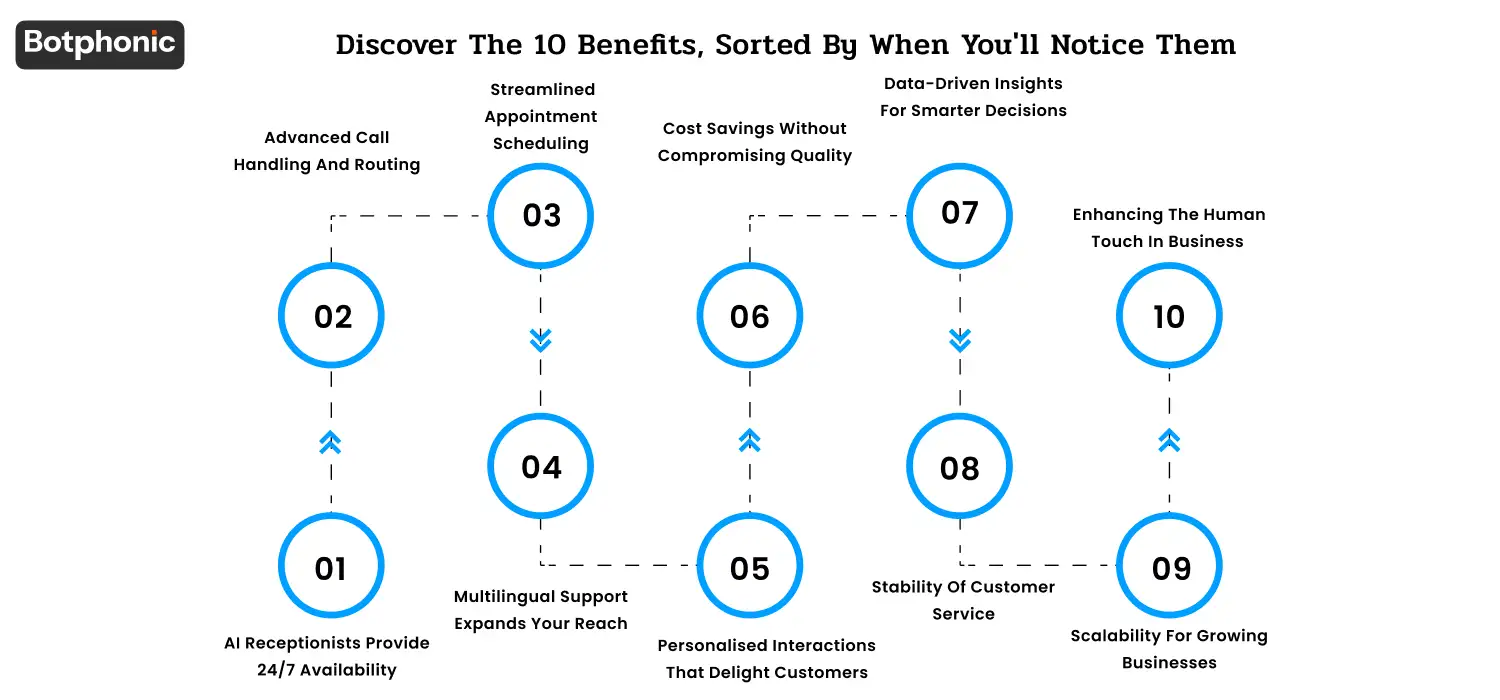
Discover the 10 Benefits, Sorted By When You’ll Notice Them
Day 1: The Benefits Visible The Moment You Go Live
1. AI Receptionists Provide 24/7 Availability
This is the first benefit of an AI receptionist that you see as it is immediate. The after-hours coverage gap goes away as soon as your AI takes its first call, at 7 a.m. Monday or 11 p.m. Saturday. Voicemail calls are answered immediately, professionally!
Day 1 metrics to measure: inbound call answer rate. A typical small to mid-sized business goes from 60-75% answering, to 95-98% answering in the first 24 hours.In the first 24 hours, a typical small to mid-sized business transitions from 60-75% answering to 95-98% answering, with answer rates for calls made outside business hours going to voicemail and some during-hours calls missing because staff is on another call. The rest (2-5%) is by design human escalation and not missed calls.
2. Advanced Call Handling and Routing
Concurrently, the AI is correctly directing incoming calls from the get-go, when you are side-by-side with the coverage. It captures what the caller is asking in the first turn (e.g., sales question, support issue, billing query, appointment request), and answers it or routes it to the proper human queue.
On Day 1, measure calls that are misrouted. The average pre-AI rate for most teams is 12-25% of calls to the wrong department. This decreases to less than 3% in the first week with a well-designed AI receptionist.
 PRO TIP
Week 1 (Days 2-7): The Patterns That Emerge In The First Week
3. Streamlined Appointment Scheduling
You’ll start to see measurable results from the appointment-booking flow by mid-week. The AI takes care of the back and forth (calendar look up, confirmation, and reminder scheduling) without any human intervention. Previously it took 3-5 e-mailings and a phone tag round to close the booking, now that’s done in the initial call.
What to measure: time-from-inquiry-to-confirmed-appointment. The typical reduction is to less than 5 minutes from 24-72 hours. This has a direct impact on revenue and show-up for appointment driven industries (medical, beauty, financial advisory, home services).
For the math on what this saves your team specifically, run the numbers on the Botphonic ROI calculator.
4. Multilingual Support Expands Your Reach
After the first week, anyone who calls you from overseas or in a language other than English hits the inbound queue, they can have a conversation that they actually want to have. The number of languages most modern AI receptionists are able to handle out of the box is 20+ languages. First turn, AI detects which language it is and automatically switches.
What to measure: Percentage of inbound calls in the non-primary languages. 5-15% of all calls made to businesses in the United States are language switched in the first 7 days. Industry research shows that 76% of buyers prefer to be served in their native language, and 40% won’t buy at all if the website/service is not available in their language leaving 40% wondering, “Who is going to buy if I’m not available in my language?
Week 2 (Days 8-14): When Personalization And Cost Signals Become Visible
5. Personalised Interactions That Delight Customers
After the second week, the customer call history stored in your CRM becomes sufficiently large for the AI to recognise repeat customers. The AI is able to greet them by name, remember their previous interaction, and provide them with information on their account, and adjust the conversation to what they’ve previously asked about.
What is to be measured: Customer satisfaction (CSAT) parity. Typically, AI handled call CSAT is equal to or slightly higher than human handled call CSAT for routine call types at the end of Week 2. But it’s the personalization that fills in the rest. If the AI isn’t integrated with CRM, it feels knowledgeable and impersonal, but with it, it feels like it knows the customer.
6. Cost Savings Without Compromising Quality
On Day 14, you’ll have 2 weeks of agent-hour data to compare with the baseline you created before the AI. The cost savings benefit becomes apparent — typically a 30-50% reduction in the number of agent hours devoted to routine call handling, which now can be applied to higher value activities such as closing, escalations and account expansion.
The honest math: a typical full-time receptionist in the US makes $36,000-$42,000 plus benefits and training2 which equals $48,000-$58,000 fully loaded. The cost of an AI receptionist subscription is $29-$249/month for SMB tiers (see Botphonic pricing) and ranges from $348 to $2,988 per year. This non-uniformity in costs is approximately 15-50× by plan.
However, the smarter idea of what cost savings looks like is not “AI replaces a receptionist” it’s “AI takes care of the 70% of repetitive tasks, and your receptionist takes care of the 30% that requires them. This affects the working posture and not only the working line.
Week 3 (Days 15-21): When Data And Consistency Become Statistically Obvious
7. Data-Driven Insights for Smarter Decisions
After Week 3, you’ve got enough call volume to see meaningful analytics – not data noise. Top call types, time of day trends, top hour overflow, language mix, AHT, abandonment rate, top failure patterns – it’s all predictable enough to make decisions on.
What you’re looking for to measure: at least one operational change that resulted from data on your AI dashboard in your 21-day period. Common Week-3 actions: Shift agent to better enforce the surfaced peak hours, add a new conversation flow for a new top emerging conversation type, fix a routing rule that’s sending the wrong calls to the wrong queue.
8. Stability of Customer Service
The quality of customer service is evident by Day 21 and that’s a good thing. Your callers receive the same high quality of answer at 11 a.m. Tuesday as they do at 9 p.m. Sunday. No bad-day variance. A void of the new hire learning curve. There is the reply, “The receptionist who knew our system left and the replacement is still getting up to speed.
Parameters to measure: CSAT differences by time-of-day and day-of-week. Prior to AI, most teams experienced a CSAT variance between 15-30% among segments. Post AI it typically shrinks to less than 5%. The mean tends to increase somewhat; the decrease in variance is more significant.
 NOTE
NOTE
Day 30: When the deeper benefits land
9. Scalability for Growing Businesses
After Day 30, it’s likely you’ve had at least one busy week, a marketing push, or a season or a viral moment. And you’ll notice something: nothing broke. No one noticed on the customer end as the AI was able to manage the surge. No queues are overflowing, no answers are getting degraded, no “we need to hire more receptionists” panics.
What to measure: Peak day call volume vs average day call volume. Generally speaking the AI deals with 3-5× spike days at the same quality of answers. Compared with the pre-AI pattern, a 2× spike typically would have been either poor answer rates or “we missed a lot of calls.”
This is the benefit that is the most difficult to demonstrate but easiest to measure after it’s there. It’s also the one that slowly builds up over time as your business expands.
10. Enhancing the Human Touch in Business
This is the one that takes 30 full days to land and the one that really changes the way your business operates. You can see that 70-80% of your routine call work is now being handled by your AI and your time has become more valuable. They are spending less time on things like confirmation of appointments and resetting passwords. The angry customer, the complex issue, a big-ticket account, the close-the-deal moment, that’s where they’re spending more time.
What to measure: the qualitative change of what your human team is working on. By day 30, you should be able to list specific high-value, work-closed deals that you recovered, expanded accounts that were not in play if you and the team were still doing the call work, and so on.
This is the irony of “AI replaces receptionists. It does not take the place of the human role, it makes the human role more valuable. The “appointment-confirmation” receptionist is now replaced by a customer conversation-focused receptionist who spends six hours a day on customer conversations that drive retention and growth.
What To Do at Day 30
Once you reach the 30-day mark, here are 3 things you should do:
- Import the 30 day metrics, answer rate, CSAT, agent hours saved, cost per resolved call, language mix, peak-day handling, top call types. Compare with your baseline before AI. Document the deltas
- The conversation flow and the first 30 days of real calls will reveal 5-10 edge cases that the original flow design didn’t account for. Update the flow before they accumulate
- Set up the following 30 days plan, and select what 1-2 things you need to optimize next given the data. The top priorities for Day-30: expanding to outbound campaigns, adding a new language, implementing a previously-delayed CRM system, or implementing a newly manual workflow within the AI flow.
For a deeper look at how AI receptionists handle the underlying voice mechanics, see how AI phone calls work, from voice recognition to conversion. For platform comparison, see compare top AI receptionists.
Final Thoughts
The line “you will know in the first 30 days” is important because it establishes expectations that were set appropriately. If you set your expectations too high that you will see all 10 benefits the first day, you will be disappointed. If you’re going live with the expectation that you’ll get the right benefits at the right times, then you’re going to measure things right, and you’re going to make the right decisions about what to optimize next.
The obvious ones are the Day 1 benefits, 24/7 availability and smart routing. They’re the ones that make the deployment to your team and your boss worthwhile. It is the Day 30 benefits – scalability, human-touch shift – that are most relevant for your business 6-12 months down the road. Both are real. Simply observe them in the correct sequence.
When you’re ready to experience this arc in your business, take a free Botphonic trial, all the dashboard is as customizable as possible in less than 30 minutes and Day 1 begins as soon as your first call arrives.
Where Botphonic fits
Botphonic is built for the SMB-to-mid-market AI receptionist use case. The configuration matters more than any single feature: SOC 2 Type II reporting, HIPAA-readiness for healthcare deployments, native integrations with the CRMs your team already uses (Salesforce, HubSpot, Zoho, Pipedrive), and out-of-the-box templates for the top SMB call types.
See improvements in scheduling and routing within the first 30 days.
Try Botphonic!