
Summarize Content With:
Quick Summary
In this blog, we will glimpse into how AI appointment booking and workflow automation come into the picture to make life easier for everyone, by not just saving so much time but to letting the team breathe, communicate better, and develop trust at every client touchpoint.
- Idiomatic phrase: AI booking automation turns scheduling chaos into clarity.
- Voice AI call assistants reduce manual workload and increase client satisfaction.
- Smart calendar syncing creates alignment and helps with stress reduction within teams.
- Data-driven insights generated from AI appointment scheduling features help with better planning and improving morale.
Introduction
Working with manual booking systems is similar to playing calendar roulette in the corporate world. Missed meetings and double-booked clients, plus the never-ending email threads about them, have become the modus operandi. Teams are more focused on the extraction of schedules from clients than on actually working.
Let’s take a look at the ground-breaking way AI booking workflow automation was used for appointments and team coordination in the old days. AI for workflow automation has groomed the company to remove the bottlenecks and unnecessary bureaucratic hurdles. And, working well for the customer, it has also created an unfathomable smooth experience for the employees.
Modern AI appointment booking systems differ significantly from the clunky software of old. These systems use natural language processing and machine learning to define and respond to customer input effectively. From a customer setting up a car service appointment to a patient booking a medical checkup, these systems can always handle multiple calls simultaneously.
What is AI Booking Workflow Automation?
If your standard scheduling is bringing you to a point of managing and controlling like a flock of sheep, the AI booking workflow automation will be your digital manager that always will keep everyone and everything scheduled and within the time frame. It is one of the best strategic applications of artificial intelligence that is already automating appointment scheduling, coordination, and even the confirmation process.
The exclusive dependence on manual input could result in the endless and frustrating exchanging of emails, or sometimes unreturned phone calls. On the other hand, the AI booking system utilizes machine learning and natural language processing, which consists of the whole workflow done automatically. It indicates how AI can effortlessly decode human intention, spot an open slot, confirm it, and even send reminders without needing to involve a human being at all.
Simply put, consider it a 24/7 AI-controlled appointment assistant who never sleeps, forgets, or fails to follow up when it should.
Key Component
Manual scheduling is not only an exhausting process; it is also a killer of productivity. Every missed call, double-booking, or just an overlooked follow-up requires the full time and morale of the teams working. The AI booking workflow automation has come to the rescue like a digital superhero who is transforming this disorganized calendar into a harmonious machine.
Let’s take a look at how:
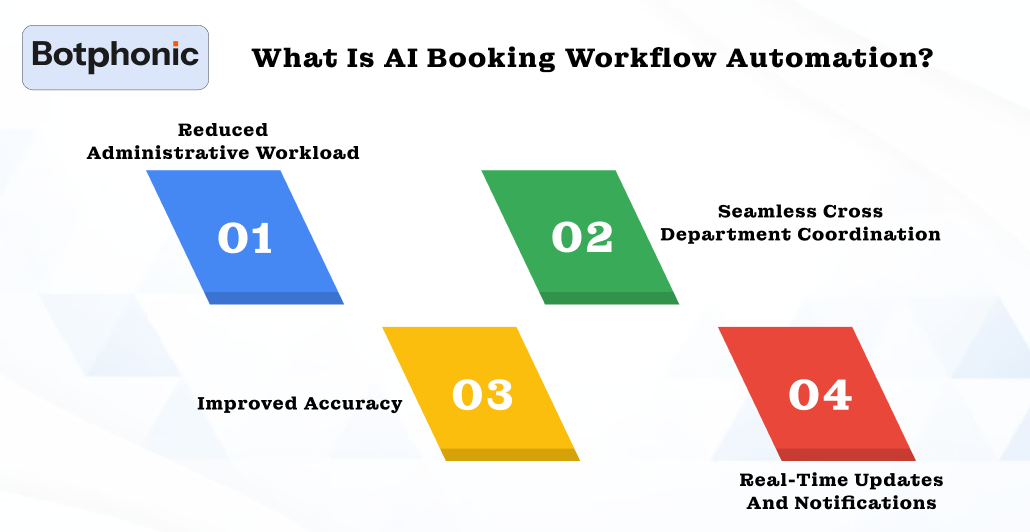
1. Reduced Administrative Workload
No longer do teams have to invest their time in hours of repetitive scheduling. The use of an AI appointment booking bot makes it possible to carry out confirmation, rescheduling, and even cancellations automatically.
2. Seamless Cross-Department Coordination
In a shift operation, the scheduling of appointments can be quite a task. AI systems do a great job of integrating calendars and CRM platforms, making sure that everyone is aware of the situation and no one gets confused.
3. Improved Accuracy
Human error is something that can always be predicted. But not the missed appointments and miscommunication. With AI call assistants, each booking is made accurately, acknowledged, and also recorded in the system in real-time.
4. Real-Time Updates and Notifications
AI will never get sleep-deprived or tired, hence your team will not have to do contact checks with it. Instant notification
 PRO TIP
For instance:
Think of a hectic automotive service center. There is a stream of customers calling, and there is no stopping it, even during peak hours; hence, it exerts pressure on the staff to juggle the services manually. With the car service AI platform, the service booking centers can automatically record appointments by voice, chat, or web portals. The AI systems then assign technicians, update calendars, and notify the customers properly in real-time.
Effectively, reducing administrative workload by 70 %, increasing response time and customer satisfaction, and scaling up easily as appointment volumes increase.
How AI Booking Enhances Team Workflows
Manual scheduling isn’t just a time-consuming task; it’s a productivity killer. Every missed call, double-booking, or just an overlooked follow-up takes teams’ entire time and morale to work. AI booking workflow automation has become a digital superhero who is turning this chaotic calendar into a synchronized engine.
Let’s see how:
1. Reduced Administrative Workload
Teams are no longer required to spend hours on repetitive scheduling tasks. Implementing an AI appointment booking bot helps handle confirmation, rescheduling, and even cancellations automatically.
2. Seamless Cross-Department Coordination
When departments are operating in shifts, scheduling an appointment can be difficult. AI systems effectively integrate calendars and CRM platforms to ensure everyone is on the same page and there are no confusions.
3. Improved Accuracy
Human error is something that can be predicted. But missed appointments and miscommunications are not. With an AI call assistant, every booking is done precisely, confirmed, and also stored in real-time.
4. Real-Time Updates and Notifications
AI never gets sleep-deprived or fatigued, so your team doesn’t have to do contact checks on it. Quick notifications are shared for bookings and cancellations. Even if there are potential chances, it keeps everyone in the loop, well-informed.
5. Scalable Operations
As appointment volume grows, so does AI’s scaling ability. Whether it’s an AI voice agent for appointment booking that handles dozens of calls per hour or an appointment booking AI chatbot that manages thousands of online bookings workflow remains smooth and efficient without adding any headcount.
Industry Applications of AI Booking Automation
This system is generally not set up for all cases. However, it fits perfectly into each industry and saves the team some time and protects them from human errors, hence, guaranteeing the best customer service experience. Here are a few prominent applications:
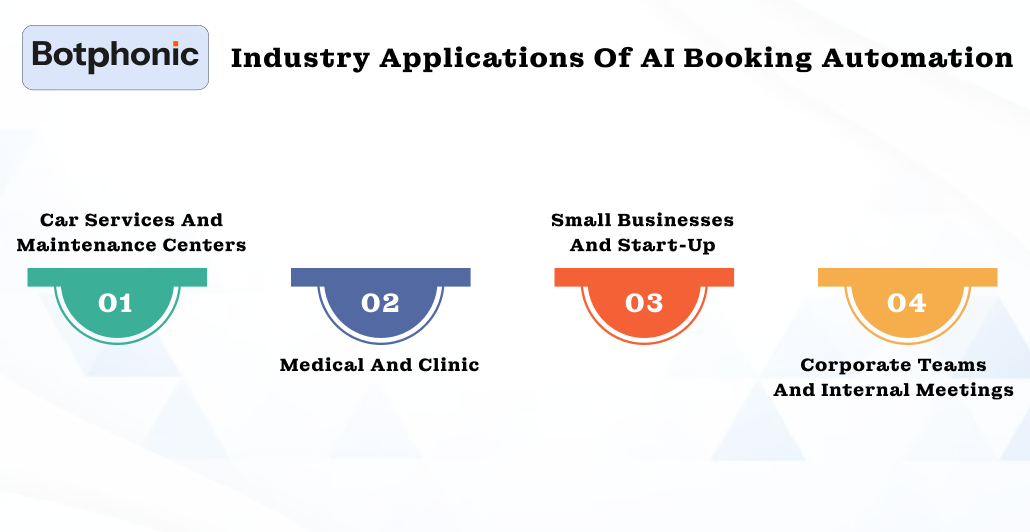
1. Car Services and Maintenance Centers
Manual scheduling of service appointments for busy auto shops is pure logistics hell. AI platforms for car service appointment booking go on to automate the entire process by:
- Web-based or voice-command booking by clients.
- Assigning technicians based on availability and skill level.
- Automatic reminders for clients and follow-ups on late arrivals.
With fewer no-shows, technicians remain engaged, while customers are content that their vehicles were serviced on time.
2. Medical and Clinic
Scheduling patient appointments is extremely time-sensitive and, above all, critical. Medical appointment AI booking software and patient appointment booking AI attempt to streamline everything, including:
- Patients are able to book, reschedule, or cancel an appointment via either chatbot or voice AI.
- Reduces the administrative burden on front-desk resources
- Auto-reminders and confirmations that lessen no-show rates.
Clinics concentrate on patient care instead of trying to stay ahead of their calendars.
3. Small Businesses and Start-Up
Small teams generally do not have the bandwidth to manually serve multiple clients and handle different bookings. Car AI Appointment Booking Bot for small businesses:
- Would serve clients 24/7 without any increase in headcount.
- Confirms and follows up on client appointments, amongst other activities.
- Allow employees to focus more on growth and customer engagement.
Scheduling done by AI makes a lean startup behave like a mathematical corporation.
4. Corporate Teams and Internal Meetings
One of the inconveniences faced by any corporate team and executive would be scheduling conflicts. Appointment booking AI voice agents solve that by:
- Scheduling meetings across calendars in different time zones.
- Integrates with email, chat platforms, and CRM tools.
Suggests the most suitable time for meetings that come after weighing availability versus priority.
PRO TIP
This creates smooth internal workflows with fewer scheduling conflicts and fewer interruptions during the meeting.
Data and Insights: How AI Booking Automation Impacts Teams Globally
| Metric / Outcome | Global Benchmark / Range | Real Example / Case | Variance & Goal-Setting Insight |
| Employee time saved through AI booking tools | Average 1 hour/day saved; 20% of users report 2+ hours/day saved. | In a 27-country survey, AI-driven teams reported consistent daily time recovery equivalent to one full workday per week. | Start small — target a 30–50% reduction in manual scheduling time in the first phase, then push toward the 1 hr/day mark. |
| Predicted productivity gain by 2029 | Expected 12 hours/week saved by professionals globally; 4 hours/week by 2025 | Professional services (law, tax, consulting) are already reporting measurable time reduction with AI task automation. | Use this as a stretch goal — aim for 3–5 hours saved per week within your first 12 months of AI rollout. |
| No-show rate reduction using AI reminders/predictive tools | 30–70% decrease depending on industry | A multi-location healthcare network cut no-shows by ~70%, dropping from 14% to 4% after implementing predictive scheduling. | Expect variance by vertical. Measure your no-show baseline and set a realistic goal — e.g., reduce by 25–40% in the first quarter. |
| Relative productivity gain from generative AI integration | Average 5.4% work-hour efficiency gain | Equivalent to roughly 2.2 hours saved/week for a 40-hour employee. | Even small percentages compound. Target a 5–8% time gain within the first 6 months — measurable, realistic, and motivating. |
| Performance variance based on AI integration depth | Organizations that deeply integrate AI see 2–3× higher efficiency gains than those using surface-level tools. | Companies with AI-trained staff and connected CRMs see scheduling conflicts drop by up to 60%. | Integration and adoption matter more than tech itself — train, test, and tune to maximize gains. |
Why It’s Time to Automate Your Booking Workflows
Let’s be honest- if your staff has been juggling spreadsheets, sticky notes, and phone calls for appointment management, they aren’t really operating a system; they’re doing damage control. The world has marched on, and AI booking workflow automation is the natural evolution for businesses that want to stay competitive, consistent, and customer-focused.
Modern appointment management is no longer about who schedules faster-it’s about who provides smarter, frictionless experiences at scale. Be it automotive services, healthcare, or a fast-growing small business, appointment booking bots, voice AI agents, and AI appointment booking for small businesses make for faster operations with zero human error and much-improved client delivery.
Those companies already harnessing these tools are enjoying measurable benefits-faster turnaround times, happier customers, and leaner teams. Those holding on to manual methods stand to lose ground to competitors who have let AI take the wheel.
The good news is, the decision really is in your hands: Automation will not replace human beings; it will equip them. When AI takes over the chaos that is scheduling, your team is free to concentrate on what really pushes growth – strategy, service, and relationships with customers.
If you have been waiting for signs to change over to new workflows, here it goes-one. The future of scheduling is not coming-it is already here, silently booking appointments while you snooze.
Implementation Strategy for Teams
Adopting AI booking for workflow automation is not really easy, but a strategic approach. With a smooth implementation, it ensures that teams are actually benefiting from the technology. Let’s review a step-by-step strategy:
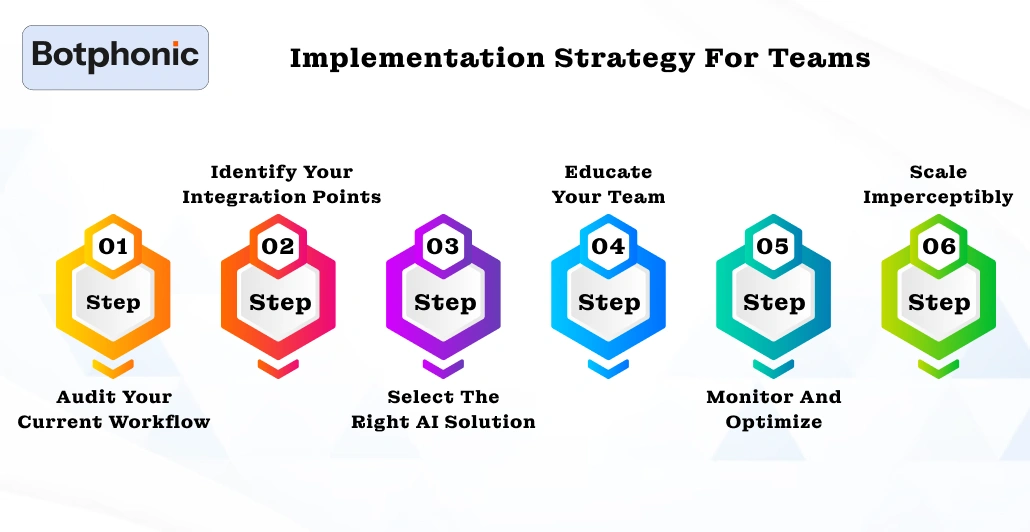
Step 1. Audit Your Current Workflow
- Ensure to identify all the pain points, such as missed appointments, double bookings, and excessive administrative workload.
- Check out the processes that are repetitive and time-consuming.
- Evaluate tasks that can be handled more easily by AI, for instance, confirmations, cancellations, or rescheduling.
Step 2. Identify Your Integration Points
- Find out the places where the AI system will require connection to external software like CRM, calendar, VoIP, or communication tools.
- Keep checking regularly to ensure that the data is smoothly flowing between the different platforms.
- Start with appointment booking AI tools, or others, to see which one is working well with your tech stack.
Step 3. Select the Right AI Solution
- Look for the solutions that can provide voice AI appointment booking software and multi-channel integrations at the same time.
- Make evaluations of the vendors according to their reliability, scalability, and security standards.
- Before making the full deployment, run a small pilot program to test the tool’s performance in a real-world situation.
Step 4. Educate Your Team
- Instruct your personnel in AI usage in client interactions and integration workflows.
- Always make it a point to give roles to the persons in charge of monitoring the outputs and dealing with the exceptional cases.
- Reiterate that the AI is merely a tool that has been incorporated to lessen the burden of administrative duties.
Step 5: Monitor and Optimize
- Keep an eye on the measurable KPIs which are booking accuracy, response time, customer satisfaction, and employee efficiency among others.
- Get the most out of the insights, that are shared, to alter the AI responses and to reschedule in a way that would enhance the overall automation of the workflow.
Step 6: Scale Imperceptibly
- Once the AI system is working smoothly, it expands its scope which handle more complex booking scenarios.
- Integrate the advanced AI features like predictive scheduling, personalized follow-ups, and analytics-driven decision-making.
Leverage the benefits of AI automated booking software and scale effortlessly.
Try the demo today!!Conclusion
The time of manual scheduling is long gone. AI booking workflow automation is not just a luxury but a competitive necessity. Businesses are adopting smart AI scheduling systems effectively and gaining a lasting edge. Offering a time-efficient solution, cost-cutting, and satisfying customers with a frictionless experience.
Integrating AI appointment booking bots, voice AI agents, and other advanced tools has made it easier for companies to get efficiency and scalability simultaneously. The results are rather measurable, with less chaos getting more clarity and work done.
Those businesses that are still using spreadsheets and email threads aren’t just working with calendars but also crises. The companies embracing AI are already getting ahead and managing customers like no one.
