

Summarize Content With:
Quick Summary
AI call centers operate by using artificial intelligence to automate their customer interactions across voice and digital channels. In this guide, we are going to break down how AI-powered call centers work, the technologies behind them, real-world use cases, pricing models, and lastly how businesses can successfully implement AI into existing support operations.
Introduction
Customer support teams are actively facing issues due to rising demands of clients. Customers are expecting instant answers, round-the-clock availability, and consistent experiences across different channels. Traditional call centers on the other hand are struggling to keep up not entirely because of lacking team effort but because manual support doesn’t actually scale.
AI call centers on the other hand solves this gap by automating repetitive interactions while enabling humans to be present in the loop for complex or emotional cases. Instead of solely replacing agents, AI manages high-volume inquiries, reduces wait times, and allows support teams to focus on conversations that actually need human judgment.
What Is AI Call Center?
An AI call center serves as a customer support platform powered by artificial intelligence technology. It manages repetitive tasks including answering questions, providing solutions, and even addressing complex customer queries.
AI-powered customer support leverages advanced technologies such as AI model training, machine learning (ML), natural language processing (NLP), and voice recognition, among others, that enable the system to comprehend and respond effectively to customer inquiries.
How AI Call Centers Work: Key Technologies Behind the Scenes
AI call centers work by means of some key technologies. Let us go through them.
- Natural Language Processing: The AI understands and identifies human language. This technology keeps chatbots and virtual assistants busy when they are engaged in communication with the customer in a somewhat meaningful manner.
- Machine Learning: ML algorithms empower the AI systems to learn through past interactions; and helps improve continuously.
- Voice Recognition: Any spoken language must be understood by AI-powered customer support, whether in a phone call or an app. In fact, a layer of sophistication is added to customer interaction by voice recognition in any AI-powered customer support.
- Predictive Analysis: This means that, based on past interactions, call centers AI can easily predict customer behavior. Afterwards, it empowers businesses to provide a customized service.
Traditional Call Center Vs AI Call Center: Quick Glance
| Aspect | AI Call Center | Traditional Call Center |
| Automation | High level of automation in handling routine queries, data retrieval, and basic troubleshooting | Manual intervention for almost all queries, with limited automation (e.g., IVR systems) |
| Technology | Powered by AI, machine learning (ML), NLP, voice recognition, and predictive analytics | Human agents using basic telephony systems, manual routing, and customer service tools |
| Response Time | Instant responses for simple inquiries via automated systems or/and virtual assistants | Longer response times due to human agents needing to resolve issues by actively answering queries |
| 24/7 Availability | Available 24/7 to assist customers whenever they need, including holidays | Limited hours, usually during scheduled shifts or business hours |
| Personalization | Uses machine learning to learn from previous interactions and personalize answers based on client history | Personalization relies on human agents remembering or manually retrieving customer details |
| Consistency | Highly accurate and consistent responses, free from human error | Inconsistent responses due to human limitation; training and experience vary among agents |
| Complexity of Queries | Can handle simple to moderately complex queries; escalates to human assistants for more complex queries | Humans handle all levels of complexity, but with more potential for errors or inefficiencies in high-volume scenarios |
| Cost Efficiency | Reduced functional costs due to lower reliance on human agents, less need for training or overtime pay | Higher operational costs due to staff salaries, benefits, and training; overtime required during peak times |
| Scalability | Easily scalable to deal with large volumes of inquiries | Scalability issues; requires hiring more staff or extending hours to manage increased volume |
| Customer Interaction | Automated interactions through chatbots, AI-driven voice recognition, IVR, and virtual assistants | Human-to-human interaction, providing a personal touch but with slower response times |
Benefits of Using AI in Call Centers
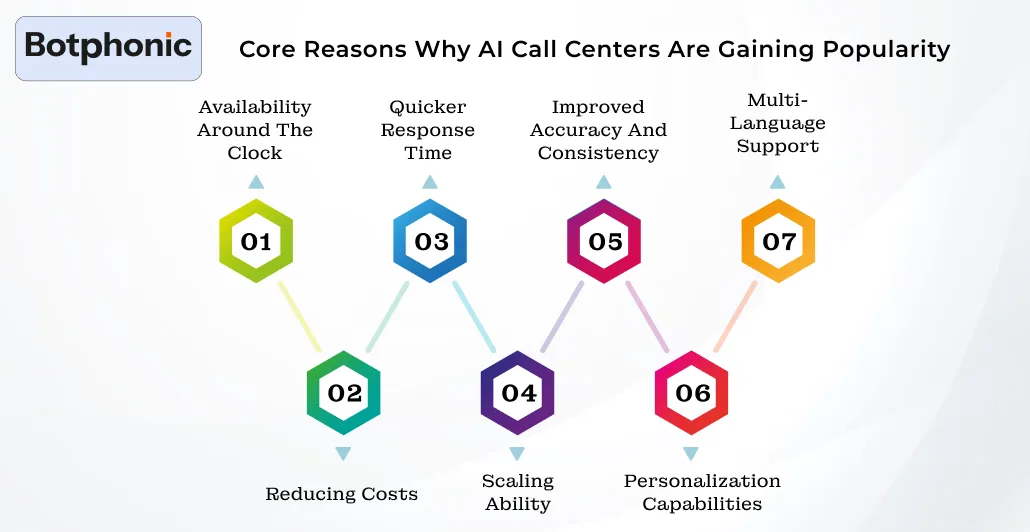
AI call centers benefit from numerous advantages. It is for these reasons that most companies planning to set up an improved customer care system are increasingly interested in AI call assistant. Here are some major reasons AI-powered customer support is so hot.
1. 24/7 Customer Availability
AI operates by answering queries 24/7 even outside business hours, which reduces the number of opportunities and lowers overnight support costs.
2. Cost Reduction at Scale
With AI handling day-to-day inquiries, human agents have time to manage complicated issues. AI also helps to reduce manpower requirement, thus lower staffing cost.
3. Faster Resolution Times
AI systems easily determine responses to a lot of requests or sometimes fix them without being asked by someone.
4. Effortless Scalability
With the growth of the industry, the requirements for customer services grow as well. AI call centres can handle all transactions without requiring additional resources, effortlessly taking on an increasing workload. In short, the seasonal ramp-ups in customer inquiries or steady growth in the volume of work would be easy for AI to maintain.
5. Accuracy and Consistency
The system offers uniform responses based on pre-programmed data and ever-increasing learn-from-experience enhancements related to the recordation of previous interactions.
6. Personalization That Actually Works
Mckensey research confirms that the companies who excel at personalization are able to generate 40% more revenue than companies who aren’t. In this era of technology, AI concierge is effectively utilizing contextual understanding which also includes past purchases, location, tone, and even previous queries as well.
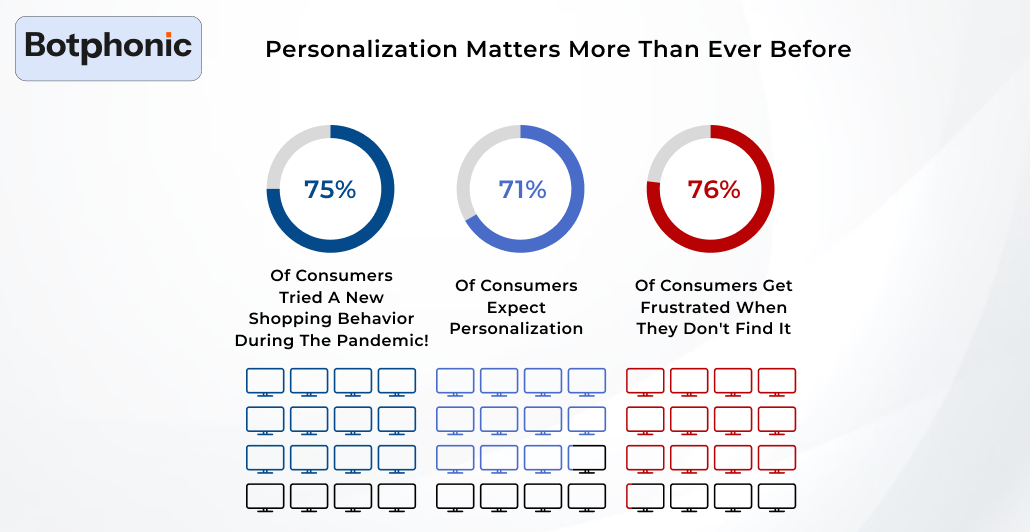
Source: McKinsey Report
AI personalizes support using CRM memory, past interactions, and real-time sentiment detection. Instead of asking customers to repeat context, the system adapts responses dynamically, improving resolution speed and satisfaction.
7. Multilingual support
AI voice agents can take out all the language barriers easily by just supporting multiple languages. Moreover, it also aids in providing a more inclusive and smart customer experience.
 NOTE
NOTE
AI Voice vs Chatbots: What’s the Difference?
AI voice agents and chatbots are usually used interchangeably, but one should know they serve different roles in modern customer support. While both of them help in automating conversations, the experience, complexity, and even their use cases vary significantly.
Let’s see how they actually compare.
1. Interaction Style: Voice AI manages real-time spoken conversations on phone calls or even on voice-enabled apps. Whereas chatbots operate via text channels like websites, apps, and messaging platforms.
2. Complexity and Technology: Voice AI is typically more demanding in reference to its technicality. It operates by combining speech recognition, natural language understanding, voice synthesis, and also real-time processing.
On the other hand chatbots are simpler because they just skip speech recognition and voice generation layers.
3. Customer Experience: Voice helps create a more natural and emotionally intuitive experience with tone, pauses and speech patterns. And chatbots are faster for direct tasks such as order tracking, account lookups, and more.
4. Cost and Deployment: AI voice assistant requires higher initial investment due to its infrastructure, training data, and real-time processing requirements.However, it still delivered strong ROI in high-call-volume environments. Chatbots have lower entry barriers and faster rollout.
5. Accuracy and Error Tolerance: AI concierge assistants are usually more sensitive to accents, background noise, speaking speed, and even language switching, as many systems are also improving rapidly.
Whereas text-based systems are more forgiving and easier to optimize since inputs are structured.
AI Voice vs Chatbots: Quick Comparison
| Aspect | AI Voice Agents | Chatbots |
| Interaction Mode | Spoken conversations via phone or voice apps | Text-based conversations on websites, apps, or messaging platforms |
| User Experience | More human-like and conversational | Faster and more transactional |
| Technical Complexity | High (speech recognition + synthesis + NLP) | Moderate (primarily NLP-based) |
| Best Use Cases | Call centers, IVR replacement, outbound calls, phone support | FAQs, order tracking, website support, lead qualification |
| Deployment Cost | Higher initial investment | Lower entry cost and faster setup |
| Accuracy Challenges | Accents, background noise, speech variations | Easier to control and optimize |
| Scalability | Ideal for high call-volume environments | Ideal for high-volume text interactions |
| Ideal Strategy | Deep customer interactions | Quick self-service automation |
Chatbots are designed to manage simple tasks and capable of offering speed and scalability, while AI voice delivers depth and human-like interaction.
Real-World AI Call Center Use Cases by Industry
Some of the ways companies have successfully integrated AI in their centers:
1. Banking: American Express inculcated AI-driven virtual assistant, “Erica,” into simple customer issues like balance inquiries, disputes on transactions, and redemptions on reward points. AI assistants also process natural language understanding that captures the query from customers and gives real-time returns based on the questions.
2. Retail: The beauty giant uses an AI-powered chatbot known as Sephora Virtual Artist that helps customers with product recommendations. The chatbot leverages computer vision and AI to analyze customer preferences and recommends products based on skin tone, beauty goals, and additional factors.
3. Indian Bank: HDFC Bank in India introduced Eva, an AI-powered voice bot, that has been created to solve common queries of customers such as balance inquiries, transfer of funds, bill payments, and others. Eva is designed to learn from its queries, improving its responses and making customer interaction much more personal and fun over time.
These examples show how AI can enhance customer service by providing faster and more accurate solutions while reducing costs and improving customer satisfaction.
How to Integrate AI into Your Call Center
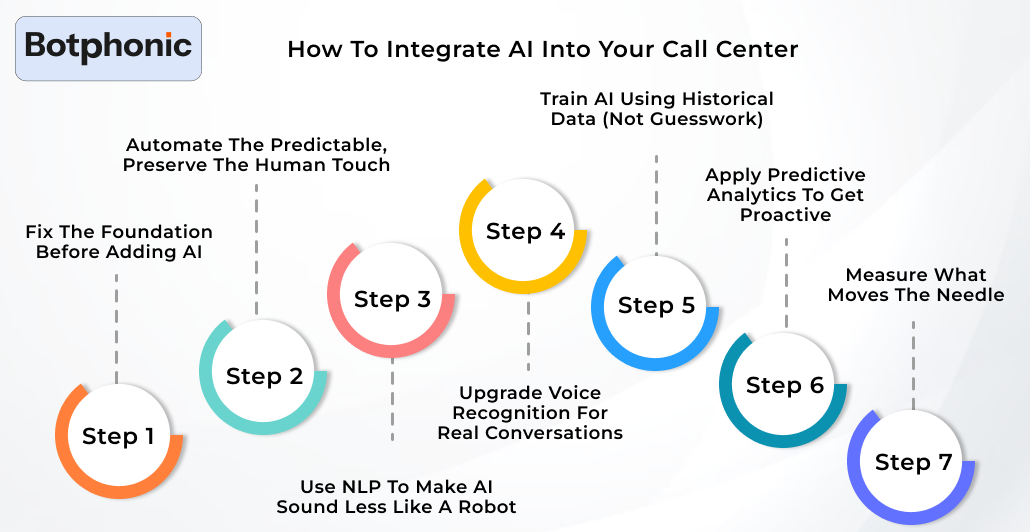
Let’s get a few things straight, an AI-powered customer support is not in the future but it’s here in the present. Companies who are still running a purely human-first approach are just waiting for their money to get lost. The winners are the ones who are blending traditional discipline with artificial intelligence in customer service that actually works.
Step 1: Fix the Foundation Before Adding AI
AI isn’t meant to fix broken operations, it’s just going to expose them more, which no one would like. Before starting with AI customer service solution, ensure that:
- Call flows are actually documented
- FAQs are accurate and up to data
- CRM data is well-organized
- Escalations rules are clearly instructed
This groundwork actually enables the system automation in call centers to operate smoothly.
 PRO TIP
Step 2: Automate the Predictable, Preserve the Human Touch
You can start with high-volume but low-emotion interactions. This is one of the prime factor for automated call centers to perform:
- Account inquiries
- Payment confirmations
- Delivery updates
- Simple troubleshooting
Deploy chatbots for customer service and you can even take help of virtual customer assistants to handle these interactions 24/7. Customers will get their instant answers and agents can focus on real brainstorming.
Step 3: Use NLP to Make AI Sound Less Like a Robot
Customers are no longer interested in pressing 1 or 2 just to get their query resolved. By applying natural language processing (NLP), AI can easily:
- Understand intents instead of looking for keywords.
- Respond conversationally
- Route calls accurately in just first try
This is the difference between imitating automation and a real AI customer experience. When it’s done responsibly, customers can barely even notice its AI.
Step 4: Upgrade Voice Recognition for Real Conversations
Modern voice recognition in call centers can easily turn spoken language into organized and structured data. It enables:
- Conversational IVR systems
- Real-time transcription
- Live agent assistance
Just pair this with real-time AI support, and agents receive prompts, compliance reminders, and even recommended responses mid-call. It’s just like having a trained supervisor whispering advice all while without actually disturbing them.
Step 5: Train AI Using Historical Data (Not Guesswork)
AI learns throughout its journey while working just like a human. It learns by interactions and data you add in it. Ensure to feed your system:
- Call recordings
- Chat logs
- Resolution outcomes
It influences machine learning in customer support, which allows AI to refine over time. It leads AI-powered support tools to get smarter over time.
Step 6: Apply Predictive Analytics to Get Proactive
Although customer feedback is important for making a strategic move, it also depends on the user how they can detect the issue on their own and work on resolving it. Enabling predictive analytics in call centers, AI can steadily:
- Forecast call volume surges
- Identify churn risks
- Trigger proactive outreach
This is customer service moving from responsive to preventive. Moreover, it also aids in lower stress and better customer retention.
Step 7: Measure What Moves the Needle
If it’s not showing better outcomes or a good improvement in your operations, it’s not for you. Ensure to track metrics that are linked with call center efficiency, such as:
- First-call resolution
- Cost per interaction
- Containment rate
- Average handle time
This part is where AI in business operations proves its worth. The principles of customer expectations haven’t changed. It’s still consistency, speed, and accountability, AI just helps them work more thoroughly at scale.
And Streamline Repetitive Tasks While Enhancing The Operational Efficiency
Try Botphonic Demo Now!!Conclusion
As we discussed what is AI call center, now we know how AI call centers have become solution-driving assets for customer service. Integrating AI into operations helps in automating tedious tasks, improving response times, and even offers personalized and scalable support. While combining AI’s smart efficiency with human expertise, businesses ensure a seamless and superior customer experience. There’s not just one but numerous AI platforms offering smart features, but Botphonic stands out of them because of its smart conversational AI features, along with its human-like response and multilingual support. Moreover, with its smart integrations, it has become scalable and offers limitless satisfaction, too.
