
Summarize Content With:
What You’ll Learn
- Why agencies lose high-intent leads through missed calls and slow response times.
- How AI receptionists qualify prospects and route sales-ready leads automatically.
- The exact strategy one agency used to increase qualified lead calls by 35%.
- Key implementation steps, integrations, and deployment lessons.
- The measurable impact on response times, CPA, revenue, and team productivity.
- How agencies can turn AI receptionists into a profitable white-label service.
- What to evaluate before choosing an AI receptionist platform.
AI receptionists for lead capture are automated phone agents that answer inbound calls, qualify prospects, and route hot leads to sales, instantly. They’re built for agencies and service businesses losing revenue to missed calls and slow response times.
Why Are Agencies Losing High-Intent Leads Before Sales Ever Gets Involved?
Lead leakage is the gap between inbound interest and a qualified conversation. For most agencies, it starts the moment a call goes unanswered.
1. The Hidden Cost of Missed Calls and Slow Response Times
Missed calls are not a minor inconvenience. They are a direct revenue loss.
According to Hatch (2023), 62% of calls to small businesses go unanswered. Of those callers, the majority do not leave a voicemail, they call a competitor instead.
Speed compounds the problem. Harvard Business Review (2011) found that leads contacted within one hour are seven times more likely to qualify than those contacted even one hour later. Most agencies respond in hours, or days.
After-hours inquiries are equally damaging. BrightLocal (2022) found that consumers expect businesses to respond within minutes, regardless of time of day. Without automation, those calls go to voicemail and rarely convert.
2. Why Hiring More Staff Isn’t Always the Answer
Adding headcount feels like the obvious fix. In practice, it creates new problems.
The U.S. Bureau of Labor Statistics reports tha the average cost of replacing an employee ranges from 50% to 200% of their annual salary, accounting for recruitment, onboarding, and lost productivity. Sales roles turn over fast.
Training call handlers consistently is harder than it sounds. Every new hire brings variability in how they qualify leads, what they ask, and how they represent the brand. Scaling coverage to 12 hours per day, let alone 24, requires multiple hires before the math works.
Direct Answer Box
What is an AI receptionist?
An AI receptionist is an automated voice agent that answers inbound calls in real time, asks structured qualification questions, captures lead data, and routes high-intent prospects to a human, or books them directly into a calendar. It integrates with CRM platforms like HubSpot and Salesforce to log every interaction without manual entry. For agencies, it functions as a 24/7 front-line filter between marketing spend and sales conversations.
What Was the Agency’s Starting Point?
This case study covers a 12-person digital marketing agency in the home services vertical. The agency managed inbound lead generation for 8 clients, fielding a combined 400–500 inbound calls per month. Their existing process relied on a two-person intake team working business hours only.
1. Agency Profile
The agency primarily served HVAC, plumbing, and electrical contractors, industries with high inbound call volume and strong urgency signals. Their own team handled client onboarding calls, upsell conversations, and referral follow-ups on top of standard lead intake.
Lead volume averaged 420 inbound calls per month across all client accounts. Of those, only 180 reached a live human. The rest were lost to voicemail, missed calls, or dropped before anyone responded.
2. Objectives Before Deployment
Before implementing Botphonic’s AI receptionist, the agency set four measurable goals:
- Reduce missed call rate below 15%
- Increase qualified conversations by at least 25%
- Improve average response time from hours to under 60 seconds
- Lower cost per acquisition (CPA) by 20%
3. How Qualified Leads Were Measured
A lead was classified as “qualified” when it met three criteria: the caller had a specific service need matching an active client offering, had a decision-making role, and requested a follow-up appointment or callback. All calls were tracked through HubSpot, with Botphonic logging call outcomes directly to each contact record. The reporting period was 90 days post-deployment.
What Was Causing Lead Leakage?
Lead leakage is the result of four compounding failures. Here is what the agency found when they audited their call process.
1. Missed Calls During Peak Hours
Peak inbound volume hit between 8–10 AM and 4–6 PM. Both windows coincided with staff meetings, client calls, and lunch breaks. The intake team was handling live conversations when new calls came in, meaning roughly 30% of peak-hour calls rang out with no answer.
2. After-Hours Lead Loss
The agency tracked calls from 6 PM to 8 AM. During that window, 100% of inbound calls went to voicemail. Call-back attempts the following morning reached fewer than 40% of those callers. The rest had already moved on.
3. Manual Qualification Bottlenecks
When calls did reach a human, qualification was inconsistent. Some intake staff asked all five qualification questions. Others skipped two or three when calls backed up. Lead data entered into HubSpot was incomplete in roughly 35% of records, missing budget range, service urgency, or decision-maker status.
4. Inconsistent Follow-Up Processes
Leads that didn’t book immediately were supposed to receive a follow-up SMS within two hours. In practice, that happened roughly half the time. There was no automation. It depended entirely on staff availability and memory.
What Was the AI Receptionist Strategy?
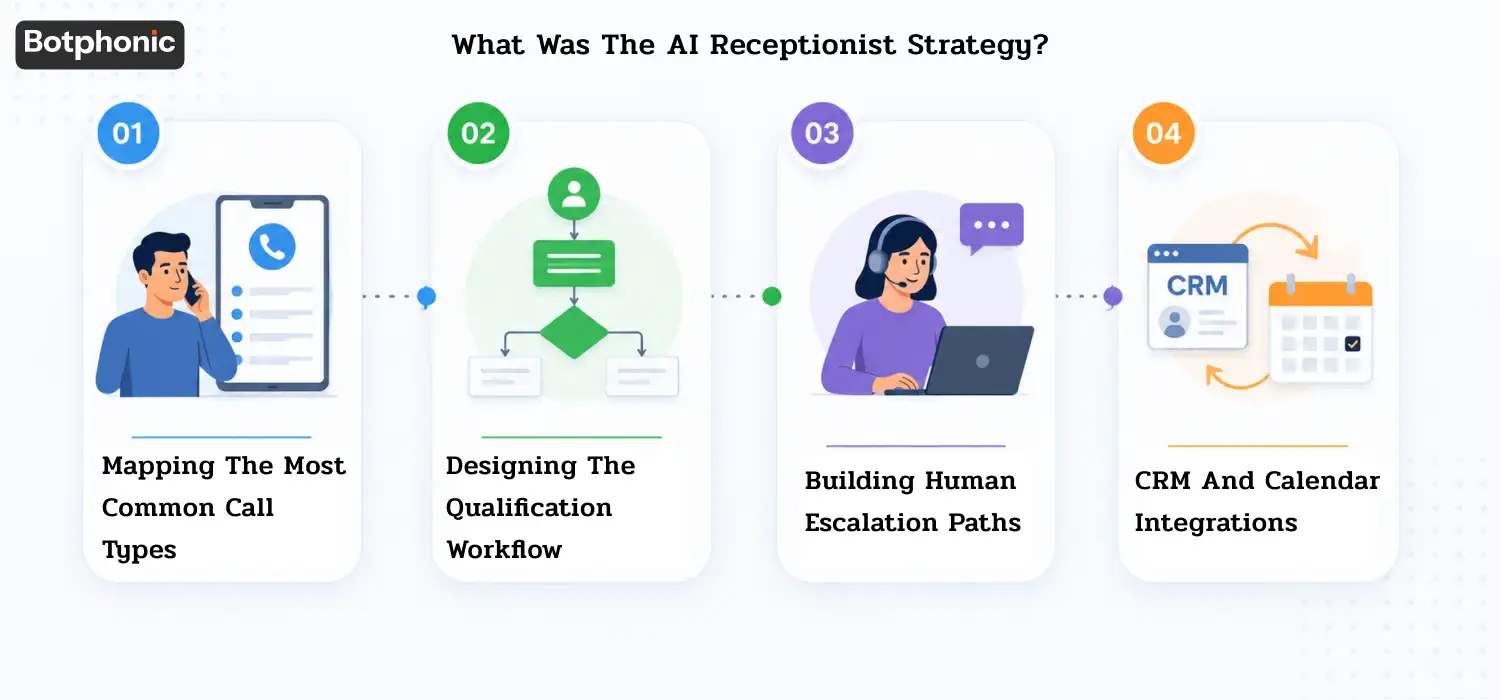
The agency deployed Botphonic as the primary inbound call handler across their own agency line and two pilot client accounts. Here is how it was designed.
Mapping the Most Common Call Types
Before scripting anything, the agency pulled 60 days of call recordings and categorized every inbound interaction. Four categories emerged: new lead inquiries (52%), existing customer service requests (21%), appointment scheduling (18%), and pricing questions (9%).
Each category received its own call flow. New lead inquiries triggered the full qualification sequence. Existing customer calls were routed directly to the account manager. Appointment scheduling went directly to Calendly. Pricing questions triggered a callback request with a human specialist.
Designing the Qualification Workflow
The qualification sequence used five questions along with smart and effective AI receptionist scripts:
- What service are you looking for today?
- Is this for a residential or commercial property?
- How soon do you need this addressed?
- Are you the decision-maker for this service?
- What’s the best number to reach you?
Answers were scored. A caller who needed service within 48 hours, was the decision-maker, and requested residential service received a priority flag in HubSpot and triggered an immediate SMS to the on-call sales rep.
Building Human Escalation Paths
The AI receptionist software transferred calls to a live human in three scenarios: caller expressed frustration or asked specifically to speak with a person, the call involved a safety-related issue (e.g., gas leak, electrical emergency), or the caller failed to answer two qualification questions in sequence.
Human handoffs used a warm transfer, the AI briefed the receiving rep with a spoken summary of what had been captured before connecting.
CRM and Calendar Integrations
All call data flowed into HubSpot automatically via Botphonic’s native integration. Appointment bookings used Calendly’s API. Missed calls triggered a Botphonic SMS follow-up sequence within 90 seconds. Salesforce was also connected for one pilot client already using it as their primary CRM.
 PRO TIP
Implementation Timeline: From Setup to Launch
The agency went from signed agreement to live calls in 28 days.
Week 1: Call Analysis and Workflow Design
The Botphonic implementation team reviewed 90 days of historical call data. They identified the four call categories, drafted qualification logic, and mapped escalation triggers. The agency’s sales director approved the qualification criteria and scoring thresholds.
Week 2: Knowledge Base Training
The AI receptionist tools are trained on the agency’s service offerings, client verticals, common objections, and geographic service areas. FAQs were loaded for each of the two pilot client accounts. Pricing guardrails were set, the AI was instructed to confirm interest in pricing conversations and route to a human rather than quote figures directly.
Week 3: Testing and Compliance Reviews
Forty test calls were run across all four call flow categories. Qualification accuracy was measured against a human reviewer scoring the same calls. Initial accuracy was 81%. Three prompt adjustments were made to address edge cases, bringing accuracy to 94% before go-live. Call recording disclosures were reviewed and approved by legal counsel.
Week 4: Go-Live and Monitoring
The agency went live on a Monday. Botphonic’s team monitored the first 48 hours in real time, flagging any call routing errors. Two minor adjustments were made to the after-hours escalation path. By day five, the system was operating without intervention.
What Were the Results After 90 Days?
The agency ran a clean 90-day measurement window against the same period from the prior year. Here are the results.
1. Response Time Improvements
Average response time dropped from 4.2 hours to under 60 seconds for all inbound calls, including after-hours inquiries.
2. Reduction in Missed Calls
Missed call rate fell from 57% to 9%. The 9% that remained were primarily callers who hung up within the first three seconds, before the AI could engage.
3. Increase in Qualified Lead Calls (+35%)
Qualified lead calls increased from 180 per month to 243 per month, a 35% lift. The increase came primarily from two sources: after-hours calls that previously went unanswered (61 new qualified conversations) and peak-hour calls that previously went to voicemail (22 additional conversations recovered).
4. Impact on Cost Per Acquisition
CPA dropped by 28%. The agency spent the same amount on inbound lead generation but converted more of those leads into booked appointments without adding staff.
5. Operational Time Savings
The intake team reclaimed approximately 14 hours per week. That time was redirected to client account management, a direct contribution to retention.
6. Revenue Impact
The agency attributed $47,000 in new client revenue directly to leads captured by the AI receptionist during the 90-day window. That number does not include recurring revenue from those clients in subsequent months.
Results Table
| Metric | Before Deployment | After 90 Days |
| Missed Call Rate | 57% | 9% |
| Qualified Lead Calls / Month | 180 | 243 (+35%) |
| Average Response Time | 4.2 hours | <60 seconds |
| Staff Hours on Intake / Week | 22 hours | 8 hours |
| Cost Per Acquisition | Baseline | –28% |
| New Revenue Attributed | — | $47,000 |
What Challenges Did the Agency Encounter During Deployment?
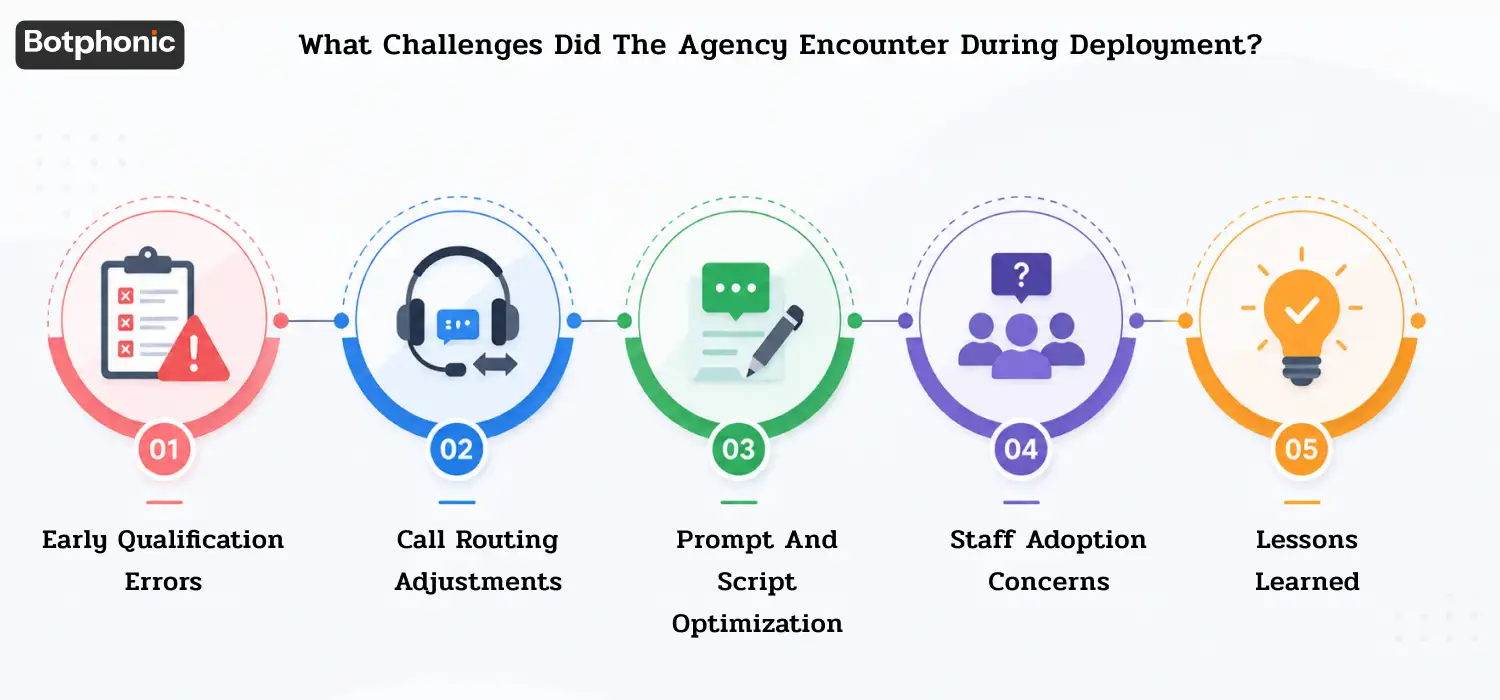
This section exists because no deployment is frictionless. Here is what actually happened.
1. Early Qualification Errors
During the first week, the AI misclassified 11% of existing customer calls as new lead inquiries. Customers calling about an active project triggered the full qualification sequence, which frustrated several of them. A caller ID routing rule was added in week two to route known numbers directly to the account management team.
2. Call Routing Adjustments
Two client verticals, electrical and HVAC, had service categories the AI initially grouped together. A caller asking about a circuit breaker issue was routed to an HVAC flow twice before the knowledge base was updated to separate the categories cleanly.
3. Prompt and Script Optimization
The original pricing guardrail was too aggressive. The AI deflected pricing questions in a way that felt evasive. The prompt was rewritten to acknowledge the question directly and explain that a specialist would follow up with accurate figures, a framing that tested better in a follow-up caller satisfaction survey.
4. Staff Adoption Concerns
Two members of the intake team initially viewed the AI receptionist as a threat to their roles. The agency addressed this by reframing their responsibilities: rather than answering calls, they became the escalation layer and quality assurance reviewers. Both staff members remained with the company.
5. Lessons Learned
The agency identified three things they would do differently on the next deployment: start with a call audit before scoping the project, involve sales staff in designing the qualification questions, and run a soft launch with a single call type before going live across all flows.
When Do AI Receptionists Work Best, And When Don’t They?
AI receptionists for lead capture are not the right fit for every situation. Here is an honest assessment.
Best-Fit Businesses
| Business Type | Why It Works | Volume Threshold |
| Home services (HVAC, plumbing, roofing) | High urgency, standardized qualification | 100+ calls/month |
| Healthcare scheduling | Appointment-driven, structured intake | 150+ calls/month |
| Real estate agencies | Time-sensitive leads, consistent qualification | 80+ calls/month |
| Digital marketing agencies | Client-facing intake, own lead gen | 60+ calls/month |
| Professional services (legal, accounting) | Initial intake before consultant involvement | 50+ calls/month |
In practice, businesses with structured, repeatable intake processes see the fastest results. The AI performs best when the qualification criteria are clear and consistent.
Situations Requiring More Human Involvement
Complex legal consultations involving privilege or liability require human judgment from the first interaction. Crisis response, where a caller is distressed or in danger, should always route immediately to a human. Enterprise procurement calls involving procurement committees and custom contract negotiations rarely fit a five-question qualification flow. Highly technical sales with deep product specification requirements (engineering, custom manufacturing) benefit more from a trained human on the first call.
How Are Agencies Turning AI Receptionists Into a New Revenue Stream?
AI receptionists for lead capture are not just an internal tool. Forward-thinking agencies are packaging them as a billable client service.
1. Internal Efficiency vs. Client Service Offering
There is a meaningful difference between deploying an AI call assistant for your own agency and white-labeling it as a managed service for clients. The former reduces your costs. The latter creates a new recurring revenue line.
The agency in this case study deployed Botphonic internally first, then used their 90-day results as a proof-of-concept to pitch the service to three HVAC clients. Two of those clients signed on within 30 days.
2. White-Label Deployment Models
Botphonic’s agency solution supports white-label deployment, meaning the AI answers calls under the client’s brand, not Botphonic’s. The agency manages the platform, designs the call flows, and handles optimization. The client sees a managed service, not a third-party tool.
3. Packaging and Pricing Structures
Agencies are structuring this as a three-tier managed service:
Starter: $299–$499/month per client
- AI call answering (business hours or 24/7)
- Basic lead capture (name, number, service type)
- Email summary of all calls
Growth: $699–$999/month per client
- Full qualification sequence
- CRM integration (HubSpot or Salesforce)
- SMS follow-up automation
- Monthly performance report
Premium: $1,499–$2,499/month per client
- Full AI receptionist with custom persona
- Appointment booking via Calendly
- Multi-location call routing
- Dedicated optimization reviews
4. Expected Margins and Retention Benefits
Agencies using Botphonic’s platform report software costs ranging from $150–$400/month per client account, depending on call volume. At Premium tier pricing, margins of 50–65% are achievable per client. Retention is a secondary benefit: clients who see measurable lead capture improvements churn at significantly lower rates than those on standard retainer agreements.
 NOTE
NOTE
What Should You Check Before Choosing an AI Receptionist Platform?
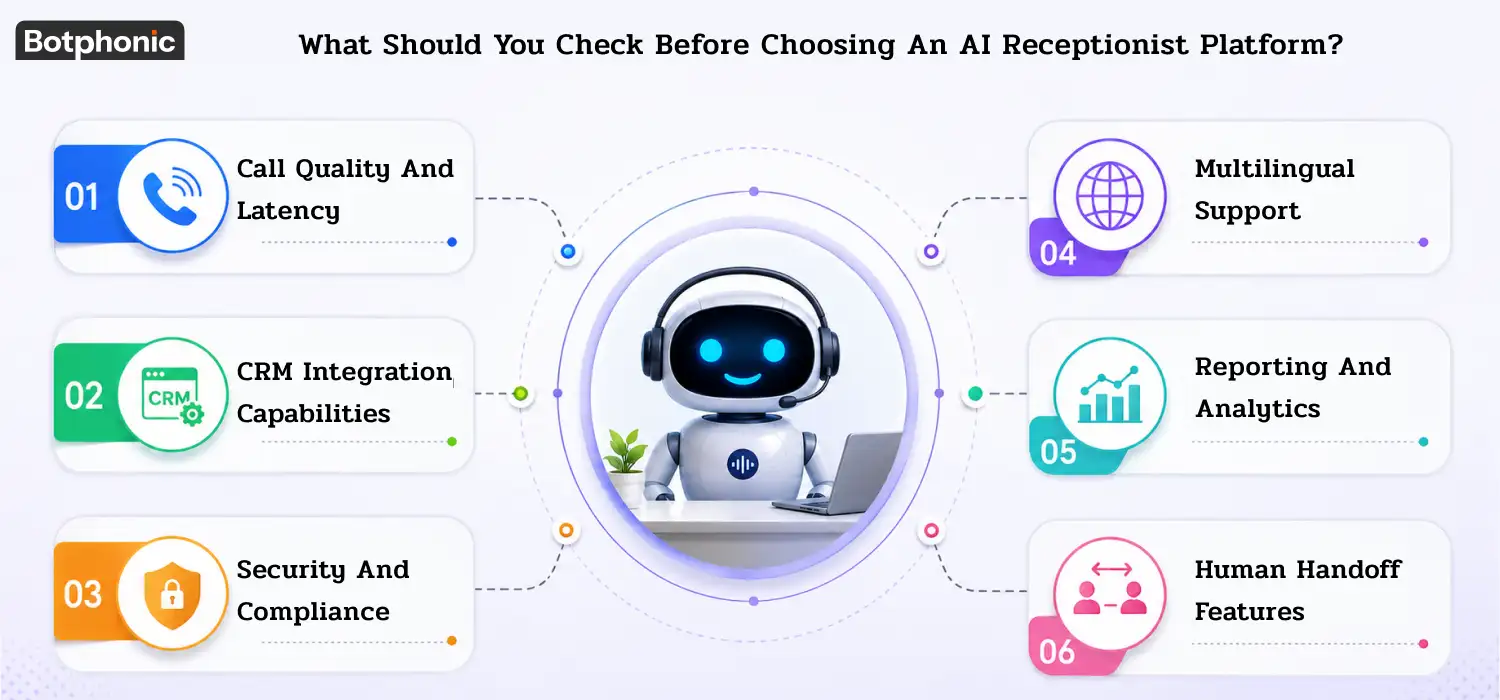
Not all AI receptionist platforms are built for agency deployment. Here is what to evaluate before committing.
1. Call Quality and Latency
Latency above 800 milliseconds creates an unnatural pause that callers notice. Ask vendors for their average latency figures and test them with real calls before signing. Botphonic is built on low-latency voice infrastructure designed for real-time conversation, not chatbot response speeds.
2. CRM Integration Capabilities
Confirm native integrations with HubSpot, Salesforce, and any CRM your clients use. API-only integrations require developer resources to maintain. Native integrations log call data automatically without manual configuration.
3. Security and Compliance
Any platform handling inbound calls must provide call recording disclosures, TCPA-compliant opt-out handling, and, for healthcare clients, HIPAA-aligned data practices. Request a data processing agreement before deploying for regulated industries.
4. Multilingual Support
If your clients serve non-English speaking markets, confirm language support before deployment. Spanish is table stakes in most U.S. markets. Some platforms support 10+ languages; others support only English.
5. Reporting and Analytics
At minimum, the platform should report missed call rate, call disposition (qualified/unqualified/existing customer), average handle time, and escalation rate. Platforms that export to Google Looker Studio or Data Studio allow agencies to build client-facing dashboards.
7. Human Handoff Features
Warm transfers, where the AI briefs the human agent before connecting, outperform cold transfers on caller satisfaction. Confirm whether the platform supports warm transfer, not just call forwarding.
Key Takeaways
What this case study proved:
The agency increased qualified lead calls by 35%, from 180 to 243 per month, without adding a single salesperson. Missed call rate dropped from 57% to 9%. Response time dropped from 4.2 hours to under 60 seconds. CPA fell by 28%. Operational intake hours dropped from 22 hours per week to 8.
The wider opportunity for agencies:
The biggest growth opportunities often come from fixing conversion bottlenecks rather than increasing traffic or expanding headcount. For agencies handling significant inbound call volume, AI sales assistants can become both an operational advantage and a scalable client service offering.
If you are running inbound lead generation for clients and your calls are going unanswered after hours, the question is not whether AI receptionists work. The question is how much revenue you are leaving on the table while you wait to find out.
Book a demo with Botphonic to see the platform in action
Request a Free Demo