
Summarize Content With:
What You’ll Learn:
- How AI receptionist notifications alerts work and why misconfigured alerts hurt response rates
- How to assign notification ownership by conversation type
- Which alert channels fit which urgency levels
- How to build escalation timelines that prevent dropped leads
- How to connect AI receptionist alerts to VinSolutions, DealerSocket, and other platforms
- How to measure whether your notification setup is actually working
AI receptionist notifications alerts are the rules that decide who gets told about a caller, when, and through which channel. They are built for any business that handles inbound calls at volume, sales teams, service desks, medical offices, and dealerships. Without a structured alert system, every incoming call either creates noise or gets missed entirely.
Why Are Most AI Receptionist Alert Systems Set Up Incorrectly?
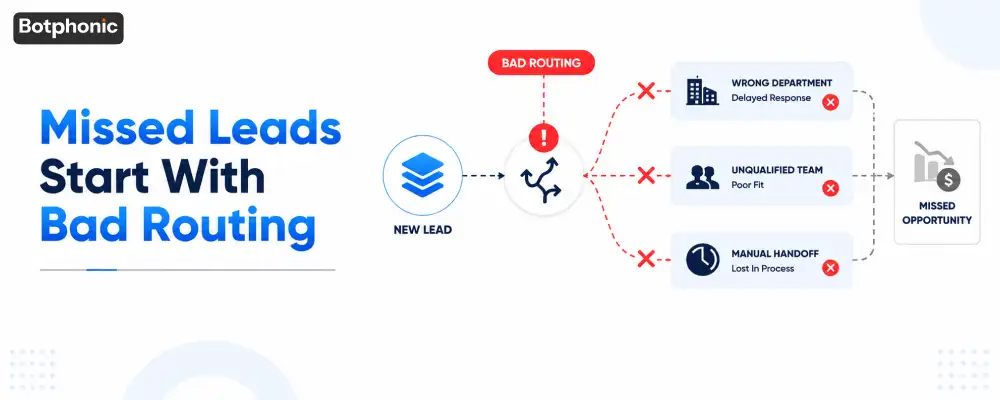
Most AI receptionist alert systems fail because they treat every conversation the same. A misconfigured system sends every caller interaction as an immediate notification to everyone, which means nothing gets prioritized and response rates drop.
According to a report by Hiver, 74% of customer service professionals say alert fatigue directly reduces their ability to respond to high-priority issues. When every alert is labeled urgent, none of them are.
The “Notify Everyone” Approach Creates Three Problems
First, team members stop reading alerts because volume is too high. Second, accountability disappears because no one is clearly responsible. Third, genuinely urgent conversations, a same-day appointment request, a high-value sales lead, get buried under routine inquiries.
 NOTE
NOTE
What Is Notification Ownership and Why Does It Matter for AI Receptionists?
Notification ownership is the practice of assigning each conversation category to a specific person or role before any alert is sent. Here’s what that means for your team: every incoming interaction has a designated destination, not a broadcast.
How To Assign Ownership By Conversation Type
Start by listing the four core conversation categories your AI receptionist handles:
| Conversation Type | Primary Owner | Notification Channel | Timing |
| New sales inquiry | Assigned sales rep | CRM task + SMS | Immediate |
| Existing customer issue | Support team lead | Help desk ticket + team chat | Within 5 minutes |
| Emergency or urgent request | On-call manager | SMS + voice escalation | Immediate |
| Routine FAQ or hours inquiry | No alert needed | Daily digest only | End of day |
This structure prevents the two most common failure modes: over-alerting on low-value conversations and under-alerting on high-stakes ones.
What Dealerships And Service Businesses Actually Experience
In practice, businesses using Botphonic’s AI receptionist find that roughly 60–70% of inbound calls require no real-time human notification at all. The AI resolves the question and logs the interaction. The remaining 30–40%, active leads, complaints, appointment changes, emergencies, are the conversations that need structured escalation. Building ownership rules around that minority is where the real performance gain comes from.
How Do You Decide Which Conversations Deserve an Immediate Alert?
Not every caller warrants an immediate notification. An immediate alert is justified when the conversation requires a human decision within minutes, not hours.
Use three tiers to categorize incoming conversations:
Critical: alert immediately:
- Emergency service requests
- High-value or qualified sales leads
- Customer escalations or complaints
- Same-day appointment requests
Important: alert within the hour:
- Demo or consultation requests
- Appointment rescheduling
- Follow-up calls from existing prospects
Informational: batch and summarize:
- Business hours questions
- Location or directions inquiries
- FAQ responses the AI resolved full
 PRO TIP
What Notification Channels Should You Use for AI Receptionist Alerts?
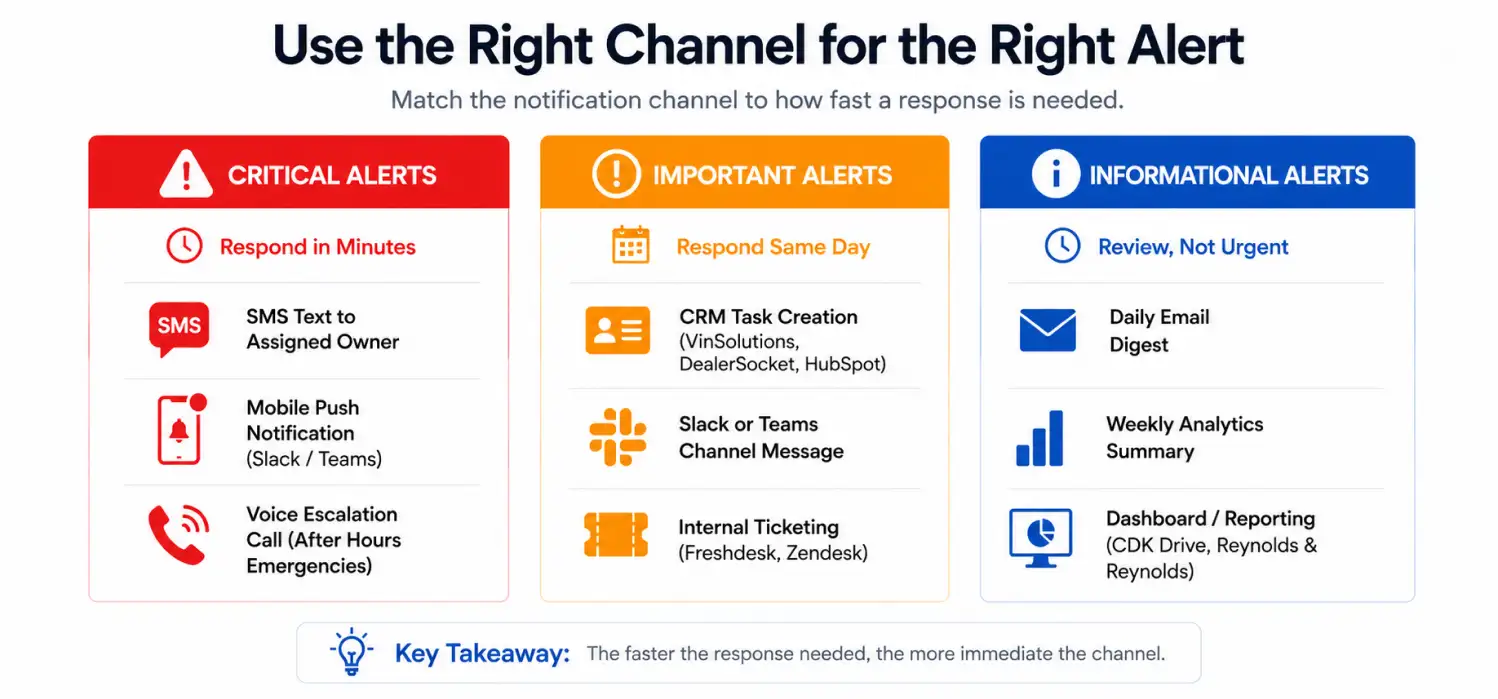
The right notification channel depends entirely on how quickly a response is needed. Using the wrong channel for urgent alerts is one of the most common and costly setup mistakes.
Match Channel to Urgency Level
For critical alerts (response needed in minutes):
- SMS text to the assigned owner
- Mobile push notification via platforms like Slack or Microsoft Teams
- Voice escalation call for after-hours emergencies
For important alerts (response needed same day):
- CRM task creation in VinSolutions, DealerSocket, or HubSpot
- Slack or Teams channel message
- Internal ticketing system such as Freshdesk or Zendesk
For informational updates:
- Daily email digest
- Weekly analytics summary in your AI receptionist dashboard
- Reporting view in CDK Drive or Reynolds & Reynolds for dealership contexts
Even a smart AI receptionist dashboard can help you determine the status.
Why Email Fails For Urgent AI Receptionist Notifications
Email open rates for internal business notifications average around 20–30%, according to Mailchimp’s Email Marketing Benchmarks. For a same-day consultation request or an emergency call, a notification sitting unread in an inbox is the same as no notification at all. Reserve email for digest-format summaries, not time-sensitive routing.
How Do You Build Escalation Rules That Prevent Missed Conversations?
Escalation rules are timed triggers that move an unacknowledged alert to the next responsible person. They exist because a single point of contact will always have gaps, meetings, time zones, sick days.
A Practical Escalation Timeline For Sales And Service Teams
A tiered escalation structure might look like this:
- 0 minutes: Alert sent to assigned sales representative via SMS and CRM task
- 15 minutes: If no response logged, alert escalates to team lead via Slack
- 30 minutes: If still unacknowledged, alert sent to department manager via SMS
- 60 minutes: If conversation is still unassigned, flag surfaces in next-hour operations review
Botphonic’s notification system supports configurable escalation windows, which means these timelines can be adjusted per conversation type. A hot inbound lead might escalate in 10 minutes. A rescheduling request might escalate in 60.
After-Hours Workflows Need Their Own Escalation Path
After-hours routing is where most AI receptionist alert setups break down. Build a dedicated after-hours workflow that routes emergency conversations directly to an on-call manager’s mobile number. Routine after-hours inquiries, hours of operation, directions, should go to the digest. Non-emergency after-hours leads should queue for the first available rep at opening time, with an automatic alert sent at business hours start.
How Do You Reduce Alert Fatigue Without Missing Important Conversations?
Alert fatigue is reduced by removing low-value notifications from real-time channels and replacing them with consolidated summaries. Here’s what that means for operations teams: you get fewer interruptions and the same level of visibility on what matters.
Three Tactics That Work Immediately
1. Batch low-priority notifications. Instead of 30 individual alerts for FAQ-type calls, send one end-of-day summary. Most teams find this alone cuts notification volume by 40–60%, with the help of AI phone call system.
2. Audit for duplicate alerts. If a conversation is already triggering a CRM notification in VinSolutions and a Botphonic alert and a Slack message, that is three interruptions for one event. Consolidate to one primary channel per urgency tier.
3. Make every alert actionable. A notification that says “New call received” creates work, the recipient has to dig into the conversation to understand what to do. A notification that says “Prospect requested same-day consultation, indicated service outage urgency, call back within 15 minutes” removes that step entirely.
Identify one notification that fires in real time but does not require immediate action. Move it to a daily digest. That single change will improve your team’s response quality on the alerts that remain.
See how Botphonic handles notification routingHow Do You Connect AI Receptionist Alerts to Your Existing Business Platforms?
AI receptionist alerts become significantly more useful when they write directly into the tools your team already uses. Integration is not optional, it is the step that prevents alerts from becoming a separate inbox to manage.
Common Integrations That Improve Notification Performance
- VinSolutions and DealerSocket: New lead conversations should auto-create a contact record and attach the conversation summary. No manual data entry required.
- HubSpot or Salesforce: Qualified leads trigger deal creation and task assignment in the same alert flow.
- Freshdesk or Zendesk: Support escalations create tickets with full conversation context attached.
- Google Calendar or Calendly: Appointment-related conversations trigger calendar holds or scheduling links sent to the caller.
When Botphonic AI call assistant connects to these platforms, each conversation generates one record, one workflow path, and one owner, rather than scattered data across multiple tools.
Learn more about how Botphonic integrates with your existing call handling setup to create unified notification workflows without rebuilding your tech stack.
How Do You Know If Your AI Receptionist Alert Setup Is Actually Working?
A notification workflow is working when urgent conversations receive faster responses and team members report fewer unnecessary interruptions. Track four metrics to measure this.
The Four Metrics That Reveal Notification Performance
1. Alert response rate. What percentage of real-time alerts receive a logged response within the defined window? Below 80% indicates routing or ownership problems.
2. Escalation frequency. How often does an alert reach the second or third escalation tier? High escalation rates point to availability gaps or unclear ownership.
3. False positive rate. How many critical alerts turn out to require no immediate action? A high false positive rate erodes trust in the system faster than anything else.
4. Missed opportunity rate. Review weekly: did any high-value conversations go unacknowledged? One missed sales opportunity per week is a meaningful revenue signal.
Run a formal review monthly. Conduct a larger workflow audit every quarter. Notification logic that worked in January may not fit your team’s structure in April.
You can also explore Botphonic’s guide to AI receptionist setup for inbound call management to understand how alert rules connect to broader call-handling workflows.
