Summarise this article with
What This Guide Covers
Most AI call center buying guides treat CRM integration as feature number eight on a twelve-point checklist. If your business already runs on Salesforce, HubSpot, Zoho, or Microsoft Dynamics, that framing is backwards.
Your CRM is the system of record. Every call outcome, every booked appointment, every qualified lead it all has to land in the right place, mapped to the right fields, in real time. If the AI call center software you choose cannot integrate cleanly with your specific CRM variant, you will spend months debugging sync failures instead of running campaigns.
This guide is structured differently. Pick your CRM first. Then read the section built for that CRM: which integration type to use, what the setup timeline actually looks like, what good versus bad integration looks like in practice, and the red flags that should stop a vendor conversation immediately.
What this guide covers:
- 6 major CRMs with integration-type breakdowns and red flags specific to each
- A 5-tier integration decoder (native, CTI, REST API, Zapier, custom build)
- 6 CRM-integration evaluation criteria with a weighted scoring framework
- Per-CRM cost of ownership estimates for SMB-to-mid-market teams
- 8 universal red flags that apply regardless of which CRM you use
- A 7-step decision flow to shortlist vendors and run a pilot
Quick CRM-by-CRM Triage
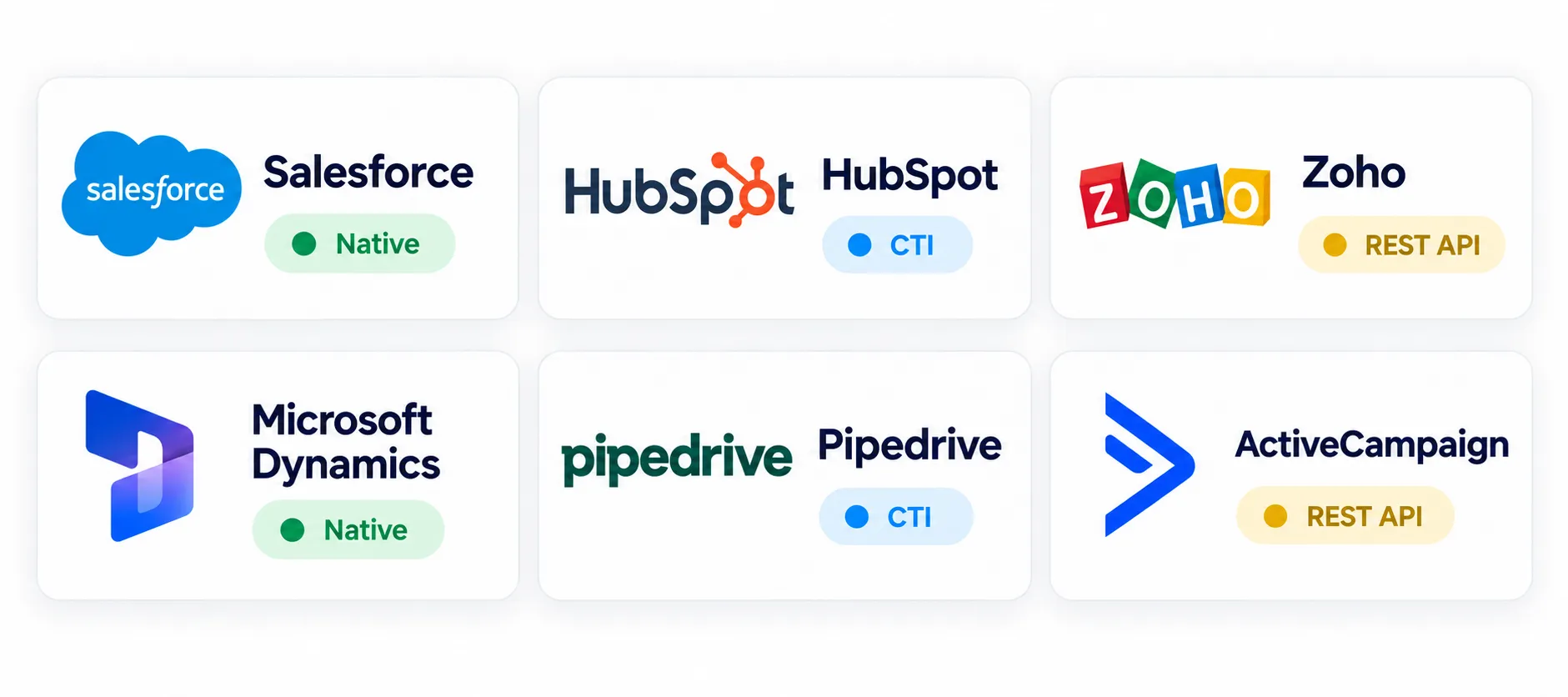
Before going deep, find your CRM in the table below and confirm which integration type you should be evaluating.
| Your CRM | Best integration type | Typical setup time |
|---|---|---|
| Salesforce Sales Cloud / Service Cloud | Native CTI via Open CTI or Service Cloud Voice | 3–7 days |
| Salesforce Financial Services Cloud | Native CTI + FSC-specific configuration | 1–2 weeks |
| HubSpot Sales Hub / Service Hub | Native via Calling Extensions API | 2–3 days |
| Zoho CRM / Zoho One | Native via Telephony Provider API | 2–3 days |
| Microsoft Dynamics 365 Sales / Customer Service | Native via Channel Integration Framework v2 | 5–10 days |
| Pipedrive | REST API + webhooks | 1–3 days |
| ActiveCampaign / Freshsales / Insightly | REST API or Zapier (verify per vendor) | 1–5 days |
| Custom / proprietary CRM | Custom REST API build | 1–4 weeks |
Read the deep-dive for your CRM in Section 3. If you are evaluating multiple CRMs simultaneously, use the scoring framework in Section 4 to weight each vendor.
Section 1: Integration Types Decoded
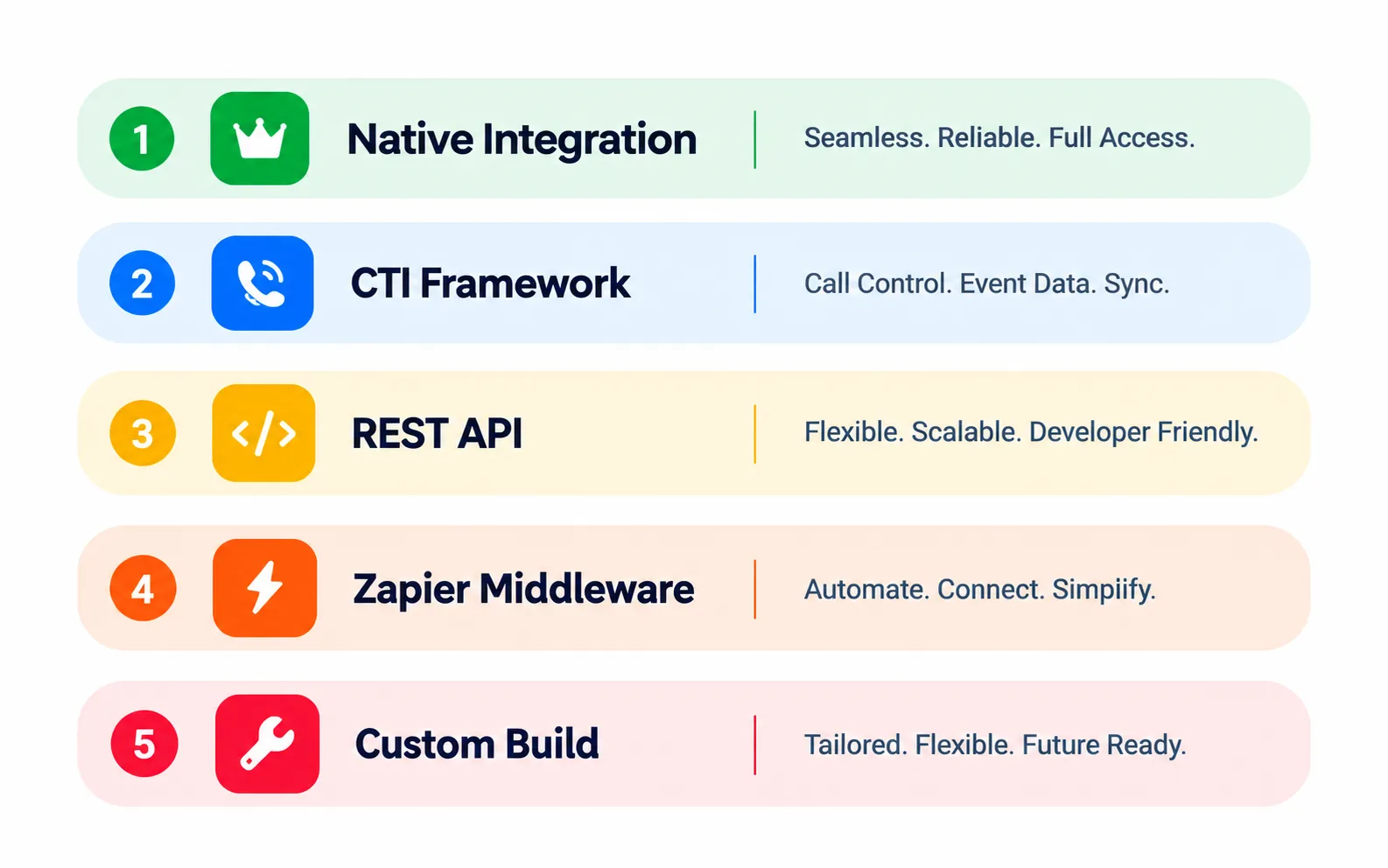
Before evaluating any vendor, understand what the five integration types actually mean and when each is acceptable.
Type 1: Native Integration
The AI call platform is a managed app or extension embedded in your CRM through that CRM’s official marketplace: Salesforce AppExchange, HubSpot App Marketplace, Zoho Marketplace, or Microsoft AppSource. Authentication uses OAuth 2.0. Data flows through the CRM’s official API channels.
When to accept: Always prefer this when available. It means the AI vendor has invested in a proper integration, it is maintained when the CRM API changes, and the setup is measured in days rather than weeks.
Limitations: Only available for CRMs where the AI vendor has built and listed the integration. Not all vendors who claim “native” are actually listed on the marketplace verify before signing.
Type 2: CTI (Computer Telephony Integration)
The industry-standard framework that enterprise CRMs expose for voice-platform integration. Examples include Salesforce Open CTI, Salesforce Service Cloud Voice, and Microsoft Dynamics 365 Channel Integration Framework v2.
What it enables: Real-time screen pop when a call comes in, click-to-dial from any CRM record, live call-event streaming to the CRM, and automatic activity logging.
When to accept: When the AI platform is primarily voice-first and your CRM has a documented CTI framework. This is the correct integration type for Salesforce and Microsoft Dynamics in most enterprise deployments.
Limitation: CTI is telephony-specific. It handles voice events well but is not designed for non-voice automation workflows.
Type 3: REST API
The AI platform calls your CRM’s REST API directly to read and write records. Authentication is typically OAuth 2.0 or API key. Bidirectional sync is possible with webhook support.
When to accept: When native integration is not available. This is the right approach for Pipedrive, Freshsales, Insightly, and similar mid-tier CRMs.
Key questions to ask: Which objects does the API integration cover (contacts only, or deals and custom objects too)? Is it bidirectional or read-only? Does the AI vendor use webhooks for real-time sync, or is it batch-based?
Type 4: Zapier or Middleware (Make.com, n8n, Workato)
A third-party automation platform sits between the AI and the CRM. Zapier receives data from the AI platform and passes it to the CRM.
When to accept: For less common CRMs with no native or REST API option, or as a temporary solution during evaluation. Not recommended as the primary integration method for production at scale.
Real costs: Zapier pricing is task-based. High-volume calling operations (500+ calls per day) can push Zapier costs to $300–$2,000 per month on top of your CRM and AI platform fees. Additionally, you introduce a two-vendor dependency an outage at Zapier affects both systems.
Sync delay: Zapier introduces 15–60 second delays. For real-time use cases like live screen pop or instant CRM update on call completion, this is not acceptable.
Type 5: Custom Build
An engineering project that connects a proprietary or niche CRM to the AI platform using custom code, an ETL pipeline, or a bespoke middleware layer.
When to accept: Only when your CRM is truly proprietary and no commercial integration exists. For any mainstream CRM, a vendor who proposes a custom build as the default approach is a red flag it means they have not invested in proper integrations.
Cost reality: Custom builds typically cost $50,000–$500,000 in initial engineering plus ongoing maintenance as both the CRM and AI platform evolve.
Section 2: The 6 CRM-Integration Evaluation Criteria
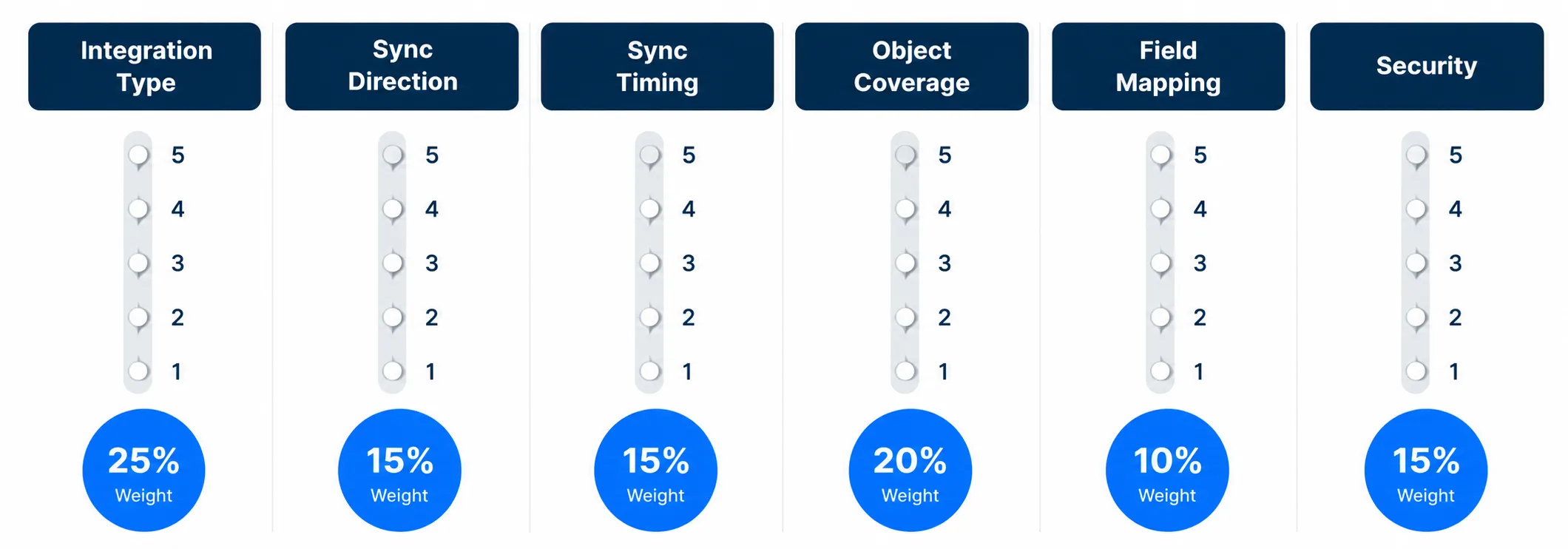
When shortlisting AI call center vendors, score each one on these six criteria. Weight them according to your priorities.
| # | Criterion | What a strong integration looks like | What a weak integration looks like | Suggested weight |
|---|---|---|---|---|
| 1 | Integration type | Native managed app on CRM marketplace | Zapier-only, no marketplace listing | 25% |
| 2 | Sync direction | Bidirectional, real-time | One-way (AI to CRM only) or read-only | 15% |
| 3 | Sync timing | Real-time (under 5 seconds) | Batch (hourly or nightly) | 15% |
| 4 | Object coverage | Contacts + accounts + deals + cases + custom objects | Contacts only | 20% |
| 5 | Field mapping flexibility | Fully customizable, supports custom CRM fields | Hard-coded to standard fields only | 10% |
| 6 | Authentication and security | OAuth 2.0, role-based access, data-residency controls, audit trail | API key only, no audit trail, no data-residency guarantee | 15% |
Score each vendor 1–5 on each criterion, multiply by the weight, and sum. Any vendor scoring below 3.0 weighted average should be eliminated before the demo stage.
Section 3: CRM-Specific Deep-Dives
Salesforce
Know your variant first. Salesforce is not one product. The integration requirements differ significantly across variants:
- Sales Cloud the standard B2B sales CRM. Most AI call center vendors with a Salesforce integration target this variant.
- Service Cloud case management and customer service. Includes Service Cloud Voice, which is Salesforce’s native telephony framework and represents the deepest possible integration level.
- Financial Services Cloud (FSC) wealth management and banking-specific extension. FSC-specific objects (households, relationships, financial accounts) require additional configuration and extend setup timelines.
- Health Cloud healthcare-specific extension. Any AI calling integration introduces HIPAA scope considerations BAA execution and PHI-handling rules must be confirmed before deployment.
Correct integration type: Native CTI via Open CTI for Sales Cloud and Service Cloud. Service Cloud Voice for the deepest telephony integration. FSC and Health Cloud require variant-specific configuration on top of the base integration.
What strong Salesforce integration looks like:
- Click-to-dial from any Salesforce record (contact, account, opportunity, case)
- Real-time screen pop with customer record and call context when an inbound call arrives
- Automatic logging of call recordings, transcripts, and AI-generated summaries to the related contact, account, opportunity, or case
- Bidirectional data flow AI updates Salesforce in real time, and Salesforce context (recent activity, open opportunities, case history) is passed to the AI agent before the call begins
- Custom object support not just standard Salesforce objects
- OAuth 2.0 authentication with role-based permission inheritance from Salesforce
- Audit trail flowing into Salesforce Event Monitoring required for SOC 2, FINRA, and other compliance frameworks
Setup timeline:
- Sales Cloud / Service Cloud: 3–7 days
- Financial Services Cloud: 1–2 weeks
- Health Cloud: 1–2 weeks (plus BAA and PHI-handling verification)
Red flags specific to Salesforce:
- Vendor claims “Salesforce integration” but is not listed on AppExchange verify before any commercial discussion
- “Native integration” that does not support custom Salesforce objects
- Integration built on Salesforce Classic rather than Lightning Salesforce Classic is end-of-life and this signals the vendor has not maintained the integration
- No documented OAuth scope security review will fail
- FSC or Health Cloud users are told to use the standard Sales Cloud integration without variant-specific configuration
Botphonic Salesforce integration: Native managed app on AppExchange. Supports Sales Cloud, Service Cloud, and Service Cloud Voice. Bidirectional real-time sync. Full object coverage including custom objects. FSC support available confirm current variant support with the Botphonic team before signing.
HubSpot
Know your variant. HubSpot is modular:
- Sales Hub deal pipeline and sales activity. Most common for outbound AI calling use cases.
- Service Hub ticket management and customer support. Most common for inbound AI calling and post-sale support automation.
- Operations Hub data sync and workflow automation. Relevant if you need high-volume bidirectional sync beyond what the Calling Extensions API provides natively.
Correct integration type: Native via HubSpot Calling Extensions API. This registers the AI platform as a calling provider within HubSpot’s native call interface the same interface your team already uses for manual calls.
What strong HubSpot integration looks like:
- AI is selectable as the calling provider within HubSpot’s call interface no tab-switching
- Inbound and outbound calls initiated through HubSpot automatically trigger the AI flow
- Calls log automatically to the HubSpot contact timeline call recording, transcript, AI summary, outcome
- Bidirectional sync of contacts, deals, and tickets in real time
- HubSpot custom properties are supported not just standard fields
- HubSpot workflow triggers fire based on AI call outcomes (e.g., a completed call with sentiment “interested” triggers a deal stage update)
- OAuth 2.0 authentication with HubSpot permission inheritance
Setup timeline:
- HubSpot native via Calling Extensions API: 2–3 days
- HubSpot with Operations Hub high-volume data sync: approximately 1 week
- HubSpot via Zapier: under 1 day (but accept the middleware trade-offs described in Section 1)
Red flags specific to HubSpot:
- Vendor claims “HubSpot integration” but is not listed on the HubSpot App Marketplace
- Calls do not automatically log to the HubSpot contact timeline this defeats the primary value of the integration
- No support for HubSpot custom properties
- Vendor bundles HubSpot Marketing Hub features into pricing when your team only uses Sales Hub or Service Hub
Botphonic HubSpot integration: Native via Calling Extensions API. Listed on HubSpot App Marketplace. Real-time bidirectional sync. HubSpot custom properties and workflow triggers supported.
Zoho
Know your variant:
- Zoho CRM the core sales and support CRM. Most common for small-to-mid-market B2B teams.
- Zoho One the full suite (CRM + Desk + Books + 40+ apps). Integration must account for cross-app data flows, not just Zoho CRM in isolation.
- Zoho Bigin the lightweight SMB version of Zoho CRM. Confirm your AI vendor supports Bigin specifically, not just Zoho CRM.
- Zoho Desk the service-specific helpdesk product. If your team uses Zoho Desk for ticket management, confirm the AI integration logs to Desk tickets, not just CRM contacts.
Correct integration type: Native via Zoho CRM Telephony Provider API. This registers the AI platform as a telephony provider within Zoho’s native interface.
What strong Zoho integration looks like:
- AI acts as a telephony provider within the Zoho CRM call interface
- Real-time screen pop with Zoho contact, lead, or deal context when an inbound call arrives
- Automatic logging of calls, transcripts, and AI summaries to Zoho records
- Support for Zoho custom modules Zoho’s equivalent of custom objects
- Bidirectional sync: Zoho contact and deal updates flow to the AI platform, and AI call data flows back to Zoho
- For Zoho One deployments: confirm the integration covers Zoho Desk, Zoho Books, or other suite apps relevant to your workflows
Setup timeline:
- Zoho CRM native: 2–3 days
- Zoho One multi-app ecosystem: approximately 1 week
- Zoho via Zapier: under 1 day
Red flags specific to Zoho:
- Vendor says “Zoho integration” without specifying which Zoho product Zoho CRM, Zoho Desk, and Zoho Books are separate applications with separate APIs
- No support for Zoho custom modules
- No data-residency confirmation for EU deployments Zoho offers EU data centers for GDPR compliance, and your AI vendor must confirm EU data is processed within EU infrastructure
- Pricing structure conflicts with Zoho One’s per-user model
Botphonic Zoho integration: Native via Telephony Provider API. Listed on Zoho Marketplace. Custom modules supported. Confirm EU data-residency requirements with the Botphonic team if applicable.
Microsoft Dynamics 365
Know your variant:
- Dynamics 365 Sales standard B2B sales pipeline management
- Dynamics 365 Customer Service case management and contact center workflows. This variant includes the most mature CTI integration options.
- Dynamics 365 Field Service service-dispatch for industries like HVAC, home services, and field operations
- Dynamics 365 Marketing marketing automation, separate from the Sales CRM
Correct integration type: Native via Channel Integration Framework v2 (CIF v2). This is Microsoft’s standard framework for telephony and communication channel integration. Any AI vendor claiming “Dynamics integration” should be able to tell you immediately whether they use CIF v2.
What strong Dynamics 365 integration looks like:
- AI registers as a channel provider through CIF v2
- Real-time call event streaming to Dynamics with screen pop
- Bidirectional data sync between Dynamics entities (contacts, accounts, opportunities, cases)
- Support for Common Data Service (Dataverse) custom entities critical for teams who have customized Dynamics extensively
- Azure Active Directory SSO with role-based access control
- Power Automate workflow integration AI call outcomes can trigger Dynamics workflows without additional middleware
- Unified Service Desk integration for contact center deployments
Setup timeline:
- Dynamics 365 Sales / Customer Service via CIF v2: 5–10 days
- Dynamics 365 with Power Automate integrations: 1–2 weeks
- Dynamics 365 with custom Dataverse extensions: 2–4 weeks
Red flags specific to Microsoft Dynamics:
- Vendor claims “Dynamics integration” but cannot confirm CIF v2 this almost always means a Zapier-based integration
- No support for Dataverse / Common Data Service custom entities
- No Azure AD SSO support this is a security gap for enterprise deployments
- Per-user pricing that conflicts with Dynamics’ licensing tiers
- No documented process for handling Microsoft’s frequent API updates
Pipedrive
Correct integration type: REST API plus webhooks. Pipedrive does not have a native CTI framework equivalent to Salesforce Open CTI or Microsoft CIF v2, so REST API is the correct and expected integration approach not a compromise.
What strong Pipedrive integration looks like:
- Inbound and outbound calls logged automatically as Pipedrive activities on the relevant deal and contact
- Real-time contact and deal context retrieved via Pipedrive API before the call begins
- Webhook events from Pipedrive (deal stage changes, contact updates) trigger AI actions
- Custom Pipedrive fields are mapped and synced not just standard fields
- Pipedrive filter segments can be used to build call lists for outbound campaigns directly within the AI platform
Setup timeline:
- Pipedrive via REST API: 1–3 days
- Pipedrive via Zapier: under 1 day (with middleware trade-offs)
Red flags specific to Pipedrive:
- Vendor uses Pipedrive API in a way that hits Pipedrive’s rate limits under high call volume ask specifically about API rate limit handling
- Sync only fires at deal creation, not deal updates this means ongoing context does not refresh during an active sales cycle
- No support for Pipedrive custom fields
Smaller CRMs: ActiveCampaign, Freshsales, Insightly, and Others
Most mid-tier and specialist CRMs have documented REST APIs but no CTI framework. The integration pattern is REST API plus webhooks, with Zapier as a fallback for CRMs with limited API coverage.
| CRM | Best integration approach |
|---|---|
| ActiveCampaign | REST API + webhooks. Confirm the vendor lists ActiveCampaign in their documented native integrations, not just “Zapier-compatible.” |
| Freshsales (Freshworks) | Check Freshworks Marketplace first. If not listed there, REST API is the correct approach. |
| Insightly | REST API + webhooks |
| Keap (Infusionsoft) | Typically requires Zapier evaluate the middleware trade-offs carefully for your call volume |
| Zoho Bigin | Use Zoho Telephony Provider API see the Zoho section above |
The key question for any smaller CRM: When a vendor says “we support 100+ CRMs,” ask them to show you where your specific CRM appears in their documented native integrations. If it is not listed, the answer is Zapier which may or may not be acceptable depending on your volume and latency requirements.
Custom or Proprietary CRMs
If your business runs on an in-house or proprietary CRM, every AI call center integration becomes a custom engineering project. Before committing, ask the vendor:
- Do they provide professional services for custom integrations, and at what cost?
- Who owns the maintenance responsibility when your CRM or their platform changes?
- Can they integrate via REST API, SOAP API, or direct database connection and which do they recommend for your specific CRM?
- What is the typical timeline for a custom integration at this scope?
- Is the integration code open-source or proprietary to the vendor?
Cost reality: Initial custom builds typically cost $50,000–$500,000, plus ongoing engineering maintenance. If your CRM is truly proprietary, also evaluate whether migrating to a mainstream CRM is the better long-term decision the integration tax compounds across every new SaaS tool you adopt.
Section 4: Per-CRM Cost of Ownership
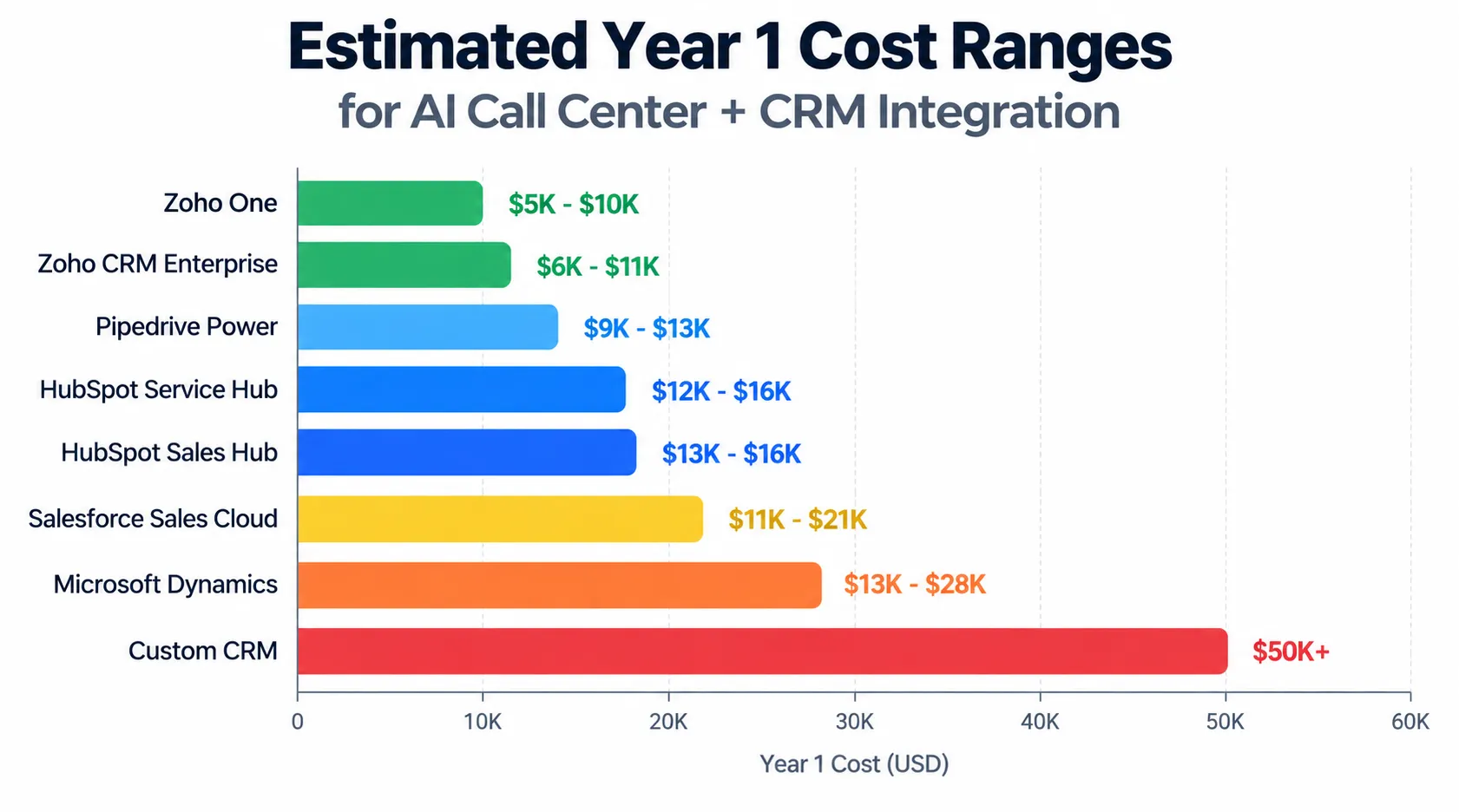
Total cost equals CRM license plus AI platform plus integration setup. The estimates below are for SMB-to-mid-market teams of approximately 10 users. Verify current pricing directly with each vendor before budgeting.
| CRM | CRM license (per user/month) | AI platform (Botphonic SMB tier) | Integration setup (one-time) | Estimated Year 1 total (10 users) |
|---|---|---|---|---|
| Salesforce Sales Cloud | $80–$150 | $29–$249/month | $0 (native) | $11,000–$21,000 |
| Salesforce Service Cloud + Voice | $150–$300 | $29–$249/month | $0–$2,000 | $20,000–$40,000 |
| Salesforce Financial Services Cloud | $300+ | $29–$249/month | $2,000–$5,000 | $40,000+ |
| HubSpot Sales Hub Professional | $100–$120 | $29–$249/month | $0 (native) | $13,000–$16,000 |
| HubSpot Service Hub Professional | $90–$120 | $29–$249/month | $0 | $12,000–$16,000 |
| Zoho One | $40–$60 | $29–$249/month | $0 (native) | $5,000–$10,000 |
| Zoho CRM Enterprise | $50–$70 | $29–$249/month | $0 | $6,000–$11,000 |
| Microsoft Dynamics 365 Sales | $95–$125 | $29–$249/month | $1,000–$3,000 | $13,000–$18,000 |
| Microsoft Dynamics 365 Customer Service Enterprise | $125–$210 | $29–$249/month | $1,000–$3,000 | $16,000–$28,000 |
| Pipedrive Power | $65–$80 | $29–$249/month | $0–$1,000 | $9,000–$13,000 |
| Custom / proprietary CRM | (existing cost) | $29–$249/month | $50,000–$500,000+ | $50,000+ |
For your specific call volume and use case, run the numbers using the Botphonic ROI calculator to estimate payback period based on your actual capture rate and current cost per handled call.
Section 5: 8 Red Flags That Apply to Every CRM
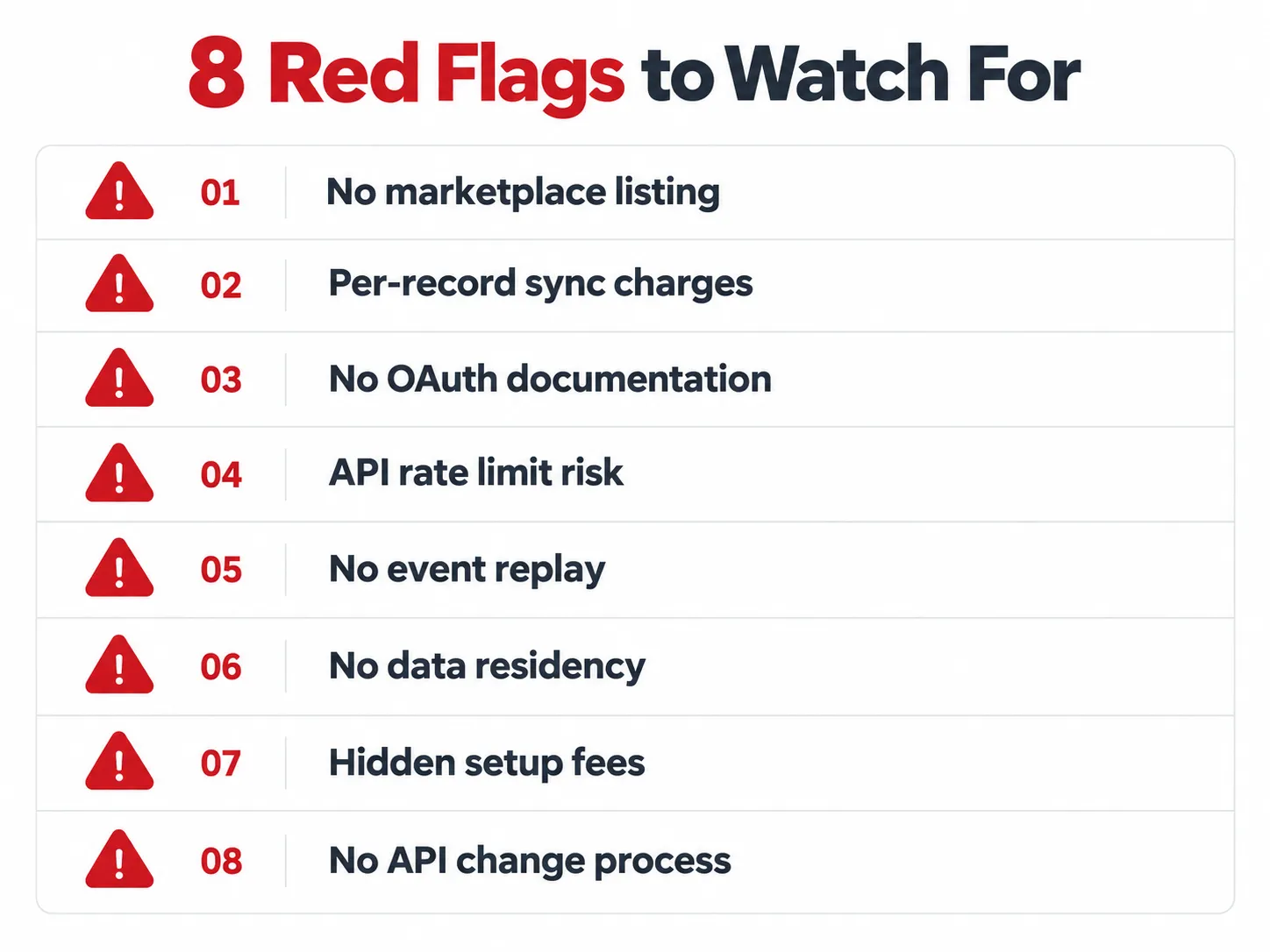
Regardless of which CRM you use, these eight signals indicate a vendor whose integration does not hold up in production.
1. “Supports 100+ CRMs” without your CRM listed by name in their documentation. This almost always means Zapier-only coverage. Ask for the specific integration documentation for your CRM before any demo.
2. Per-record sync charges that were not in the initial pricing conversation. Some vendors charge per CRM record synced or per API call made. At scale, this adds $500–$5,000 per month that was not in the proposal.
3. No OAuth scope documentation. If a vendor cannot tell you exactly which OAuth permissions their integration requests, your security team will reject it. This also signals the integration may request broader access than it needs.
4. No handling for CRM API rate limits. Every CRM has API rate limits. A poorly written integration will consume your entire API budget, breaking other tools that also depend on the same CRM API. Ask specifically: how does your platform handle CRM API rate limits, and has it caused issues for other customers at similar call volumes?
5. Sync pauses during system maintenance with no event replay. If the AI platform goes down for 30 minutes during a maintenance window, what happens to the call events that occurred during that window? A well-built integration queues and replays missed events. A poorly built one drops them.
6. No data-residency guarantee for GDPR-scope deployments. If your CRM data is stored in EU data centers, your AI vendor must guarantee that call data is also processed within EU infrastructure. This is not optional confirm it in writing before signing.
7. “Native integration” that requires $5,000–$25,000 in vendor professional services to implement. A genuinely native marketplace integration should be configurable by your team in days, not weeks. Extensive professional services requirements for a “native” integration is a signal that it is more complex or more fragile than advertised.
8. No documented process for CRM API changes. CRM vendors update their APIs regularly. When Salesforce, HubSpot, or Zoho introduces an API change, who identifies it, who fixes the integration, and how quickly? If the vendor cannot answer this clearly, you are taking on maintenance risk.
If three or more of these red flags appear in your evaluation of a vendor, eliminate them regardless of price.
Section 6: The 7-Step Decision Flow
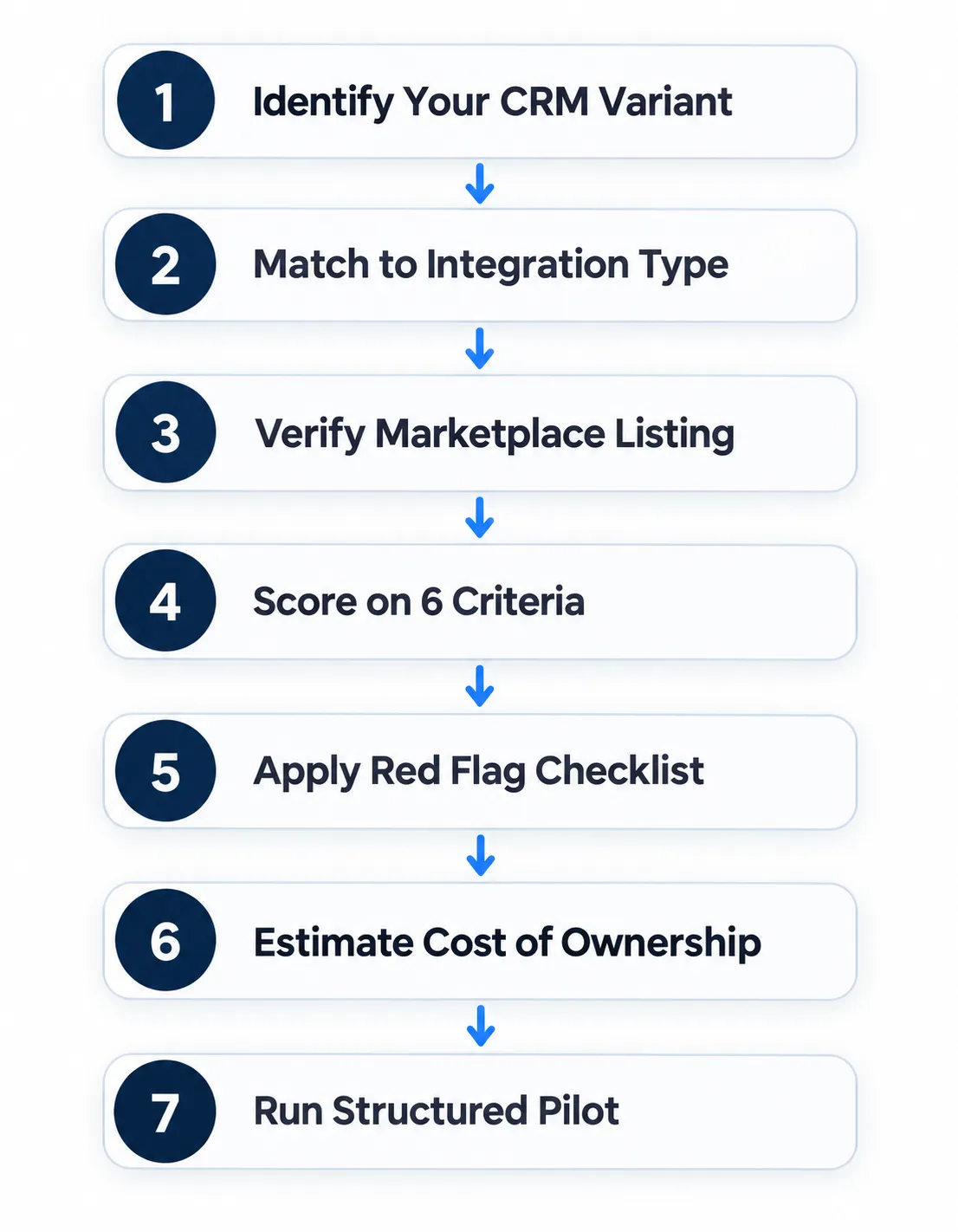
Step 1: Identify your CRM and specific variant (for example: Salesforce → Service Cloud; HubSpot → Sales Hub Professional; Dynamics 365 → Customer Service Enterprise).
Step 2: Refer to the CRM-specific deep-dive in Section 3 to determine the correct integration type for your CRM.
Step 3: Check whether each AI vendor you are evaluating has a native integration listed on your CRM’s marketplace (Salesforce AppExchange, HubSpot App Marketplace, Zoho Marketplace, Microsoft AppSource). Eliminate any vendor who claims native integration but is not listed.
Step 4: Score each remaining vendor on the 6-criterion framework from Section 2. Weight the criteria based on your priorities.
Step 5: Apply the 8 red flag checklist from Section 5. Eliminate any vendor with three or more red flags.
Step 6: Estimate per-CRM cost of ownership using the table in Section 4, adjusted for your team size and actual call volume.
Step 7: Take the top two or three vendors through a structured pilot. In the pilot, test specifically: real-time screen pop accuracy, sync latency under load, custom field mapping, and what happens when a call ends abnormally (dropped call, transfer, no-answer). Do not evaluate based on the happy-path demo alone.
Section 7: What This Guide Does Not Cover
To set clear expectations:
- It does not help you choose between CRMs. If you are deciding between Salesforce and HubSpot, this is not that guide.
- It does not replace the vendor’s sales and demo process. This framework helps you shortlist and structure evaluation the actual POC and contract negotiation still happen with each vendor.
- It does not cover Year 2 and beyond. Questions about vendor support degradation, contract auto-renewal terms, and what happens when the CRM introduces a breaking API change need to be addressed in your contract, not just in the buying process.
- It does not cover B2C-specific CRMs such as Salesforce Marketing Cloud, Klaviyo, or Mailchimp. The evaluation framework still applies, but the criteria weighting should shift toward marketing-automation-specific capabilities.
Where Botphonic Fits
This guide is written to be CRM-agnostic and applicable to any AI call center vendor you evaluate. That said, here is where Botphonic’s current integration coverage stands as of July 2026:
Strong coverage:
- Salesforce Sales Cloud and Service Cloud native managed app on AppExchange with bidirectional real-time sync and full object coverage including custom objects. Service Cloud Voice supported.
- HubSpot Sales Hub and Service Hub native via Calling Extensions API, listed on HubSpot App Marketplace, custom properties and workflow triggers supported.
- Zoho CRM and Zoho One native via Telephony Provider API, listed on Zoho Marketplace, custom modules supported.
- Pipedrive REST API integration with webhook event handling.
Verify before committing:
- Salesforce Financial Services Cloud available, but confirm current variant-specific support with the Botphonic team.
- Microsoft Dynamics 365 CIF v2 integration in current roadmap. Confirm current status and timeline directly.
- Smaller CRMs (ActiveCampaign, Freshsales, Insightly) REST API or Zapier available. Confirm object coverage for your specific CRM.
- Custom or proprietary CRMs REST API integration possible. Requires scoping with the Botphonic team before quoting.
Where Botphonic is not the strongest choice:
- Enterprise-grade UCaaS telephony ecosystems (RingCentral, Genesys, Avaya) where you need deep platform-level CTI beyond what an AI layer provides
- Multi-CRM federated environments with complex Dataverse customizations in Dynamics
- Marketing-automation-specific workflows Botphonic is voice-first and is not designed to replace Salesforce Marketing Cloud or similar platforms