
- Visual Workflow Builder
Build Powerful Workflows Visually, No Code Required
Start designing intelligent call flows and automate multi-step conversations while orchestrating seamless customer journeys, with visual workflow builder, enabled with drag-and-drop canvas.
60+
Workflow Modules
Unlimited
Workflow Steps
14d
Free Trial
- Build workFlows. Not Frustration
Design Conversations & Deploy Automation
Botphonic’s visual workflow builder transforms complex conversational automation into intuitive drag-and-drop. From conditional branching and smart delays to API calls and data transformations, every step is visual and every workflow is live in minutes
State-Persistent Execution
Every flow stays where exactly it should be. After a delays or even a manual pause, execution starts from exactly where it was stopped
Live Execution Logs
Get the entire history of every workflow execution, including the path taken, inputs to each node, results returned, and execution time taken. Debug in seconds, not hours
Intelligent Canvas Layout
The canvas stays clear, so does your mind. Botphonic's intelligent auto-layout makes sure the nodes are laid out for optimal readability, even for complex workflows of 3, 10, or 30 steps
- Core Modules
Building Blocks For Effortless Automation
Conversation design, data processing, system integration, even AI-assisted logic modules 30+ of them, all drag and droppable to you
Trigger
Start off your flow with incoming messages, webhooks, schedule events or segment changes
Message Block
Send text, call, carousels, quick reply, or dynamic templates via email, WhatsApp and Call among others
Conditional Router
Branch conversations into multiple paths using AND/OR conditions based on user attributes or intent
Smart Delay
Pause flows for a fixed duration until specific date or user action is completed. Avoid automation fatigue
Webhook / API
Connect to any REST API, trigger outgoing webhooks, receive incoming data, and pass results in your flow
AI Responder
Plug in GPT-4 or your own LLM to generate contextual and personalized replies. Use AI as a smart step
CRM & Data Sync
Read and write to your CRM, database, or spreadsheet mid-flow. Enrich, update, or tag contacts in real-time
Data Transform
Parse JSON, format dates, manipulate text, and convert CSV to transform data between steps without writing a single line
Iterator / Loop
Process arrays of items one by one, and run nested flow steps per item for batch operations, list sends, or bulk updates
- How It Works
From A Thought to Live Automation
No engineers. No scripts. Just drag, connect, configure, and deploy
01. Choose a Trigger For Workflow
Start by selecting a trigger that starts your workflow - webhooks, schedules, forms, or any event.
02.Drag & Connect Modules
Add conditions, messages, delays, API calls, and even data transformers to your canvas. Link them effortlessly with smart connectors and proceed.
03. Configure Each Step
Use dynamic variables, condition logic, and live data from earlier steps to personalize each action based on need. No formulas, no syntax required.
04. Test, Then Go Live
Run live test simulations, inspect each node’s output, verify results, and activate them with a single click. Your automation is live and working to get you leads.
- Platform Capabilities
Enterprise-grade Logic. Zero Learning Curve
Advanced features that make complex automation simple
Node-Based Visual Canvas
An infinite and zoomable canvas with smart auto-layout keeps your complicated flows readable and organized, however they grow.
Real-Time Step Testing
Start with a test against any individual node and inspect its exact output before your flow ever goes live.
Human-in-the-Loop
Stop your flows to enable human reviewing, approval or overriding and restart automatically where you last left.
Built-In Flow Recovery
The flows will restart at the point of delay, error, or approval checkpoint. Zero data loss, zero re-entry results.
Async Background Processing
All workflows execute automatically, a long running automation queue is executed smoothly without any blocked threads.
Error Handling & Retry Logic
Set step-level error paths, number of retries, fallback paths and even alerts. Making you go strong with each interaction that was made.
- Real-World Examples
Workflows That Do The Work
From lead capture to order processing, these are real-world workflow examples solving real business problems.
Automated User Registration Journey
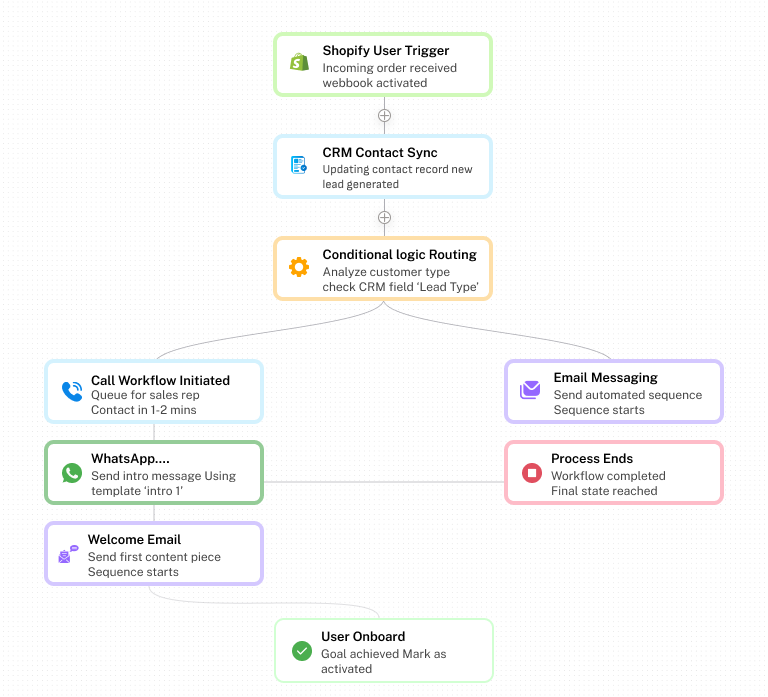
With Botphonic’s smart workflow builder automatically welcome every new user the moment they register on Shopify. The workflow syncs the iser with CRM and checks whether a mobile number is available. If a number exists, a call will be made, followed by a WhatsApp message sent through WhatsApp Cloud API. After which a well formatted welcome email is delivered. It ensures every user receives a timely onboarding experience.
- Shopify User Trigger
- CRM Contact Sync
- Conditional Logic Routing
- Call Workflow initiated
- WhatsApp and Email Messaging
Intelligent Lead Capture & Response
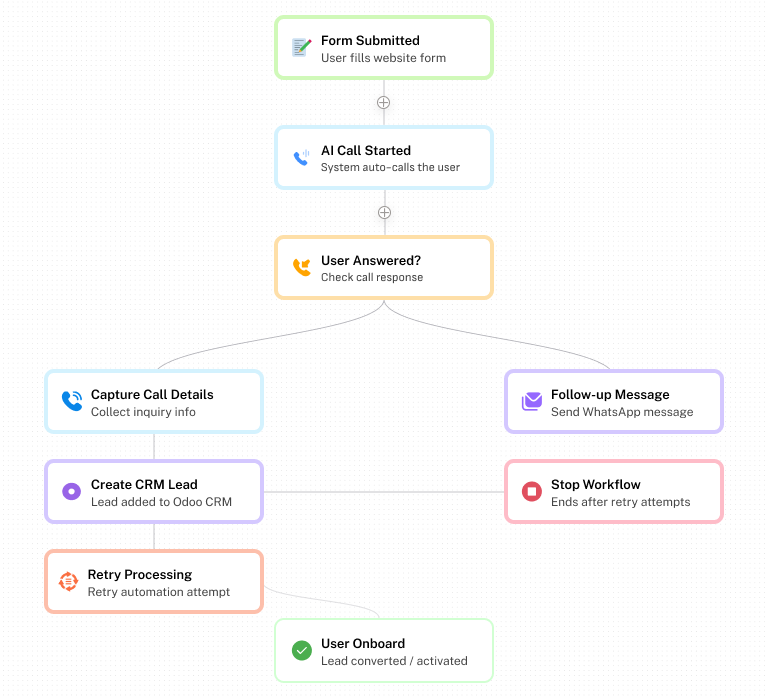
Turn every form submission into an instant opportunity. When a visitor submits a form, the workflow captures the data and automatically creates or updates the contact in CRM. After which it proceeds to analyze the submitted information to determine the most suitable communication channel. Leads with mobile numbers receive calls, followed with WhatsApp and email. Even if a call isn’t received, the user will receive an email.
- Form Submission Processing
- CRM Contact Creation
- Lead Routing Logic
- Instant Multi-Channel Responses
AI Customer Support Auto-Responder
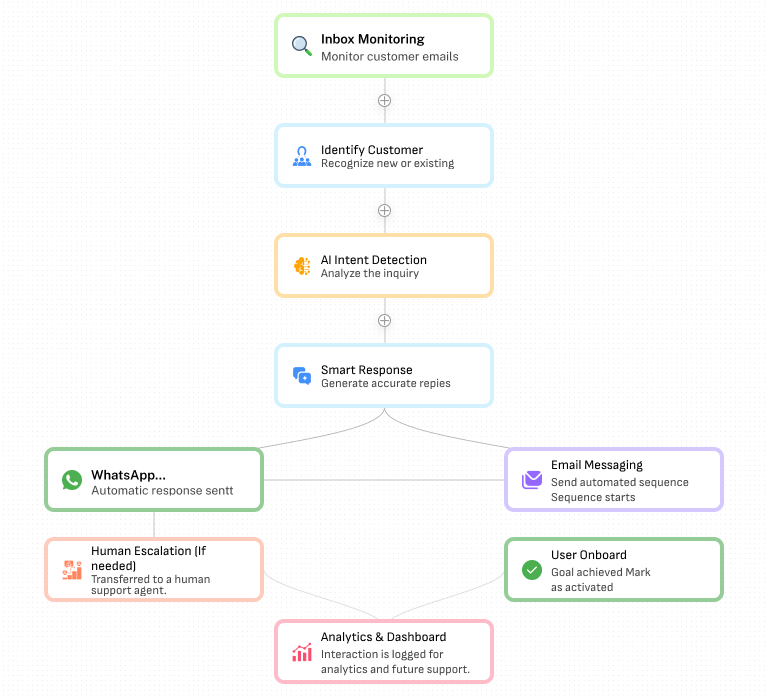
Deliver instant customer support without overburdening your support staff. The emails or customer support requests are analyzed by AI to understand what the customer wants to know. The AI then creates a reply to that request using the data from the knowledge base. If it is a complex request, a human support staff member is brought into the conversation with all context.
- Inbox Monitoring
- AI Intent Detection
- Automated Response Generation
- Human Escalation Routing
- See It In Action
Ready to build your first Visual workflow
Book a demo and we’ll set it up with you live.
- Real-World Use Cases
Workflows That Run Your Business
From healthcare to fintech, Botphonic adapts to your industry’s compliance and communication needs
Smart Lead Qualification
Take the lead and score intent AI-based intent scoring and forward hot leads to sales immediately and cold ones to be nurtured
Deflect & Resolve at Scale
Auto-triage tickets, answer questions through AI, and forward complicated problems to full content agents, and less handle time.
Post-Purchase Journeys
Confirm the orders received and provide shipping updates and make review requests at the appropriate time and retrieve abandoned carts.
User Activation Flows
See your new users through step-by-step setup and milestone check completion, and provide them with contextual advice depending on their progress on their journey.
Booking Automation
Enable your customers to make appointments through a conversation, effortlessly integrate them with a calendar and make confirmations and set up reminders at 24h and 1h.
Win-Back Campaigns
Identify at-risk or churned users and initiate personalized win-back flows, including offers. Send them manuals in case of no response after 3 touchpoints.
- FAQ
Frequently Asked Questions
Everything you need to know before getting started.
What is a visual workflow builder?
A visual workflow builder is a drag-and-drop application that allows you to build automated conversation workflows without the need to write any code. Rather than writing logic, you put triggers, messages, conditions and actions on a canvas and make them visually connected. The visual workflow builder created by Botphonic is specifically created to do conversational automation, all the nodes are created to model how real users engage with bots and not necessarily how the flow moves between applications.
What does a visual workflow builder and a traditional workflow automation tool differ?
The automation tools of the traditional workflow are constructed on the basis of transporting data between applications – synchronizing spreadsheets, initiating emails, updating CRM. A conversational AI visual workflow builder goes one step further: it manages to create the experience of a real dialogue, responding to user prompts, branching replies, intent recognition, and multi-channel messaging on a single canvas. Botphonic is a combination of the two, data automation and conversation design in one interface.
Can I code to create automation flows in Botphonic?
No coding is required. The visual workflow builder created by Botphonic will be targeted at marketers, operations teams, and customer success managers, not only at developers. All the triggers, conditions, delays and the actions are set using visual controls and dynamic fields. Advanced logic options can also be added to teams that are interested in functionality going even farther, but they do not leave the canvas.
What types of workflows can I build with Botphonic's Visual workflow Builder?
You can create any kind of conversational or functional workflow you like – lead qualification workflows, customer onboarding workflows, support ticket workflows, appointment booking, order processing, post-purchase follow-up workflows, re-engagement workflows, AI-enabled response workflows. You can construct it on the Botphonic canvas, should it consist of a trigger, a decision and an action.
What is the difference between Botphonic visual workflow builder and other similar products such as Zapier or Make?
Zapier and Make are generalized automation tools that are designed to transfer data between apps. Visual workflow builder by Botphonic is designed to support conversational automation – it can process user input, branch messages, people intent analysis, channel preference, and AI-generated responses. It is the distinction between the movement of data and experience design.
Does the visual workflow builder of Botphonic support conditional logic and branching?
Yes. Branching on conditions is a fundamental facility. You may direct users through other routes depending upon their replies, traits, buying behavior, buying indicators, or any other fact in your flow. The router module will enable you to have several parallel branches with AND/OR logic and the branch module to allow simple yes/no splits – so you have complete control over each decision point in your process.
Can I test my workflow before making it live?
Yes. Botphonic offers the ability to test any individual node in isolation or the entire flow in simulation mode before making it live. This allows us to view the exact input and output of each individual process, trace the flow of data in the workflow, and catch errors before they reach the user.</p>
What happens if a step in my workflow fails?
Botphonic offers robust error handling at each and every level. This includes the ability to set up retry logic, define alternative paths for the flow if any process fails, set up alerting to your team, and choose whether the flow should stop or continue on failure. Detailed execution logs allow us to pinpoint the exact point and cause of the failure.