
- Email Infrastructure
Enterprise-Grade Email Infrastructure That Delivers
Start deploying enterprise-grade email infrastructure with automated domain setup, authentication protocols, and advance deliverability monitoring.
Compliance Ready
Setup in 10 minutes
No credit card required
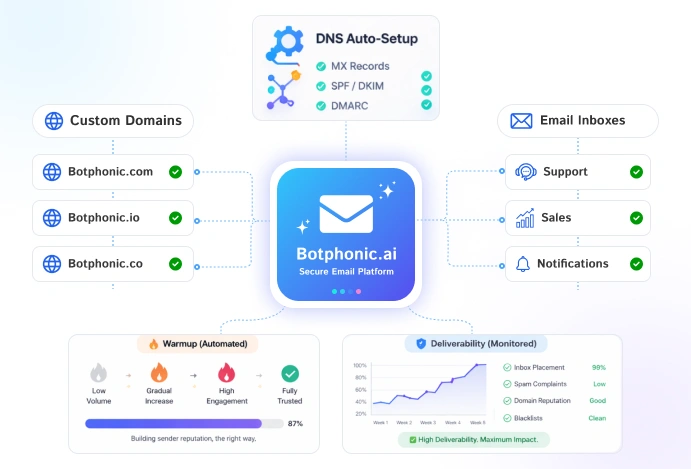
98%
Average inbox placement rate
10min
Average infrastructure setup time
5K+
Domains managed on platform
99.9%
Uptime across all infrastructure
- What is Email Infrastructure?
The Setup Behind Your Emails
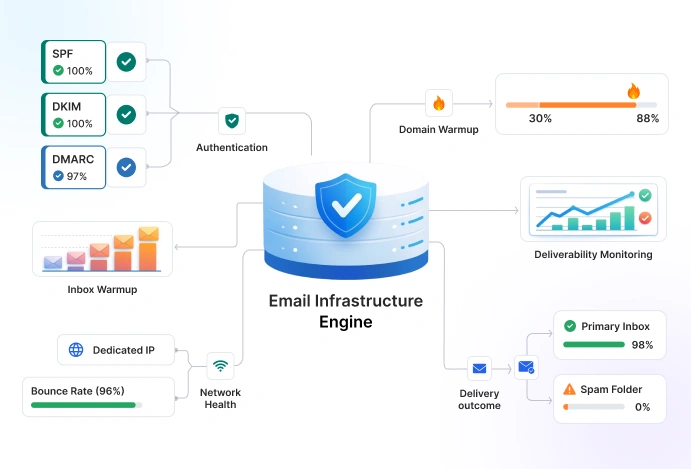
Email infrastructure is the technical setup. It ensures that your cold emails are authenticated, reliably sent, and actively delivered to the primary inbox instead of spam.
It includes:
- Domains you send from
- Security checks that prove your emails are real
- Warming up your inbox before sending at scale
- Monitoring to make sure emails don’t go to spam
Without this setup, your emails might not be seen and no matter how good they are. Botphonic helps you take care of everything automatically.
- Platform Features
Everything You Need in a Cold Email Infrastructure
From domain setup to inbox placement, Botphonic effectively manages every layer of your email infrastructure in one certified platform.
Custom Domain Setup
Manage secondary sending domains without actually relying on external registrars. Smartly protect your primary domain while scaling outreach.
- Secondary domain provisioning
- Automatic DNS configuration
- Multi-domain inbox rotation
SPF, DKIM & DMARC
Ensure every email of yours is authenticated and trusted by major mailbox providers with fully automated configuration of DNS records.
- SPF record generation
- DKIM key management
- DMARC policy & reporting
Inbox Rotation
Scale your sending volume safely by easily distributing emails across multiple inboxes and domains. It also assists with centralized reply management.
- Load balancing
- Intelligent rotation logic
- Per-inbox sending limits
Deliverability Monitoring
Track and optimize your email performance with real-time insights and alerts. Such as spam placement testing, blacklist monitoring, and more.
- Spam placement testing
- Open and bounce analytics
- Inbox vs spam reporting
Dedicated IP Addresses
Maintain full control over your sending reputation with dedicated IP infrastructures. It helps you with blacklist detection and automated IP warmup.
- Dedicated IP allocation per mailbox
- IP reputation monitoring
- Automated IP warmup
Inbox Warmup Automation
Build sender reputation gradually with AI-powered warmup that also prepares your inboxes for scale. It assists in automated warmup scheduling.
- Engagement simulation
- Real-time reputation scoring
- Progress tracking dashboard
- How It Works
Set Up Your Email Infrastructure in 4 Simple Steps
With Botphonic, you don’t need any technical expertise. It guides you through the entire setup, from domains to deliverability, in minutes.
Choose Your Domains
Purchase any new sending domains or you can connect to your existing ones. For optimal performance, use 2 to 3 per 1,000 emails daily.
Auto-Configure DNS
SPF, DKIM, DMARC, and MX records are automatically configured. Without requiring any manual setup, just deploy and move forward.
Warm Up Your Inboxes
Build your sender reputation gradually over 2-4 weeks using AI-driven engagement patterns that helps you establish your credibility with ISPs.
Launch & Monitor
Launch your campaigns with visibility and start sending your mails with confidence. Track deliverability, bounce metrics, and inbox placement.
- Deliverability First
Catch Issues Before They Cost You
Your campaigns are only as strong as your infrastructure. Botphonic allows you to stay ahead of the problems even before they affect your performance.
Detect Problems Early
Monitors blacklists and gets alerted even before your reputation gets a hit.
Validate Before You Send
Test emails across your inbox provider, for instance Gmail, Outlook, and Yahoo before sending them.
Reputation Score Tracking
Track your domain and IP reputation score accordingly, and get AI-powered recommendations to improve your sender reputation.
Automatic Bounce Handling
Botphonic operates by processing hard and soft bounces, while removing invalid addresses.
Inbox Placement Report
Last 30 days across all domains • Primary inbox only
Gmail
97%
Outlook
94%
Yahoo
91%
94%
Avg. inbox placement
↑ vs. 60–70% industry average
- Infrastructure Calculator
How Much Email Infrastructure Do You Need?
Enter your outbound goals and we’ll calculate the recommended infrastructure setup.
Your Outreach Goals
Adjust sliders to match your sending volume
100
1,000
10,000
20
40
100
1
3
5
Recommended Infrastructure
Sending inboxes needed
25
Sending domains needed
9
Max emails per day
1,000
Max emails per month (30-day)
30,000
Estimated Infrastructure Cost
$90 – $150
Setup complexity
Medium
Based on safe sending limits to maintain inbox placement
- Use Cases
Who Needs a Reliable Email Infrastructure?
From sales teams to agencies, a strong infrastructure enables you to have consistent cold email performance at scale.
Scale Cold Outreach Without Burning Your Domain
Sales teams who send 500+ emails everyday might need dedicated sending infrastructure. Secure your primary business domain and scale outreach safely with secondary domains.
Run Multi-Domain Campaigns with Consistent Deliverability
Marketing campaigns usually require a reliable infrastructure. That helps maintain high inbox placement. Monitoring tools help you keep your deliverability metrics long term.
Manage Email Infrastructure for Multiple Clients
Lead generation agencies can easily manage all client sending infrastructure from one dashboard. Have provision domain and monitor deliverability for every client quickly.
- FAQ
Common Questions About Email Infrastructure
Everything you need to know about setting up and maintaining a cold email infrastructure with Botphonic.
What is email infrastructure and why does it matter for cold email?
Email infrastructure is the technical foundation that enables your emails to be sent, authenticated, and delivered reliably. For cold email, it includes your sending domains, DNS authentication records (SPF, DKIM, DMARC), IP addresses, and inbox warmup. Without proper infrastructure, even well-written cold emails will land in spam costing you opens, replies, and deals.
How many sending domains do I need for cold email outreach?
A common best practice is to use 1 secondary domain for every 2–3 inboxes, and 1 inbox for every 30–50 emails sent per day. If you want to send 500 emails per day, you’d need roughly 10–15 inboxes across 4–6 domains. Our infrastructure calculator above gives you a personalized recommendation based on your send volume.
What are SPF, DKIM, and DMARC and do I need all three?
Yes – all three are essential for a healthy email infrastructure. SPF (Sender Policy Framework) specifies which servers can send email for your domain. DKIM (DomainKeys Identified Mail) adds a cryptographic signature to verify email authenticity. DMARC (Domain-based Message Authentication, Reporting & Conformance) tells receiving mail servers what to do if SPF or DKIM checks fail. Together, they dramatically improve your inbox placement rate and protect your domain from spoofing. Botphonic auto-configures all three for every domain on your account.
How long does inbox warmup take for a new sending domain?
Typically 2–4 weeks for a new domain to reach full sending capacity. During warmup, Botphonic gradually increases your daily send volume while simulating positive engagement (opens, replies, and moving emails from spam to inbox). This signals to Gmail, Outlook, and other providers that your domain is a legitimate, trusted sender. Rushing the warmup process is one of the most common mistakes that leads to deliverability problems.
Can I use my primary company domain for cold email outreach?
We strongly advise against it. Cold email outreach carries inherent deliverability risks – bounces, spam complaints, and blacklistings – that can permanently damage your primary domain’s reputation and affect all company email (including internal communications and transactional emails). Always use secondary sending domains that closely resemble your primary domain (e.g., getbotphonic.ai, try-botphonic.ai) for cold outreach. Botphonic makes it easy to set these up in minutes.
Does Botphonic support Google Workspace and Microsoft 365 mailboxes?
Yes. Botphonic supports Google Workspace (Gmail), Microsoft 365 (Outlook), and custom SMTP mailboxes. You can provision new mailboxes directly inside Botphonic or connect existing ones. All supported mailbox types include automatic inbox warmup, deliverability monitoring, and full reply management from a unified inbox.
How do I monitor email deliverability performance?
You can easily start by tracking:
- Inbox vs spam placement
- Open and reply rates
- Bounce rates
- Spam complaints
Tools that are integrated with Google Postmaster Tools give you visibility about domain health. And if you are not measuring, you are just guessing about it, which will result in killing campaigns.
How do blacklists affect cold email campaigns?
Landing on a blacklist is similar to getting flagged. Emails simply get blocked or filtered. Services like Spamhaus maintain these lists, and they don’t unblock them easily.
Ready to Build Your Email Infrastructure?
Join thousands of sales teams and agencies who rely on Botphonic for enterprise-grade cold email infrastructure. Set up in 10 minutes. Results from day one.
No credit card required
Free 14-day trial
Setup in 5 minutes